Author Archives: %s

IRS Acknowledgements- Reminder

30 Jan 24
Kim Manuel
No Comments

The IRS can take up to 48 hours to make acknowledgements available to software vendors.  The VITA/TCE support reps, see the same information  you see in Client Status.  We actively monitor e-file and acknowledgements to determine if there is anything outstanding or if we are seeing trends in reject codes.

IRS Rejected Returns [RESOLVED]

29 Jan 24
Kim Manuel
No Comments

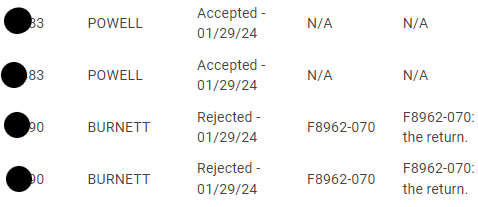
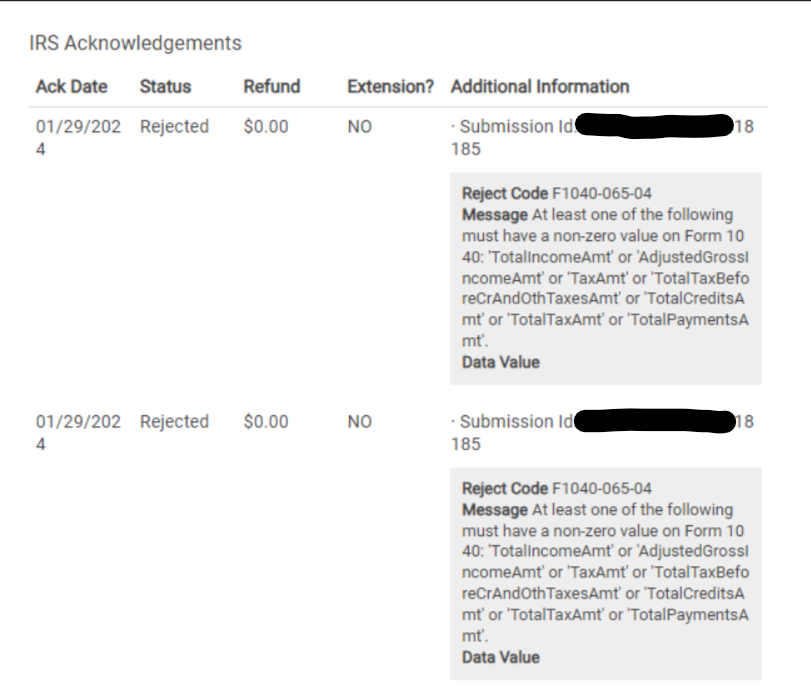
Problem:  You currently cannot view the reason the return has been IRS Rejected on some returns.  This also impact the IRS Ack reports not displaying the reject reason.

Workaround:  None

Solution:  We are investigating why the reject reason is not displaying.

Portal List: How do I know when the taxpayer uploads a document or Sends a message?

26 Jan 24
Kim Manuel
No Comments

When the taxpayer uploads a document or sends a message, a red dot will appear next to messages.  You will then select the Unread Message dialog in the lower left corner of the screen (same as always).

The portal list will also display the number of documents that were uploaded.

In the below screenshot the link registered date is now populated because I created my portal login in order to upload the document.

FAQ: Your connection is not private message

26 Jan 24
Kim Manuel
No Comments

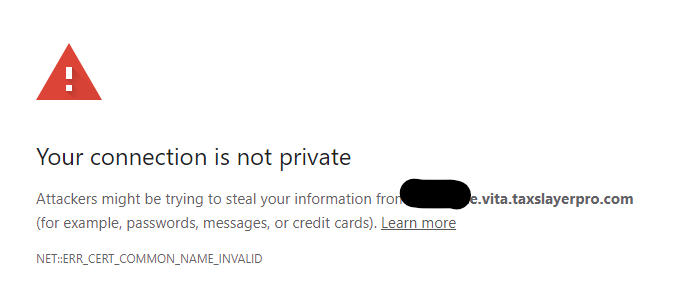
Problem:  You or your taxpayer receive the following message when clicking on an activation link (site activation, admin activation or customer portal activation).

Reason:  This is due to the privacy settings on the device you are using.  The privacy settings are trying to safeguard you from clicking a harmful link

Solution:  Copy and paste the URL to a new browser window

Introducing the Portal Clients list

26 Jan 24
Kim Manuel
No Comments

The Customer Portal list allows the sites to more easily manage the taxpayers who have been sent a customer portal link.

Select the Portal Clients button on the Welcome Screen.


This will display a client portal listing for the taxpayers you have sent a customer portal link:

  • SSN: Taxpayer SSN
  • Status: Federal Status
  • States: States listed on the return.  Hover over the ? to see the state status
  • Messages: Displays the number of messages from the taxpayer.  Unread messages will have a red dot
  • Docs: Number of documents the taxpayer has uploaded
  • Link Sent Date: The latest date the volunteer sent a customer portal link
  • Link Registered Date: The date the taxpayer registers their portal link by creating their account

You have the same abilities to manage returns as you do on the client list pages.

Select allows you to enter the return from the Portal Clients list.

Note: Due to the amount of data on the listing, you will need to scroll horizontally. You also have the ability to search for the taxpayer in the search bar.


Link and Learn Certification Site: Support Reminder

25 Jan 24
Kim Manuel
No Comments

We are getting several calls and emails regarding challenges with the certification tests for Link and Learn.

TaxSlayer DOES NOT host and/or maintain Link and Learn.  Please reach out to your SPEC Relationship Manager if you are having challenges.  We are sure they are aware of the challenges and making this a priority.

The EFIN associated with my site is not correct: What is the process?

23 Jan 24
Kim Manuel
No Comments

TaxSlayer cannot change the EFIN associated with a site without authorization from SPEC Headquarters in Atlanta.

If the EFIN associated with your site was ordered incorrectly or the site has been issued a new EFIN,  you will need to do the following:

  • Reach out to your SPEC Relationship Manager with the information
  • Your SPEC RM will follow their protocols to get the information to SPEC Headquarters in Atlanta
    • We cannot change the EFIN even if the SPEC RM makes the request with TaxSlayer
  • The TaxSlayer Relationship Manager in Atlanta will send a formal request to have the information changed if applicable

TaxSlayer will update their internal CRM system and also the ERO information for the site.  A site cannot transmit returns with an EFIN that is not on file with TaxSlayer.


January 15, 2024: Official launch of “Start New Return”

15 Jan 24
Kim Manuel
No Comments

TaxSlayer 2023 is officially open for sites to utilize the “Start New Return” menu item.

Things you should know:

  • Start New Return at the site level should only be used to prepare live returns
  • All Practice Returns should continue to be completed in the Practice Lab
  • All States will be released today
    • States not approved for electronic filing will have an e-file block
      • The e-file blocks will be removed as we receive e-file approvals
    • State forms not approved for printing will contain a “Do not Mail” strip down the middle.
      • The strips will be removed as we receive print approvals
  • Electronic filing
    • Opens January 29, 2024
    • Each site must transmit their returns after we turn on e-file on January 29th (will post processes and times close to January 29th)