Author Archives: %s

Customer Portal Enhancement: Add notification when documents are signed

20 Sep 22
Kim Manuel
No Comments

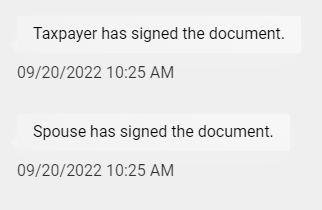
The volunteer that prepared the return and the volunteers who can see all returns will see a notification when the taxpayer and/or spouse has signed the tax documents made available to them.

This is from the taxpayers view

 

The user that prepared the return and any users that have the ability to see all returns will see a chat/message notification

 

In this instance there are two unread messages because both taxpayer and spouse signed the tax document.

The volunteer will select the unread message(s) – Note we will be adding more clarification around which taxpayer the chat/message belongs to.


The chat history will display the messaging that the documents have been signed.
Enhancement: Adding Email address to Personal Information

20 Sep 22
Kim Manuel
No Comments

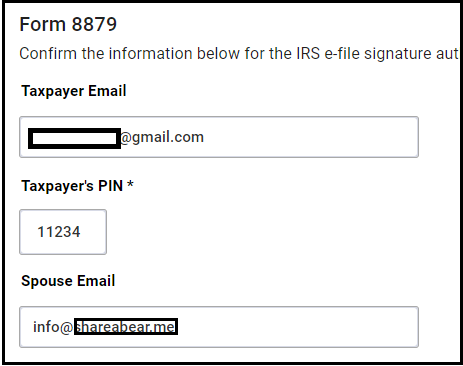
The following enhancement has been delivered to TaxSlayer 2021.  You can now enter the taxpayer/spouse email address in the personal information section.  This information will ultimately be used by the customer portal feature to eliminate the need to key in the email address a second time.  For all NEW returns, the email addresses entered in personal information will flow to the Return Details page in the e-file section.


TaxSlayer 2016: Reminder

12 Sep 22
Kim Manuel
No Comments

This is a reminder that TaxSlayer 2016 will be retired when we roll out TaxSlayer 2022 in early to mid-November.  At that time, you will no longer have access to the 2016 application.

VITA/TCE Support — Closed until 9:30 am

08 Jun 22
Kim Manuel
No Comments

The VITA/TCE support team will be unavailable until 9:30 am on Wednesday, June 8th for training

Error Message: Temporarily Unavailable [RESOLVED]

06 May 22
Kim Manuel
No Comments

We have sporadic reports of sites receiving an error message that states:  TEMPORARILY UNAVAILABLE with a refresh button.

Error Details:  WEB SERVER IS RETURNING AN UNKNOWN ERROR.

Our engineers are investigating the error.

Try the following:  Switch to a different browser, or if using Chrome, open the browser “in cognito” and login.  This should force you to a different server that is not rendering the error


Rejects: IND-195 and IND-196 [RESOLVED]

06 May 22
Kim Manuel
No Comments

Update:  We delivered a solution for this.  You will need to resend any returns that were rejected for one or both of the above codes.  This reject spanned 2021, 2020 and 2019 returns

We are working on a resolution for these two rejects.  If you have a return (2021, 2020, or 2019) being rejected for one of both of the above codes, please hold them until further notice.

Runtime Error: Pro Online 2021 [RESOLVED]

05 May 22
Kim Manuel
No Comments

Update:  This has been resolved.  You may experience a bit of slowness when you open the first return.

______________________________________________________

We are getting the following error when trying to open an 2021 return:

Server Error in ‘/2021/avalon’ Application.

We have opened a critical ticket with our engineering team.

Customer Portal: New Management Reports

15 Mar 22
Kim Manuel
No Comments

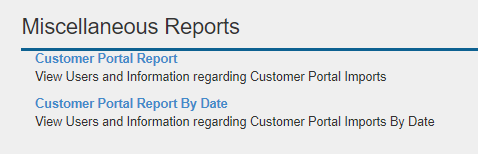
We delivered a new Customer Portal Management report that will help you more easily identify which of your taxpayers have been sent a customer portal link and which ones have registered their portals.  You can also refer to this report for now to determine which return a chat/message belongs to via their email address.

Navigate to Reports>>Management Reports>>Miscellaneous Reports


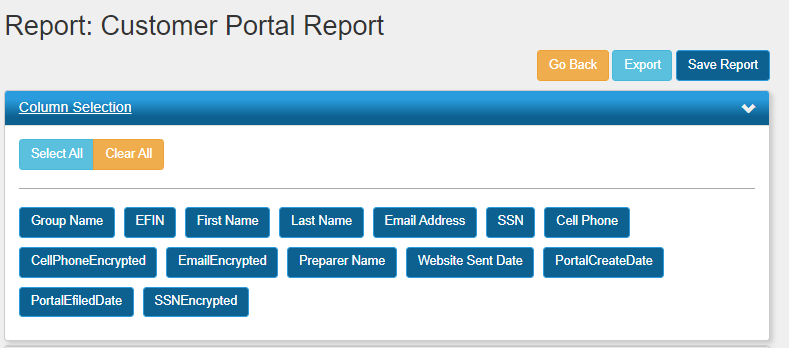
Both reports contain the following columns:


Group Name = N/A

EFIN = Will be blank

First name = Primary Taxpayer’s first name

Last Name = Primary Taxpayer’s last name

Email Address = Email used to send Portal Link

SSN = Primary SSN (Issue 6967 to truncate to last 4)

Cell Phone = Phone number used to send portal link

Cell Phone Encrypted = Will be blank

Email Encrypted = Will be blank

Preparer Name = Preparer of Record

Website Sent Date = The date the customer portal link was sent

Portal Create Date = The date the taxpayer registered their portal

Portal Efiled Date = The date the site electronically filed the return

SSN Encrypted = Will be blank