Author Archives: %s

Pro Online 2021: Client Status generating an error message [RESOLVED]

28 Feb 22
Kim Manuel
No Comments

2:43p ET – This has been resolved.


We are currently experiencing an unexpected error when you navigate to Tools>>Client Status from the client list.  This does not impact your ability to prepare and electronically file returns.


Pro Online 2021: Selection for state e-file (Missing) [RESOLVED]

25 Feb 22
Kim Manuel
No Comments

You can filter your returns created on today to determine which returns you need to open and select the state e-file.

Enter Today’s date for the beginning date and the end date.  The client list will indicate if there is a state return on there.  The potential time of impact was between 10:40 am and 11:20 am Eastern time


The selection for state e-file is currently missing.  We are working to resolve this.


Customer Portal: Error when taxpayers are logging in (resolved)

25 Feb 22
Kim Manuel
No Comments

Update:  This has been resolved.  If your taxpayer still sees an error, they will most likely need to delete their cache

Update:  We are going roll out the fix for this.   You may experience getting kicked out of TaxSlayer Pro Online if you are on a server that is being updated.

Taxpayers are receiving a server error when trying to login to their portal account (if you get questions from  your taxpayers)

FSA Kiosk Users: 1040-NR Filing Status Wizard

21 Feb 22
Kim Manuel
No Comments

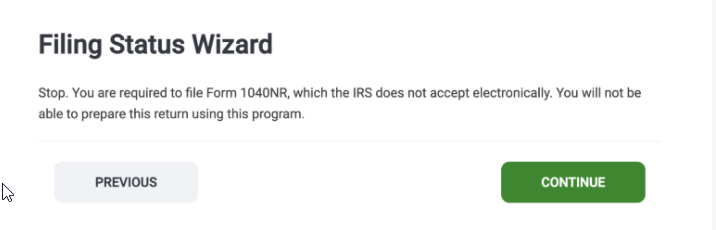
If you get questions from your taxpayers regarding the following message in the Filing Status Wizard, please tell them to ignore and click continue.  1040-NR is only supported via the assigned VITA/TCE Kiosk URLs and not with our consumer facing Do it Yourself product (www.taxslayer.com).

2021 1040X efile: Live

21 Feb 22
Kim Manuel
No Comments

You can now electronically file your 1040X returns.

(1) Complete the 2021 Amended Return

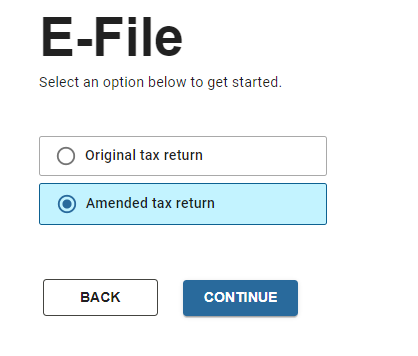
(2) Navigate to the efile section and you will see the following E-File selection page


(3) Select Amended tax return and click Continue


(4) The 1040X e-file section will be displayed.  Note:  The boxes in the upper right corner are not clickable, the light background option is the active option

Note:  Do not change the Federal Return Type

(5) Select the Submission page

(6) Follow your site procedures for selecting applicable return tags

(7) Make sure the return is marked Complete

(8) Select Transmit Return (You must transmit the 1040X from the Submission page)

Release Notes: February 21st – DE & 1099-G

20 Feb 22
Kim Manuel
No Comments

The site will be placed in maintenance on Monday, February 21st, beginning at 5:00am ET to release the below update(s). Note that deployments may take up to 3 hours to complete. During this time, access to the program may be limited.

DELAWARE

  • Correct an issue with the automatic pension exclusion (Issue 6757)
  • Spouse name/SSN not printing on Married but Filing Combined Separate (Issue 6758)

FORM 1099-G

  • Add Input of Box 6 in 1099-G for Taxable Grants for NY Excluded Workers Fund payments (2021 Update)


Pro Online 2021: Can I e-file my 1040X? (Update)

17 Feb 22
Kim Manuel
No Comments

Update:  We are in final internal testing of the 1040X flow.

You may see glimpses of the new flow, but the front end is not connected to the e-file process yet.   We are working to hide this feature until the back end process is turned on to avoid confusion.


We are in the process of adding the ability to e-file the 1040X into the new e-file section.

We recommend you use a return tag to easily identify any 2021 1040X returns you need to electronically file.

We anticipate having this enabled by mid-February.

Pro Online 2021: Printing issues [RESOLVED]

16 Feb 22
Kim Manuel
No Comments

We are getting reports of slowness in printing or sporadic time outs when printing inside or outside of a return.  We are currently investigating