Author Archives: %s

Slowness opening returns [RESOLVED]

15 Dec 25
Kim Manuel
No Comments

Update:  This has been resolved

We are currently working to resolve the slowness you are experiencing when opening returns (all years).

Errors accessing e-file, roles & permissions and client portal lists (all years) [RESOLVED]

09 Dec 25
Kim Manuel
No Comments

Update 8:30 am:  All errors have been resolved.


Update 8:03 am:  Errors accessing Roles and Permissions and the client portal lists have been resolved


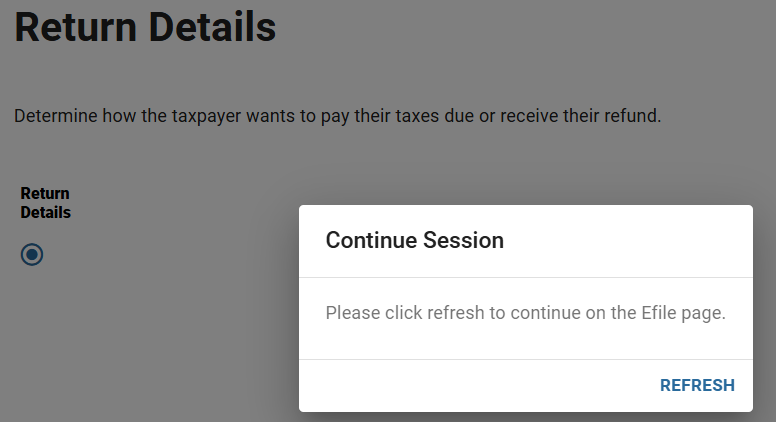
As we are preparing to move into the new season, our dev team is working on some infrastructure changes.  Currently, the following features are not working as expected:  The Client Portal List, Accessing Roles & Permissions and access the e-file section.  You will see the following when trying to access the e-file section and need to close the browser to exit the messaging:

Practice Lab 2025: Random Fee error on the Submission Page

26 Nov 25
Kim Manuel
No Comments

Scenario:  Complete a 2025 return in the Practice Lab and Click Save & Exit without selecting “Mark Return Complete”

The following red error will appear  “Before you can save the submission page, you must save the fee summary checkpoint”

Reason:  This is a residual error from removing the “Fees” page from e-file if there are not fees established

Work Around:  Select “Your office” from the left navigation bar to exit the return.

Note:  Once you get the error on a return, you will continue to get the error.

TaxSlayer Pro Online 2025: What to expect

29 Oct 25
Kim Manuel
No Comments

We will begin the process of rolling out TaxSlayer Pro Online 2025 the week of November 3rd.  This is a very fluid process, but our goal is to keep your disruption of services to a minimum.

What can you expect once we roll out TaxSlayer Pro Online 2025?

  1.  The Practice Lab will support 2025 and 2024
  2. Your Production site will default to 2025, but you will not be able to “Start A New Return” until a yet to be determined date in January, 2026.
  3. You can still prepare 2024, 2023, 2022, 2021 and 2020 returns
  4. You can still e-file 2024, 2023, and 2022 returns until the IRS cut-over (Date to be determined by the IRS)
  5. You will NO longer have access to 2019 returns or reports

Reminder for TaxSlayer 2019: Scheduled to roll off the prior year list in early November

29 Oct 25
Kim Manuel
No Comments

Reminder:  TaxSlayer 2019 will no longer be available when we roll out our early release of TaxSlayer 2025.  Our tentative date is the first week of November, but we strongly recommend you finish up any outstanding work or reports by October 31st, 2025.

What does this mean?  You will no longer have access to 2019 returns or 2019 reports.


Steps to follow if your site’s EFIN has changed

22 Oct 25
Kim Manuel
No Comments
  1.  Reach out to your SPEC Relationship Manager with the changed information
  2. Your SPEC Relationship Manager will notify the appropriate team for verification that the new EFIN is active in the IRS system
  3. TaxSlayer will be notified by our IRS Relationship Manger when the EFIN can be changed

Q:  Can TaxSlayer support request my EFIN to be changed?

A:  No


Q:  Will I still have access to prior year returns and carry forward data if my EFIN changes?

A:  The new EFIN must be changed in TaxSlayer’s system prior to the software order being received


Q:  What happens if my old EFIN is still active with TaxSlayer and my order is placed with my new EFIN?

A:  You will not have access to any prior year returns or prior year carryforward


Q:  How will I know if my old EFIN has not been changed prior to my software being ordered?

A:  You will receive an email notification to setup your admin user account.  If you are create a new user account and do not see any of your prior year users or prior year returns, you need to reach out to your SPEC relationship Manager immediately so this can be resolved.

TaxSlayer Desktop 2025: Multi-Factor Authentication (MFA)

18 Sep 25
Kim Manuel
No Comments

Multi-Factor Authentication will be required for all TaxSlayer Desktop 2025 users.

Question:  Once a user authenticates on a specific computer, how long before they will have to authenticate again on that specific computer?

Answer:  Since tax return information is stored locally (either on the computer or local network), all users will be required to complete the MFA process every 24 hours.

Errors Creating New and Opening Existing Returns [RESOLVED]

10 Sep 25
Kim Manuel
No Comments

[UPDATE]  This has been resolved

We are aware that you are receiving API Errors for “ID Server not found” when creating new returns and opening existing returns in 2024, 2023, and 2022.  Our IT and development teams are working this as a critical item.