Author Archives: %s

Release Notes February 17, 2025: Carryforward

17 Feb 25
Kim Manuel
No Comments

Carry Forward

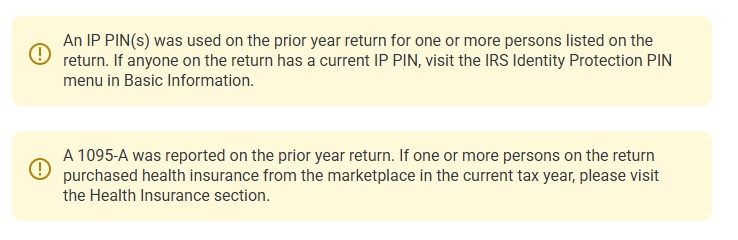
  • Added an informational alert to the carryforward screen if an IP PIN was used on the prior year return (Enhancement)
  • Added an informational alert to the carryforward screen in a 1095-A was reported in the prior year return (Enhancement)
  • Capital Loss Carryover worksheet not pulling loss carryover from prior year (Issue 2543)

Call Notes: TaxSlayer All Partner Call 2/6/2025

10 Feb 25
Kim Manuel
No Comments

Opening comments by TaxSlayer

  • A little over 250,000 returns filed since 1/27
    • Slower states: AL, NY slow in the beginning but resolved
    • OK – delay in acknowledgements
  • Top 5 Federal Rejects
    • F8962-070 – Form 1095-A missing (3,517)
    • IND-181 – IPPIN missing (1,421)
    • R0000-500-01 – Primary Name/SSN mismatch (622)
    • F1040-164-01 – Claiming EITC after disallowance without adding F8862 (389)
    • FW2-502 – Employer EIN does not match IRS records (322)
  • All states are open for e-file except CO (controlled launch beginning 2/14)
    • Can still transmit CO returns to us
  • Practice Lab practice exercises are updated to 2024 as of 1/30
  • Subscribe to the blog
  • Brad Martin Joins us once again from United Way in Alabama

Question and Answer session

Volunteer 1:  Time outs seems to be happening much quicker than last year.  I have noticed that it seems to be timing out while I am inside of the return moving around when I am actively going from page to page.

Volunteer 2:  I experience the same time out issues in the program, everywhere except the Main Client Menu.

Guest Host:  I have noticed it happening when I am editing the W2.

TaxSlayer:  The timer itself is set to 20 minutes.  If you could send us a detailed email of when this is happening most frequently it will help us get the scenarios to our development team.  The program resets the clock when you click the continue button.  So for example:  If you have a PDF up and it takes you longer than 20 minutes to review the return, the program is going to time out in the background because you are not accessing it.  If you are reviewing the return by going down the left nav bar (completed form) and not clicking continue the program could be timing out.


Volunteer:  What is the guidance on removing the optional questions from the Program

SPEC:  The IRS is still waiting on guidance from counsel


Volunteer:  On some of my computers, numbers are automatically populated and it blocks all other information.

TaxSlayer:  That is specific to the browser and not something that TaxSlayer controls

Guest Host:  Chrome and Edge both have auto-fill features.  The one for addresses and more encompasses a lot.  I would recommend urning them off.


Volunteer:  There are 2 new tax credits for Oklahoma that are not printing in the print sets

TaxSlayer:  We typically have to manually enter those in the print sets.  You can always make a request to support to have them added.

Note:  The credits were added to the prints sets after the call.


Volunteer:  The message center is not sending messages when a return is marked approved.

TaxSlayer:  Can you send us an email detailing out how it was working vs how it is working now so we can replicate and get in front of our development team.


Volunteer:  If a client files their return on their own, can we file an amended return for them?

TaxSlayer:  Yes, you will need to recreate the return with the amended changes and then you can electronically file the amended return after completing the amended return menu.


Volunteer:  Can we do prior year returns?

TaxSlayer:  Yes, we support current year and five prior years.  You can electronically file current year and prior 2 years.


Volunteer:  We had a problem with a taxpayer not getting their FSA MFA codes.

TaxSlayer:  If you can get us the username or email address we can take a look. 2/10 Update:


Volunteer:  There are times when I cannot click the Submission button after reviewing a return to mark it approved, without clicking through the other e-file screens.

Guest Host:  I have volunteers in my site with the same issue.  I do not have that issue when navigating with the keyboard

TaxSlayer;  We will look at this.  If nothing else is required, you should be able to go from Return Details to Submission by selecting the button across the top.  I have found that you have to click a certain place…I mainly get it when I click the upper middle of the circle.


Volunteer:  Can I get an update on Issue 2543

TaxSlayer:  We have verified that our development team is actively working this issue.  We have run into a couple of “snags” but we think we have that figured out.  We will continue to monitor this issue.


Volunteer:  Can you bring back the more simplified prior year comparison?

TaxSlayer:  No.  We added more comparison items based on feedback and suggestions from the volunteers over the years.  While it appears to be more complex, it renders a lot more useful information for most volunteer sites.


Volunteer:  Can you explain the difference in an error and a suggestion?  For example:  When I put in a future date and transmit the return, It comes back with a validation error.  I reached out to support and they told me to submit a suggestion and that just doesn’t sound right.

TaxSlayer.  Go ahead and send another email and tell them that I (Craig) want to take another look at this, especially since it is getting a validation error, it sounds more like an issue that  we should be able to resolve programmatically.
TaxSlayer 2024: New Cancel button on (Paid Preparers) Due Diligence Checklist page

07 Feb 25
Kim Manuel
No Comments

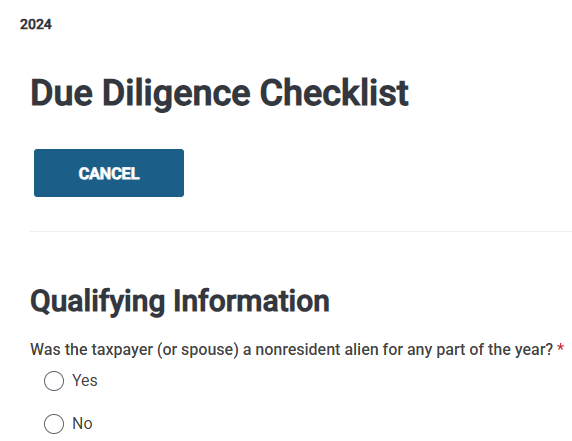
We have added a “CANCEL” button to the top of the Due Diligence Checklist (required for Paid Preparers Only), that auto loads as “Earned Income Credit” in the Forms tree when EITC is calculated in the return.  This is an effort to make it easier to the volunteers to exit the page.  For example, if they open it from the Left Navigation Tree and start completing the page, they can select Exit to exit and close the page.

2024 Consents Spinning when trying to click Continue [RESOLVED]

07 Feb 25
Kim Manuel
No Comments

Update:  The issue has been resolved.  If you are still stuck on that page,  you will need to click Back and/or Exit the e-file section and go back through e-file again.


We are currently working the issue where you cannot click continue on the Consent page.  You can click Back to get off the consent page.  We recommend you flag this return with a return tag so you can go back and revisit it to complete any missing consents.

You can continue to prepare returns, but we recommend completing the Global Carry forward or any other applicable consents prior to electronically filing the return

State Only E-file: Frequently Asked Questions

04 Feb 25
Kim Manuel
No Comments

How do I identify returns I may need to send as “state only”

  • Rejected state returns are listed in your Rejected Clients list located on the welcome page

Common reasons for filing a return as “State Only”

  • The federal return is accepted and the state return is rejected.
  • You have no federal filing requirement, but need to file the state for a credit
  • The taxpayer comes back after their already filed and accepted federal return and needs to file their State return
  • The taxpayer needs to add another state to their already filed and accepted return.

When should I NOT file a “State Only” return

  • While you are waiting for your state to acknowledge the return you filed with your Federal return.
  • Reminder:  States typically take longer to acknowledge their returns than the IRS MeF system.

Is there a report I can run that identifies states that are marked as “electronic” and have not been filed?

  • Navigate to Reports >> Management Reports >> Select the Pro Web Returns – Detailed Return Report
  • You can either export the report or filter it by the state return type
    • You are looking for any state return type other than Paper with a blank status
  • Note:  If you have multiple states on the return, there will be multiple rows per return

What return type do I need to select for the Federal Return?

  • TaxSlayer automatically marks the appropriate federal return type when you select the State Only box.
  • The federal return portion will be marked as stOnly in client status
  • The type of return under the Federal Return Section of the Submission page will reflect : State Only – Federal Return is NOT being submitted to the IRS

How do I transmit my “State Only” returns?

  • You must submit them from the Submission Page (Save and Transmit Return)


E-file Opening Day stats

27 Jan 25
Kim Manuel
No Comments

Congratulations on a successful opening day.  You filed over 8,538 electronic returns with an overall reject rate of 8%.  Below are the top 10 rejects we saw on opening day.

Column 1 = number of Rejects

Column 2 = Reject Code

Column 3 = Reject explanation

306 F8962-070 The e-File database indicates Form 8962 must be included in the return. The taxpayer, the taxpayer’s spouse if filing jointly, or a dependent claimed on the tax return was enrolled in Affordable Care Act (ACA) Marketplace health insurance and advance payments of the premium tax credit were paid for the coverage. Please resubmit the return with the Form 8962 using the information from your Form 1095-A. If you did not receive or have lost your 1095-A, you can get a copy from the Marketplace through which you obtained coverage. If you think Form 8962 is not required, please resubmit the return with a binary attachment (PDF) containing the heading “ACA Explanation” and explaining why the Form 8962 is not required. Please visit the IRS website at: https://www.irs.gov/newsroom/how-to-correct-an-electronically-filed-return-rejected-for-a-missing-form-8962 for additional information.
79 IND-181-01 The Primary Taxpayer did not enter a valid Identity Protection Personal Identification Number (IP PIN). Please visit www.irs.gov/getanippin for further information and resubmit your return with the correct number.
39 R0000-500-01 ‘PrimarySSN’ and ‘PrimaryNameControlTxt’ in the Return Header must match the e-File database.
27 IND-996 The Dependent/Qualifying Person Identity Protection Personal Identification Number (IP PIN) provided on the return is not valid. Please visit www.irs.gov/getanippin for further information and resubmit your return with the correct number.
20 F1040-164-01 Form 8862 must be present in the return with Earned Income Credit Claimed Indicator checked. The e-File database indicates the taxpayer must file Form 8862 to claim Earned Income Credit after disallowance.
18 SEIC-F1040-501-02 Each ‘QualifyingChildNameControlTxt’ that has a value on Schedule EIC(Form 1040), Line 1, and ‘QualifyingChildSSN’ that has a value on Line 2, must match that in the e-File database.
14 R0000-504-02 Each ‘DependentSSN’ and the corresponding ‘DependentNameControlTxt’ that has a value in ‘DependentDetail’ in the return must match the SSN and Name Control in the e-File database.
14 FW2-502 Form W-2, Line B ‘EmployerEIN’ must match data in the eFile database.
12 IND-180-01 Primary taxpayer’s Identity Protection Personal Identification Number (IP PIN) must match the e-File database. Please double check your entry and resubmit your return with the correct number.
11 SEIC-F1040-506-04 Each ‘QualifyingChildSSN’ that has a value on Schedule EIC (Form 1040), must not be equal to another Qualifying Child SSN on another accepted return for the same tax year. Visit www.irs.gov/identity-theft-fraud-scams/identity-theft-dependents for additional information. To electronically file with this duplicate condition, an Identity Protection Personal Identification Number (IP PIN) will be required. If you wish to get an IP PIN and you don’t already have an account on IRS.gov, then you must register to validate your identity. Please visit www.irs.gov/getanippin for further information and resubmit your return with an IP PIN.

What’s Trending in Support: IRS Reject F8962-070

27 Jan 25
Kim Manuel
No Comments

The e-File database indicates Form 8962 must be included in the return. The taxpayer, the taxpayer’s spouse if filing jointly, or a dependent claimed on the tax return was enrolled in Affordable Care Act (ACA) Marketplace health insurance and advance payments of the premium tax credit were paid for the coverage. Please resubmit the return with the Form 8962 using the information from your Form 1095-A. If you did not receive or have lost your 1095-A, you can get a copy from the Marketplace through which you obtained coverage. If you think Form 8962 is not required, please resubmit the return with a binary attachment (PDF) containing the heading “ACA Explanation” and explaining why the Form 8962 is not required. Please visit the IRS website at: https://www.irs.gov/newsroom/how-to-correct-an-electronically-filed-return-rejected-for-a-missing-form-8962 for additional information.

TIPS:  

  • Look at your e-file warning if you use carry forward on the return.  If there was a 1095-A in the prior year return but  not the current year return, there will be a warning.
  • Get on the phone with the taxpayer and the marketplace.  Phone numbers for Federal and state marketplaces can be found at Marketplace Phone numbers
  • The taxpayer may not have received their 1095-A yet so if you are asking if they received their 1095-A, it is possible they have not.


Call Notes: TaxSlayer All Partner Call 1/23/2025

24 Jan 25
Kim Manuel
No Comments

Opening Comments by TaxSlayer

  • Controlled Launch
    • The IRS MeF team conducts controlled launch with industry anywhere from 5-8 business days before e-file opens.  They do this to get e-files going through their system to validate any programmatic changes they have had to make.
    • We typically choose a day and allow VITA/TCE e-files to come through to make sure all of our processes are in place before opening day.
      • Ability to send
      • Ability to get acks
      • View reject codes in all the appropriate places
      • Run IRS Acknowledgements (which we strongly encourage)
      • Client List status changes appropriately based on where the return is in the process.
    • We sent around 390 e-files
      • 8% reject rate
      • Top rejects:
        • F8962-070: E-file database indicates that someone on the return (TP, SP or Dependent) was enrolled in the ACA Marketplace
        • IND-181-01: Primary taxpayer did not enter a valid IP PIN
        • IND-996:  Dependent/Qualifying person did not enter a valid IP PIN
  • E-file opens January 27th
    • We will turn on e-file for VITA/TCE around 11:00am ET for current year 1040 returns
      • We will monitor rejects throughout the day
      • We will post dates on when we will turn on “State Only” and Prior year Returns (Typically towards the middle or end of the week)
  • Disaster Designation
    • We have seen a lot of questions about this. We recommend that you go ahead and mark the Disaster box and enter the appropriate disaster code
  • TaxSlayer Application Deploy Schedule
    • Monday, Wednesday, and Friday during season
    • Craig will post release notes on the blog the night before
  • Orders from the IRS
    • We are still receiving orders on Tuesdays and Thursdays
  • Subscribe to the blog for notifications
    • We have approximately 6,729 subscribers that get automated notifications out of approximately 60,000 users
    • We are aware some people are still getting blank screens when they click on the Blog from the springboard
      • Reach out to support so they can walk you through gathering some data for our development team
  • VITA/TCE Support Hours
    • Phone, e-mail and chat support is available Monday-Friday from 8am-11:59pm ET and Saturday and Sunday from 8am-8pm ET
  • Special thanks to Brad Martin who volunteered to be a guest “Question answerer” today.

Question and Answer Session

Question: When will Alabama be approved for e-file and what do I need to do for the returns that I prepared earlier when the program still indicated the return would have to be paper filed?

Answer from TaxSlayer: We will check to see if it is approved.  Once we turn on e-file for Alabama, you will just need to open the return and change the state return type to the appropriate e-file.


Question: Will we receive a schedule of calls and the call-in number earlier next time? I did not receive mine until just a few minutes before the call.

Answer from IRS: Your SPEC Relationship Manager should be reaching out with the call in information.  If you do not have it a week prior to the call, you should reach out to them to get it.


Question: How do we find out the status of our software order and how do we get notified you have it?

Answer from TaxSlayer: Reach out to VITA/TCE support to see if we have a current year order. If we do not, then you would need to reach out to your SPEC Relationship Manager to see if there were any problems with the order. We receive orders Tuesdays and Wednesdays. You will receive 1 notification via email if you are a returning site and 2 notifications via email if you are a new site.


Question: If the return is rejected for Form 8962 and the taxpayer is adamant they did not have coverage, will the program still allow you to mark that they don’t have coverage and send the efile back?

Answer from TaxSlayer: The behavior should not have changed. Once the return is rejected, go back through the healthcare menu to mark the applicable box and resubmit.

Feedback from Brad: In Alabama I often find that they really did have marketplace insurance and did not realize it. There are times when I have to get on the phone with the marketplace and typically find that they had the insurance for a short period of time and they just didn’t realize it.


Question: When will the new 5329 tax on early distribution codes be available in TaxSlayer?

Answer from TaxSlayer: We have an open development item for this that is marked production ready so it should go out either Friday, January 24th or Monday, January 27th.


Question: Can you check on a couple of places where the EIN is not working; 8863 and the 2441?

Answer from TaxSlayer: We have an active work order to fix the EIN database on the 8863. It worked in 2023 and should be working in 2024. We will have that fixed soon. We will check on the 2441 as we thought it was working.


Question: Can you also check on the EIN database not working on the 1099-RRB?

Answer from TaxSlayer: We have an open work item on this one too. We will check on it.


Question for Guest Speaker: Do you have to be with the taxpayer when you call the marketplace?

Answer from Guest Speaker: Yes. I typically call the marketplace and put the taxpayer on the phone with them so they can get authorization for me to talk to them. The authorization is just for this specific day. The whole process takes about 10 minutes. Saturdays are the best, there is typically no hold time.


Question for Guest Speaker: How do you handle it when the taxpayer is not at the site?

Answer from Guest Speaker: Sometimes we have them come back to the site because it could impact their refund/balance due and we would need a new signature. I have done a 3 way call between me, the taxpayer and the marketplace. Then if something changes on the return, I can  make the return available to the taxpayer via customer portal.


Question: How do we get in touch with support?

Answer from TaxSlayer: Once you open the VITA/TCE Springboard, scroll to the bottom and all of the support information is listed.