Author Archives: %s

Message from Ohio: State Acknowledgements (RESOLVED)

04 Feb 19
Kim Manuel
No Comments

2/6/2019

Ohio sent the below messaging to software vendors this morning.

“Ohio is currently in the processing of re-sending out all acknowledgements which were not received.  We are estimating that all acknowledgments will be re-sent out and received over the next several business days.  A follow-up email will be sent when all acknowledgements are showing received in our system.  The problem appears to be an intermittent problem, and we are still researching the issue to ensure this does not happen for future submissions.”


2/4/2019

Ohio sent a message to all software developers that they are aware of an issue that is isolated to acknowledgements only.  All submissions were processed according to the standard Ohio processing and rejection rules.  They are aware of the error and are currently researching the cause and will notify software vendors when there is a resolution.

Volunteer Time: All Partners Call Notes from January 31

04 Feb 19
Kim Manuel
No Comments

Opening comments (TaxSlayer)

  • Electronic Filing opened on Monday, January 28th
    • Federal acknowledgements are taking around 30 minutes
    • State acknowledgements will take longer…most states do not consider them late until after 5 days
  • Reject Code R0000-019
  • 11 states where the state return received a validation error due to the federal SIDN not carrying to the State SIDN field
  • Send State Only returns is on
  • Reporting potential defects
    • If calling support, be in front of the computer
    • If emailing support, need the EFIN/SIDN and last 4 digits of the SSN, along with a detailed explanation
    • DO NOT submit a defect via the Suggestion Box
  • All orders received by the IRS has been processed
    • Orders are processed on a daily basis when received
  • Instructions if the site admin changes and they need to setup their login credentials
  • EFIN Changes
    • DO NOT just change the EFIN in the software, this will result in IRS Reject 202
    • Submit the change in writing to TaxSlayer support and your SPEC Relationship Manager
      • Must be approved before TaxSlayer can make the change

Questions and Answers received during the call:

Q: Has the Federal Direct Debit issue been fixed where the date of filing was being included in the transmission instead of the requested payment date?

Q: 1099-R issue with carryforward showing numerous irrelevant 1099-R’s that do not belong to the TP/SP. Have you heard of that?

  • We have previously opened Issue 2527 and is actively being worked by development
  • Suggestion:  Uncheck the extra 1099-R’s while you are on the Carry Forward Data page, this is a much faster resolution than deleting the actual 1099R’s from inside the return.

Q: How do I go about getting our FSA sites and Traditional sites linked together when ordering?

  • Please refer to your SPEC RM to assist in entering them into IRS system to appropriately provide to TaxSlayer. They will be listed together within the IRS ordering system.

Q: Getting “Do Not Mail” on a Federal Print Set. How to remove that watermark from Federal returns?

  • This is intentional on the Taxpayer Copy Print Set. Per IRS regulations, to save paper when stacking the new 1040 and new schedules, they must be watermarked so they are not inadvertently paper filed by the Taxpayer.

Q: How to remove preparer name from Federal and State Returns?

  • There is a checkbox in Configuration>Office Setup to hide preparer name

Q: Processing returns with EITC/CTC to issue refunds. When does that begin?

  • Generally, these returns will not be processed by the IRS to begin issuing refunds until February 15th.

Q: Update on Health Insurance Coverage/exemption checkbox issue?

  • This was reported as Issue 2230 and is currently in development to be resolved. We do not have an ETA at this time.

Q: How to access Suggestion Box?

  • The Suggestion Box is available when logging into your site from the left-hand navigation menu. Please note the Suggestion Box is to only report enhancement ideas related to the software and NOT to report bugs/defects.

Message from Indiana: Some Business Rule corrections (Action Required)

01 Feb 19
Kim Manuel
No Comments

Indiana would like to inform you of some corrections that many of you are receiving on your submissions. The following Business Rejection Rules have been adjusted within our system to allow many of your rejections to be resubmitted and accepted.

We are putting into production this evening (January 31)  a correction to our business rules S529-009 and S529-010 that will now allow the correct rounding to the nearest whole dollar.

We will in production this evening (January 31)  to our business rule SDEP-001-01. It has been discovered that we adjusted the rule behind the scenes erroneously and were not allowing any SSN’s/ITIN’s that start with 9. This should now be corrected and should function exactly as it did on a 2017 submission last year.


If you have any return in this rejected state, you can now resend them.  You can quickly make this determination by selecting the Rejects button (next to message center) .  This will list all of your returns that are both federal and state rejected.

IRS Reject Code: R0000-019 (RESOLVED)

28 Jan 19
Kim Manuel
No Comments

1/30/2019 – Impacted returns can now be resubmitted for processing.

Problem:


Solution:

We will be issuing a software update on January 29th to resolve this.  Please hold returns with this reject until further notice.

Release Notes: Tuesday, January 29, 2018 at 5:00 am EST

28 Jan 19
Kim Manuel
No Comments

Returns will be placed in maintenance on Tuesday, January 29th to release a series of software updates.

2017 STATES

  • Corrected an issue in 2017 where clicking to “edit” a state return was prompting to close the window (Issue 2512)

ALABAMA

  • Added the ability within “Basic Information” to choose the AL Standard Deduction or AL Itemized Deduction when MFS (Issue 2434)

ARIZONA

  • Add an adjustment field within the AZ Itemized Deductions menu to adjust gambling winnings on AZ Schedule A, Line 7 when not reported on a W-2G (Issue 2437)

IDAHO

  • Corrected an entry issue within the Grocery Credit menu for dependents where a value greater than “12” months could not be entered (Issue 2460)
  • Corrected an issue where Column F was not calculating on Form CG (Issue 2462)

KENTUCKY

  • Corrected an issue where certain Federal Itemized Deductions were carrying to KY Schedule A when no longer allowed at the state level (Issue 2483)

MONTANA

  • Corrected an issue where the “Total Rent Paid” menu opened a blank screen (Issue 2457)

NEW YORK

  • Corrected an issue where NY Long-Term Care Premiums entered within the Itemized Deduction menu were not carrying to Form IT-196, Line 41 (Issue 2424)
  • Corrected an issue where NY was taking the itemized deduction when standard deduction was higher (Issue 2485)

NORTH CAROLINA

  • Removed the “Children Deduction” menu inside the Subtractions from Income menu because this is automatically calculated based on Federal entries (Issue 2441)

TAXPAYER NOTES 

  • Limited character entries to 200 characters when inside of a return. This has already been implemented outside of the return (Issue 2358)

TRANSMISSION MENU

  • Corrected a display issue where the newly added state columns were not consistently showing state values (Issue 2423)

WISCONSIN

  • Removed “Code 26” from the Subtractions from Income menu related to retirement exclusion because it is now automatically calculated based on Federal entries (Issue 2474)


*Click here to download a PDF of our Cumulative Release Notes.

State E-files not containing the SIDN (RESOLVED…ACTION REQUIRED)

28 Jan 19
Kim Manuel
No Comments

Update 01/30/2019

This has been resolved, however you will need to send the states back as “State Only” returns.

How do I identify the returns?

  1. Click on the Rejects button (next to the Messages button)
  2. Select Validations from the drop down menu

Selecting the rejected link will display the following validation error

You can now click the green Select button next to the return.

Navigate to the e-file section

Select the Send State Only box

Read and click the Warning.  (remember, the federal return must be selected with an e-file option, but it will not resend)

Click Save  on the e-file page to advance to the submission page

Click select on the Save and Transmit Returns button

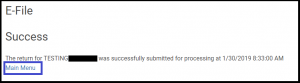
Select Main Menu to return to the welcome page

You will need to repeat these steps for each return with the state validation error.


Update 01/29/2019 

The following two states have been identified as not correctly receiving the SIDN from the federal return:

  • RI
  • WI

We estimate having having a fix for this deployed on Wednesday, January 30th.

—————————————————————————————————————————————–

The following list of states is not correctly receiving the SIDN from the federal return:

  • AR
  • ID
  • KS
  • MD
  • ME
  • NY
  • OK
  • VT
  • WV

What does this mean?

We need to update the state program to accept the SIDN from the federal return.  Once we do this, we will notify you of the next steps.  These did not pass validation to go with the federal return.


E-file: When will we turn it on?

28 Jan 19
Kim Manuel
No Comments

Update 11:06 AM:  We have turned on current year, 2017 and 2016 e-file for 1040 returns.  We have not turned on Send State Only.


Update:  Current year e-file has been turned on.  Please keep in mind that the IRS system is receiving a significant volume of e-files today, so receiving acknowledgements may take longer than normal.


We are currently waiting to receive acknowledgements from the Commercial returns we transmitted this morning.  Once we receive and process them, we will turn VITA/TCE on

Software Orders — Government Shutdown is over, what do I do?

26 Jan 19
Kim Manuel
No Comments

We have processed all orders submitted to us by the IRS prior to the government shut down and submitted to us through our interim plan during the government shut down.

If you have sites that are not active or new sites that have not been created and activated, you will need to reach out to your SPEC Relationship Manager.

Thank you for your patience and working with us under alternate plans.