Author Archives: %s

Crowdstrike Incident [RESOLVED]

19 Jul 24
Kim Manuel
No Comments

9:11am ET – All TaxSlayer Production Systems are actively running as expected at this time.


The Crowdstrike Incident is impacting a large number of businesses that use Microsoft Windows to host files.  This is currently impacting your ability to open returns and print returns from the client list.  Our IT team is closely monitoring the “Crowdstrike Incident” and is following any guidelines released to lessen or eliminate the impact on our applications and services.

Article about outage

You may experience pages with the following wording:

We’re Sorry

We experienced a problem.

This error has caused you to be logged out of your account. We have been notified and are currently working to correct the problem.

Error transmitting returns from the Transmission menu [RESOLVED]

01 Jul 24
Kim Manuel
No Comments

Scenario:  I am receiving an error when trying to transmit returns from the transmission menu

Workaround:  Transmit the returns individually from the Submission page in e-file

Solution:  We are working to determine the reason for the error and deliver a programmatic solution.

End of Season Closeout just got easier…

23 Apr 24
Kim Manuel
No Comments

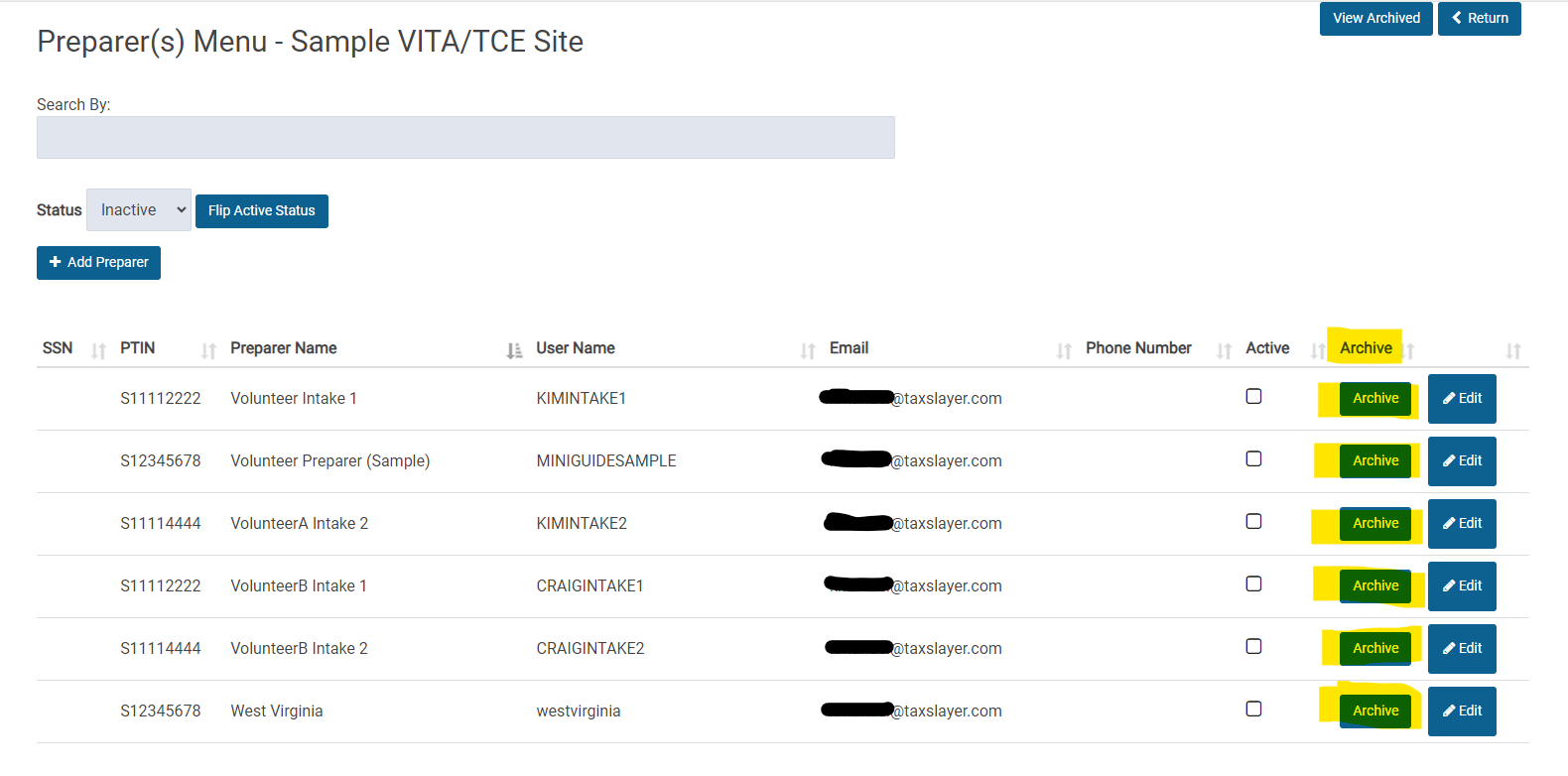
We have added an easier way to archive Preparers that you know will not be volunteering at your site in the future.

  • Select Configuration
  • Select Preparer Setup
  • Once you have marked the appropriate preparers are “Inactive”, change the Status to “Inactive”
  • Click “Archive” next to each preparer that you know will not be volunteering at your site in the future.
    • In the past, you had to edit each inactive user to mark them as archived.

This process will make it easier to manage your active/inactive users by not displaying those that will not be returning.

Delay in Transmitted Returns (Update 11:56am) — RESOLVED

19 Apr 24
Kim Manuel
No Comments

Update (11:56am)  We have identified the issue and restarted all necessary services.  You will slowly see the returns change from “Received” to “ready” to “Sent”.  Once they are sent to the IRS, you will see the acks come back in their normal timely fashion.


We are experiencing a delay in returns being sent to the IRS.  These will appear with the status of “Transmitted” on your Client List and will display as “received” on the client status.  We have opened a high priority ticket with our development team to resolve this.

Pro Online: Recommended End of Season Reports

11 Apr 24
Kim Manuel
No Comments
  • Federal Returns not Transmitted
    • Gives you a list of federal returns that have never been transmitted, along with the status (i.e. in progress, complete, etc.).  This will allow you to review any returns marked Complete that may need to be transmitted
  • Rejected Returns
    • Outstanding rejects that have not been changed to Paper
  • Federal Returns Transmitted with no States
    • Helps to identify any state returns that were not sent with the Federal or as State Only
  • State Returns not Transmitted
    • Gives you a list of returns that have a state attached that has not been transmitted.
  • Pro Web Returns – Detailed Return Report (Web Management Report)
    • Gives you detailed information on both the Federal and any state attached to the return
  • Returns Awaiting Acknowledgement (Web Management Report)
    • Returns that have not received an IRS acknowledgement

Extension e-file: Spinning [RESOLVED]

09 Apr 24
Kim Manuel
No Comments

Update 04/09/2024  8:47am:  This has been resolved.  You can now continue through the extension process.

Scenario:  You select to File an extension and the page just spins

Workaround:  Click “Your Office” on the left navigation panel to exit the page

Solution:  We have entered a high priority ticket to resolve this.

Rejected Extensions: Next steps [Corrections Made]

04 Apr 24
Kim Manuel
No Comments

Update 4/5/2024:  You can now correct and electronically re-submit any rejected extensions


Scenario: My extension was rejected and there is no option to re-submit it after correcting the reject errors.

Impact: [Minimal] A small percentage of extensions are rejected by the IRS.  They typically do a cursory check for name control and if an extension is already on file.

Solution: We have a work item in for a programmatic fix.

Alternative solution until this can be resolved:

  1.  Paper file the extension
    • You can send the taxpayer a customer portal invite and make the return available for them to print, sign and mail once they have registered their account.


Errors printing returns [RESOLVED]

03 Apr 24
Kim Manuel
No Comments

Update:  11:30 am.  The PDFs are rendering from all areas of the application.  If you are still getting an error printing, log out, close your browser, open a new instance of the browser (not just a new tab) and log back in.  This will clear any error that is still in your cache.


We have opened a high priority ticket to resolve the errors we are seeing while printing a return.