Category: Software News

Prior Year e-file and 2023 state only is now available.

02 Feb 24
Kim Manuel
No Comments

Update (02/02/2024 10:00 am EST)  We have turned on 2023 State Only and prior year e-file for 2022 and 2021.

Note:

The IRS currently has a business rule in place that will erroneously reject any 2022 or 2021 return that has a 1099-R with Federal Withholding.  They are working with industry to determine the best resolution.  During the meantime, we strongly recommend that you tag any prior year return that you are planning to electronically file that has a 1099-R with a Federal Withholding amount.


Our current plan is to turn on prior year e-file (2022 and 2021) tomorrow (Feb 2) at 10 am EST

Update (01/31/2024 2:29pm EST)  We will be turning on prior year (2022 and 2021) e-file on Friday, February 2, 2024 at approximately 10 am EST


Update:  (01/29/2024 1:15 pm EST)  Don’t panic if you see that the returns you sent have not gone to the IRS.  This is Day 1 of e-file and we are monitoring the flow of returns out the door to the IRS so ensure they arrive at their destination with no issues.


Update:  (01/29/2024  11:05 am EST)  TY2023 e-file is open.  We will monitor the turn around time for IRS acknowledgements and post if we see any extreme delays.  Remember the IRS can take up to 48 hours to acknowledge returns, but we typically see them within an hour.


The IRS will open their MeF system to accept e-files from all vendors in the industry at 9 am ET

  • 10:30 ET (Tentative Time) We will turn on e-file for TY 2023
    • Open and review returns created prior to the 29th.
    • You will be able to send your Federal and State Returns together (State only will not be available until later in the week)
    • You will receive IRS acks
      • State acks will come as the states process their returns (varies by state)
  • We will update this blog post throughout the day.
IRS Reject F1040-065-04

02 Feb 24
Kim Manuel
No Comments

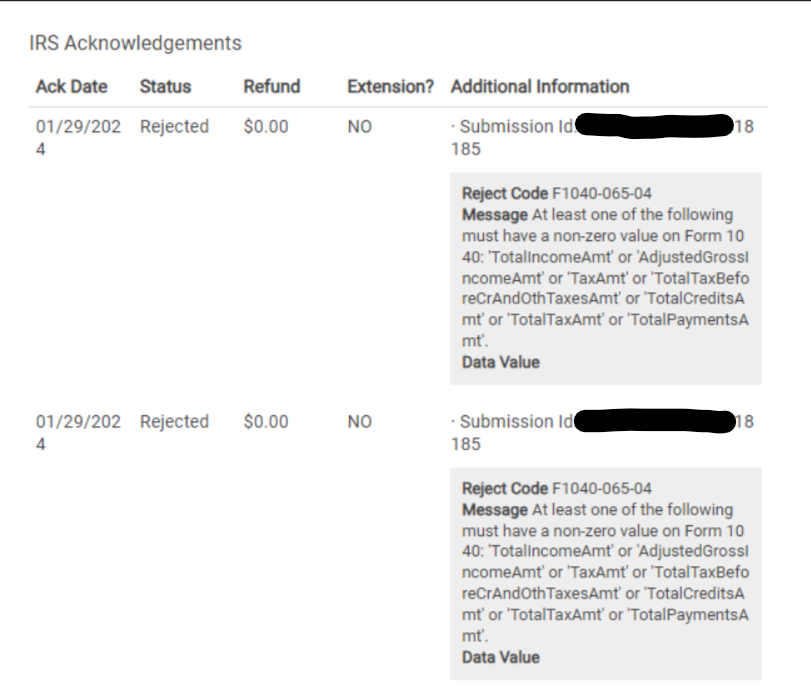
F1040-065-04:  At least one of the following must have a non-zero value on Form 1040: ‘TotalIncomeAmt’ or ‘AdjustedGrossIncomeAmt’ or ‘TaxAmt’ or ‘TotalTaxBeforeCrAndOthTaxesAmt’ or ‘TotalCreditsAmt’ or ‘TotalTaxAmt’ or ‘TotalPaymentsAmt

TaxSlayer Tip:  One of the following lines on the 1040 must have a value greater than zero based on the e-file Schema for the IRS MeF system to process the return

  • Line 9: Total Income
  • Line 11:  Adjusted Gross Amount (AGI)
  • Line 16:  Tax Amount
  • Line 18:  Represents Total Tax Before Credit and other Taxes Amount
  • Line 21:  Represents Total Credits Amount
  • Line 24:  Total Tax
  • Line 33:  Total Payments


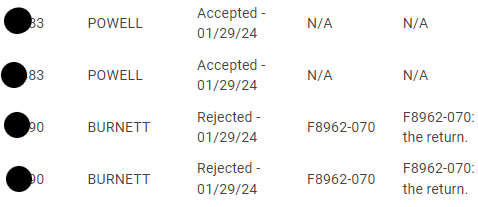
IRS Acknowledgements: Why am I seeing double?

30 Jan 24
Kim Manuel
No Comments

Scenario:  When I run my IRS ack report report, I see some of my taxpayer’s listed twice…either accepted twice or rejected twice


Reason:  We inadvertently picked up and processed the acknowledgement twice.

Action required:  None


Scenario:  When I select my Rejected Clients, I see them listed twice


Reason:  We inadvertently picked up and processed the acknowledgement twice.

Action required:  Just select one of them to fix and resend the return.  We are working on a solution to limit the display


Scenario:  When I click on the rejected link from the client list, I see the reject detail twice

Reason:  We inadvertently picked up and processed the acknowledgement twice.

Action required:  None

IRS Acknowledgements- Reminder

30 Jan 24
Kim Manuel
No Comments

The IRS can take up to 48 hours to make acknowledgements available to software vendors.  The VITA/TCE support reps, see the same information  you see in Client Status.  We actively monitor e-file and acknowledgements to determine if there is anything outstanding or if we are seeing trends in reject codes.

IRS Rejected Returns [RESOLVED]

29 Jan 24
Kim Manuel
No Comments

Problem:  You currently cannot view the reason the return has been IRS Rejected on some returns.  This also impact the IRS Ack reports not displaying the reject reason.

Workaround:  None

Solution:  We are investigating why the reject reason is not displaying.

Portal List: How do I know when the taxpayer uploads a document or Sends a message?

26 Jan 24
Kim Manuel
No Comments

When the taxpayer uploads a document or sends a message, a red dot will appear next to messages.  You will then select the Unread Message dialog in the lower left corner of the screen (same as always).

The portal list will also display the number of documents that were uploaded.

In the below screenshot the link registered date is now populated because I created my portal login in order to upload the document.

FAQ: Your connection is not private message

26 Jan 24
Kim Manuel
No Comments

Problem:  You or your taxpayer receive the following message when clicking on an activation link (site activation, admin activation or customer portal activation).

Reason:  This is due to the privacy settings on the device you are using.  The privacy settings are trying to safeguard you from clicking a harmful link

Solution:  Copy and paste the URL to a new browser window

Introducing the Portal Clients list

26 Jan 24
Kim Manuel
No Comments

The Customer Portal list allows the sites to more easily manage the taxpayers who have been sent a customer portal link.

Select the Portal Clients button on the Welcome Screen.


This will display a client portal listing for the taxpayers you have sent a customer portal link:

  • SSN: Taxpayer SSN
  • Status: Federal Status
  • States: States listed on the return.  Hover over the ? to see the state status
  • Messages: Displays the number of messages from the taxpayer.  Unread messages will have a red dot
  • Docs: Number of documents the taxpayer has uploaded
  • Link Sent Date: The latest date the volunteer sent a customer portal link
  • Link Registered Date: The date the taxpayer registers their portal link by creating their account

You have the same abilities to manage returns as you do on the client list pages.

Select allows you to enter the return from the Portal Clients list.

Note: Due to the amount of data on the listing, you will need to scroll horizontally. You also have the ability to search for the taxpayer in the search bar.