Category: Software News

American Rescue Act — What we know (Update 3/16)

16 Mar 21
Kim Manuel
No Comments

Update 3/16/2021:  We are receiving many emails on how to handle these changes in the software.  Please understand that even though the IRS made a post of how to handle this on the 1040, we are still waiting for the IRS to issue instruction changes for the purposes of calculating the changes in the software and for electronic filing.  If you are more comfortable waiting to file these returns, we recommend you create a return tag.  As of today, we do not know how the IRS is going to handle previously filed returns with Unemployment or how they are going to handle returns filed between the passing of the Act and their implementation plans.


Now that the Act is signed, the IRS will interpret the Act and issue instructions on how it should be handled on new returns and on returns already electronically filed.

Once we get guidance, we do not believe it will take long to make changes to the software.  We are already being proactive and creating some reports that will allow sites to identify returns that have a 1099G in case they need to revisit them.  The excess payments for PTC is already on the Site Production Detail report in the event those returns need to be revisited.  We strongly recommend you wait until we receive clarification and guidance from the IRS before making any changes to existing returns or changing how you prepare new returns.

We, as a software vendor, have already had calls with the IRS.  They are committed to working closely with all vendors to get the appropriate messaging and instructions out as soon as they know them.


The National Association of Tax Professionals (NATP) has published an excellent summary of the American Rescue Act.   Click here to view their summary.


IRS Statement regarding the American Rescue Act.  Click here to view statement


IRS Coronavirus page.  Click here to view latest Coronavirus information


Temporary Suspension of Limits on Charitable Contritbutions

12 Mar 21
Craig Smith
No Comments

IRS Release

Temporary Suspension of Limits on Charitable Contributions

In most cases, the amount of charitable cash contributions taxpayers can deduct on Schedule A as an itemized deduction is limited to a percentage (usually 60 percent) of the taxpayer’s adjusted gross income (AGI). Qualified contributions are not subject to this limitation. Individuals may deduct qualified contributions of up to 100 percent of their adjusted gross income. Contributions that exceed that amount can carry over to the next tax year. To qualify, the contribution must be:

  • a cash contribution;
  • made to a qualifying organization;
  • made during the calendar year 2020

Contributions of non-cash property do not qualify for this relief. Taxpayers may still claim non-cash contributions as a deduction, subject to the normal limits.

How to claim this in TaxSlayer Pro Online?

It is a two-step process.

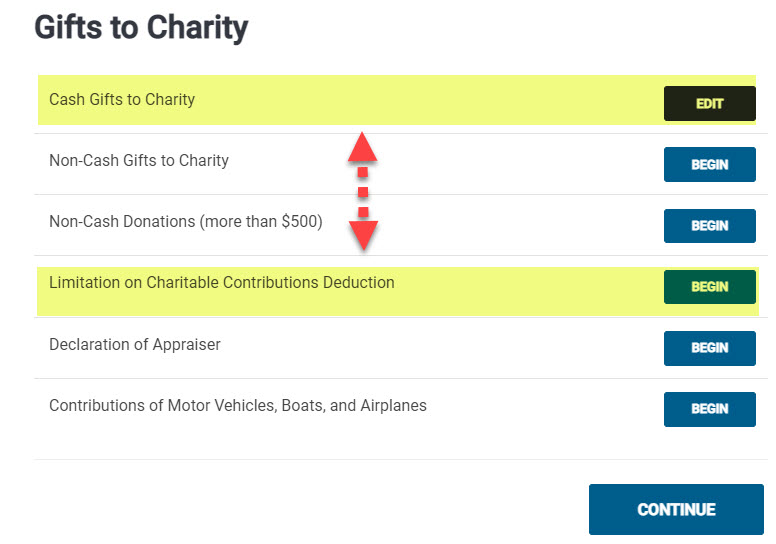
  1. Report your taxpayers cash gifts to charity just as you normally would within the “Cash Gifts to Charity” page within the Itemized Deductions menu.
  2. If their donations qualify to take advantage of this temporary suspension of limitations, after completing Step 1 above, go to the “Limitation on Charitable Contributions Deduction page (shown below) and enter the qualified contributions.


FSA Kiosk URL Sites — MFA via Text Messaging [RESOLVED]

26 Feb 21
Kim Manuel

No Comments

3:10 pm ET:  MFA via text messaging has been restored


10:50am ET

As our engineers continue to work with the service provider, MFA via Text has been turned off. What this means is that when you are presented the page to MFA for your account, only e-mail will be available.


MFA via text messaging has been temporarily turned off.  The taxpayers will need access to their email accounts in order to complete the authentication process.  Once the MFA service provider is back online, we will re-enable the feature


Message from Connecticut: Rejected Returns [RESOLVED]

26 Feb 21
Craig Smith
No Comments

2/26/2021

Connecticut has resolved their issue with the IRS. CT e-files can resume at this time. If you have any CT returns rejected with Reject Code: Rule Number – State-001, they can be resubmitted at this time.


2/25/2021

Software vendors received the below message from Connecticut.

It appears that the IRS is rejecting all Connecticut Returns for the reason of: IRS ERROR MESSAGE: The agency to which a State Submission is filed must participate in the Fed/State program.  Connecticut has contacted the IRS to figure out what is causing these rejects.  Until this issue is resolved, Connecticut is recommending that you do not submit any MeF submissions to Connecticut.  I will send out an email once this issue has been resolved.

Note: At this time, we have turned off the ability to e-file CT returns per CT guidance.

Form 7202: How to Elect to use 2019 Net SE Earnings

25 Feb 21
Craig Smith
No Comments

Question: In the current iteration of the Form 7202 page inside TaxSlayer, how do I elect to use the 2019 net earnings from self-employment?

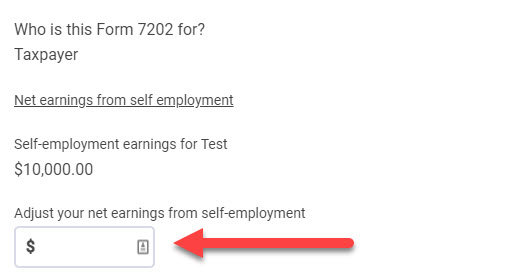
Answer: To use 2019 net earnings from self-employment when calculating any applicable credit using Form 7202, the 2019 Net SE earnings MUST BE greater than the 2020 Net SE Earnings. If this is the case for your client, enter as a positive number, the difference between 2019 and 2020 Net SE Earnings into the “Adjust your net earnings from self-employment” field (shown below). The manually entered value will add to the already calculated 2020 Net SE Earnings and carry to Line 7 of Form 7202.

  • To locate 2019 net self-employment earnings, in most instances, refer to Line 6 of the 2019 Schedule SE. You can also refer to Form 7202 instructions for additional guidance by clicking HERE.

For example: If the 2020 Net SE Earnings is $10,000, but in 2019 it was $17,000, the difference is $7,000. Inside the TaxSlayer application, $7,000 would be entered in the adjustment field. This would add to the $10,000 already calculated in the return and carry a total of $17,000 to Line 7 of Form 7202.

Note: We realize this is not intuitive and are working to improve the experience when electing to utilize 2019 Net SE Earnings for this credit.


FSA Kiosk URL Sites — How do I support my taxpayers

22 Feb 21
Kim Manuel

No Comments

There are several ways you can offer support to your taxpayers.

  • Communicate your site’s support information when you send the taxpayer the URL.  DO NOT rely on them being able to navigate your site and find it.  This should include all ways that the taxpayer can communicate with a certified volunteer at your site such as:
    • Support number, along with hours or operation
    • Email address, along with expectations of when they can receive an answer
  • There are several ways you can support your taxpayers which include, but are not limited to
    • Utilizing screen share applications
    • Following along with a support account you have created (you can have up to 5 usernames per email address)
    • Being available to answer tax related questions
    • Being available to help them work through any IRS or state rejects
  • If there are questions you (as the site) cannot answer, you should email VITA/TCE with detailed information.  They will need to know the following at a minimum:
    • Account Username
    • Account email address
    • Detailed information on what you need assistance with
  • At no time should you recommend or advise a taxpayer to reach out to TaxSlayer for support.  The agents will not be able to assist your VITA/TCE Kiosk taxpayers directly.


Where can I find my 2019 Earned Income

18 Feb 21
Kim Manuel
No Comments

Where can I find the taxpayer’s 2019 Earned Income?

Preferred Method

Look at a copy of the taxpayers 2019 tax return.

  • Look for Form 8812. Earned income is shown on line 6a.
  • If there is no Form 8812, look for the EITC worksheets, which are usually included at the end of your return. Earned income is listed on Worksheet A, Line 1 and Worksheet B, Line 4b.

Alternative Method

If the taxpayer does not have a copy of the 2019 return, the taxpayer can obtain a transcript from the IRS.


Filing Status = MFS and the taxpayer doesn’t know the spouse SSN

17 Feb 21
Kim Manuel
No Comments

Scenario: I have a client that is separated so she is filing Married Filling Separate. They system is asking for her Spouse’s information. Is there a way to bypass this?

Solution:  In order to electronically file the return, the spouse SSN must be entered.  If the taxpayer cannot obtain the information, then you can enter 111-00-1111 to by pass the entry screen, but the return will have to be filed via paper.  The IRS does a SSN/Name match for the spouse SSN during the electronic filing process