Author Archives: %s

TaxSlayer Pro Online: Slowness Reported

19 Feb 19
Craig Smith
No Comments

11:47am ET – We are continuing to monitor as site performance is currently operating at optimal levels. If anything changes, we will return and update this post.

11:29am ET – We have received a couple reports of slowness on the site/web reports. At this time, we are actively monitoring with our engineering teams. If you experience consistent slowness, we recommend closing all instances of your browser (not just the tab) and start back with a fresh session connection.

TaxSlayer Pro Online: $18 Software Fee – Display Issue Only (RESOLVED)

19 Feb 19
Craig Smith
No Comments

2/21/2019 – This is now resolved.

We have opened Issue 2818 to correct a display issue showing on the Submission page of some returns. The below is only a display issue and no fee is actually assessed or required prior to submitting VITA/TCE tax returns. We apologize for any confusion this may have caused.

We anticipate having this display issue resolved with our next deployment this week.

TaxSlayer Pro Online: Illinois Reject Code -9999 (RESUBMIT)

19 Feb 19
Craig Smith
No Comments

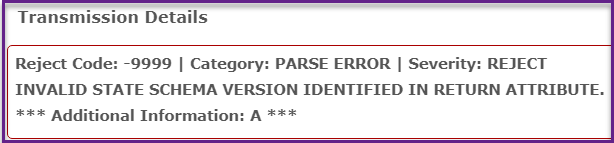
Update – The latest IL schema was updated in the software before IL was ready to begin accepting the new schema electronically. As of 2/19, these IL returns with Reject Code -9999 can be resubmitted.


We have received several support contacts regarding Illinois Reject Code -9999 regarding an Invalid State Schema shown below.  We have opened Issue 2841 to work with IL to determine what may be causing this particular IL reject. If you have any IL returns rejected for this reason, please hold those returns until we provide an update on this post.

TaxSlayer Pro Online: Management Reports (UPDATE)

19 Feb 19
Craig Smith
No Comments

February 19th – Management Reports are now turned back on and be actively used at your site(s).


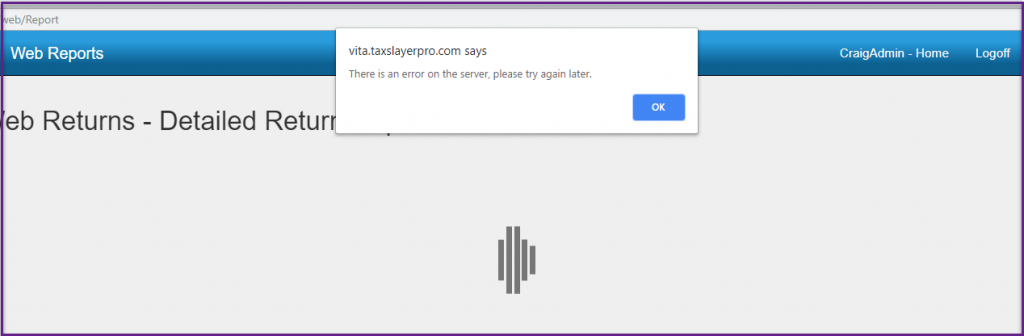
We wanted to provide an update on Management Reports. They remain turned off as we continue our investigations related to the issues experienced on Tuesday, February 12th. However, today, you will notice that you can now access the Management Reports menu, select a report, choose a date range and EFIN and click to run the report. When clicking to run the report, you will see the below screen. This is expected behavior at this time since Management Reports are turned off.

Release Notes: Tuesday, February 19th at 5:00am ET

18 Feb 19
Craig Smith
No Comments

The site will be placed in maintenance on Tuesday, February 19th to release the below software updates.

CALIFORNIA

  • Correct an issue where an entry within the CA Itemized Deduction menu (Additions – Gifts by cash or check field) was not saving entries (Issue 2734)

KANSAS

  • Correct a print issue where Schedule S was being generated in the PDF when not applicable (Issue 2743)

MARYLAND

  • Correct a display issue where “2018” was showing instead of “2019” for next year’s estimated payment vouchers (Issue 2733)

NEW JERSEY

  • Corrected a page validation issue where the NJ Property Tax Deduction/Credit drop-down was not allowing a “NO” entry (Issue 2764)

OHIO RITA LOCALITY

  • Add the ability to source Schedule C and Schedule E income to the RITA locality (Issue 2687)

PENNSYLVANIA

  • Correct an issue where MFJ Federal returns were electing to file MFS PA returns but the MFS selection was not being saved in the PA program (Issue 2746)

REVIEW RETURNS

  • Correct an issue inside the Review Returns menu where the print icon was only providing the “Print Return” option instead of also showing custom print sets (Issue 2774)


*Click here to download a PDF of our Cumulative Release Notes.

Release Notes: Monday, February 18th at 5:00am ET

17 Feb 19
Craig Smith
No Comments

The site will be placed in maintenance on Monday, February 18th to release the below software updates.

FILING STATUS

  • Adding back the MFS question regarding the period during the year the spouses lived together (Issue 2480)

MINNESOTA

  • Correct a display issue where M1-LTI, Line 3 was not showing applicable values from Schedule M1SA, Line 4 (Issue 2542)


*Click here to download a PDF of our Cumulative Release Notes.

Message from Arizona: News and Announcements

15 Feb 19
Craig Smith
No Comments

The Arizona Department of Revenue (ADOR) reminds taxpayers the process to claim tax credits for public schools, Qualifying Charitable Organizations (QCOs) and Qualifying Foster Care Charitable Organizations (QFCOs) has changed.

Public Schools

An individual may claim a nonrefundable tax credit for making contributions or paying fees directly to a public school in this state for support of extracurricular activities. The public school tax credit is claimed on Form 322.

For the purpose of claiming Arizona’s tax credit for contributions made or certain fees paid to a public school, ADOR now requires taxpayers report the school’s County Code, Type Code, District Code and Site Number (CTDS) on Form 322, which is included with the Arizona income tax return. 

The CTDS is a nine (9) digit number that the Arizona Department of Education uses to identify Arizona public and charter schools. Taxpayers must enter the school code and not the district code. To find the CTDS number for a public school in Arizona, please visit the ADOR website at https://azdor.gov/tax-credits/public-school-tax-credit.


Qualifying Charitable Organizations and Qualifying Foster Care Charitable Organizations

Arizona provides two separate tax credits for individuals who make contributions to charitable organizations: one for donations to Qualifying Charitable Organizations and the second for donations to Qualifying Foster Care Charitable Organizations. Individuals making cash donations to these charities may claim the tax credits on their Arizona Personal Income Tax returns.

Effective in 2018, the Arizona Department of Revenue assigned a five (5) digit code to identify each QCO and QFCO for Arizona tax credit purposes on Form 321 and Form 352, which is included with the Arizona income tax return. Taxpayers must use the “QCO Code” or “QFCO Code” of certified organizations to claim the tax credits for contributions to QCOs or QFCOs.

The department maintains the lists of qualifying charities and assigned code for each organization. A taxpayer can only claim a tax credit for donations made to certified charities. Please note: QFCOs are currently going through the re-certification process for 2019 contributions and not all 2018 certified QFCOs are certified for 2019.

To confirm certified qualifying charities and more information on QCO and QFCO tax credits, see https://azdor.gov/tax-credits/contributions-qcos-and-qfcos

Release Notes: Friday, February 15th at 5:00am ET

14 Feb 19
Craig Smith
No Comments

The site will be placed in maintenance on Friday, February 15th to release the below software updates.

2015 TAX PROGRAM

  • Corrected an issue where sites preparing 2015 returns were unable to access the E-file/Submission screens (Issue 2705)

EDUCATION CREDIT E-FILE BLOCK 

  • Change the current E-file Block when Form 8863 is present on a return but did not list an EIN (from F1098-T) to a warning instead. This will allow sites to still access the e-file menu to appropriately mark impacted returns as “Paper Returns”. IRS implemented a new MeF business rule that will reject electronically filed returns that do not have an EIN reported with a F8863 present. In situations where a taxpayer may qualify for an Education Credit but was not issued a 1098-T, these returns must be paper filed. (Issue 2451)

KANSAS

  • Update text within the Homestead menu (K-40H/PT) inside the blue header to match 2018 income requirements (now $35,000) (Issue 2691)

REPORTING

  • Corrected an issue where the “State Return Not Transmitted” report was not populating data (Issue 2613)


*Click here to download a PDF of our Cumulative Release Notes.