Author Archives: %s

Release Notes: February 8th – 1040-X, DE, NM, NY & WA

07 Feb 23
Craig Smith
No Comments

A product deployment for TaxSlayer Pro Online will occur Wednesday, February 8th, beginning at 5:00am ET to release the below update(s). Note that deployments may take up to 3 hours to complete. During this time, access to the program may be limited.

1040-X

  • Unable to generate PDF when amended return present (Issue 7521)

DELAWARE

  • Pension exclusion calculation issue (Issue 8072)
  • Unemployment compensation is being incorrectly subtracted from state return (Issue 8064)

NEW MEXICO

  • Military retirement subtraction only supports input for one TP (Issue 8229)
  • PIT-RC, Line 4 not calculating (Issue 8112)
  • Refundable Nurse Credit not limited to $1,000 (Issue 8189)

NEW YORK

  • Reject Code R0102 (Issue 8075)

WASHINGTON

  • Remove e-file block for capturing e-mail address when not required by the state (Issue 8065)


Release Notes: February 6th – Basic Info, F2106 & State and Local Refund Worksheet

05 Feb 23
Craig Smith
No Comments

A product deployment for TaxSlayer Pro Online will occur Monday, February 6th, beginning at 5:00am ET to release the below update(s). Note that deployments may take up to 3 hours to complete. During this time, access to the program may be limited.

BASIC INFORMATION

  • Remove checkbox for 2019 earned income election (Issue 7764)

FORM 2106

  • Unable to make entry in only the “Miles Driven Before 7/1” field (Issue 7703)

STATE & LOCAL REFUND WORKSHEET

  • Line 6 not marking when TP/SP was blind in prior year (Issue 7495)


Release Notes: February 3rd – 1040-NR, ID & IA

02 Feb 23
Craig Smith
No Comments

A product deployment for TaxSlayer Pro Online will occur Friday, February 3rd, beginning at 5:00am ET to release the below update(s). Note that deployments may take up to 3 hours to complete. During this time, access to the program may be limited.

1040-NR

  • 1042-S, Income Code 16 for scholarship income incorrectly carrying value to Schedule 1, Line 8r (Issue 7894)

IDAHO

  • Update dependent standard deduction worksheet to add $400 instead of $350 (Issue 7864)
  • Dependent standard deduction worksheet, Line 3 not including scholarship income (Issue 7864)

IOWA

  • Add subtraction code AA in the other income dropdown (Issue 7763)


TaxSlayer Pro Online: E-file Menu Update to Mask Preparer Phone & E-mail

01 Feb 23
Craig Smith
No Comments

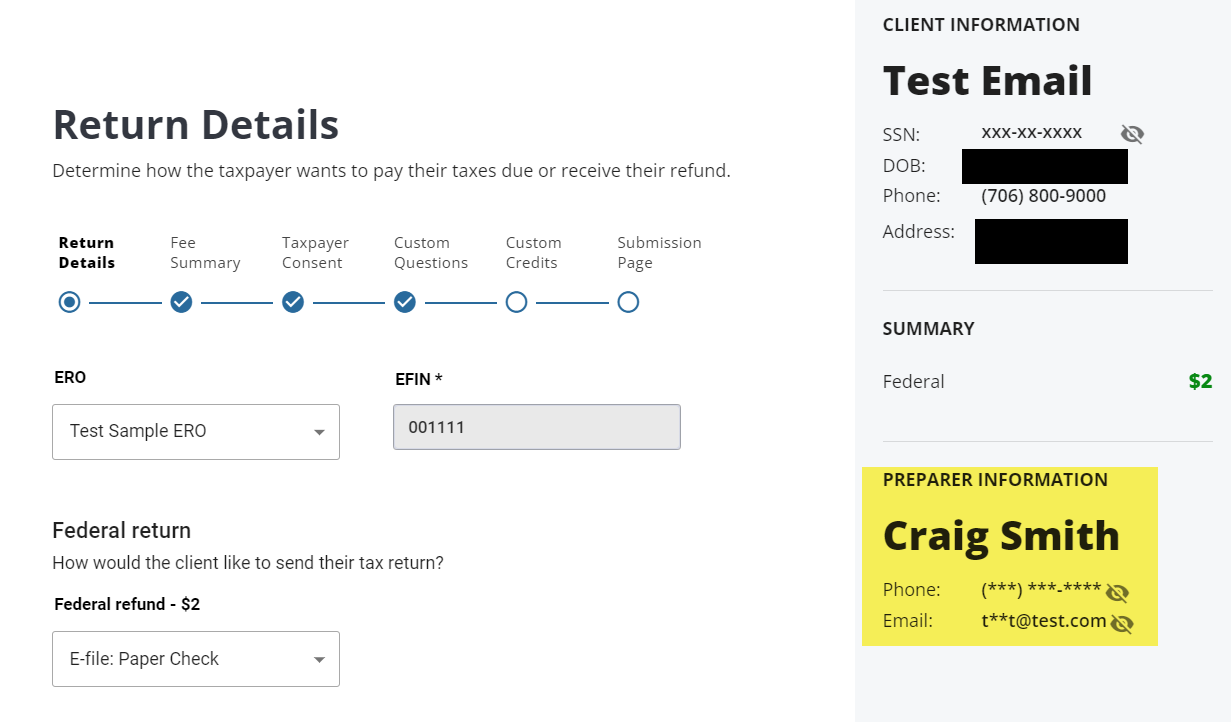
With the deployment this morning (February 1st), we delivered an update to the e-file pages where the Preparer Phone Number and E-mail on the right hand side is masked. If you wish to have this information visible, select the “eye” icon.

Note:  If you DO NOT want the volunteer name to show,  we have verified with our SPEC Relationship Manager and SPEC Program Manager that you can use either First Name, Last initial or First Initial, Last Name for their username account.


Release Notes: February 1st – CO, E-FILE, IRA Deduction, LA, OR & Sch. C/F

31 Jan 23
Craig Smith
No Comments

A product deployment for TaxSlayer Pro Online will occur Wednesday, February 1st, beginning at 5:00am ET to release the below update(s). Note that deployments may take up to 3 hours to complete. During this time, access to the program may be limited.

COLORADO

  • TABOR credit not reflecting on Line 33 (Issue 7678)
  • Social security subtraction not limited to $20,000 when TP over 55 and under 65 (Issue 7694)

E-FILE MENU

  • Mask Preparer Phone Number and E-mail when inside e-file menu (2022 Update)

IRA DEDUCTION

  • IRA deduction worksheet Line 3 not including INT/DIV income (Issue 7694)

LOUISIANA

  • Schedule E exemptions not subtracting correctly (Issue 7803)
  • Update military pay exclusion onscreen text to reflect $50,000 (Issue 7792)

OREGON

  • Schedule OR-EIC-ITIN Section 3, Line 5 initial amount calc error (Issue 7706)

SCHEDULE C/F

  • Update LTC Premium amounts to 2022 limits (Issue 7489)


Reminder: Paper Filed Returns Must Display Full SSN

31 Jan 23
Craig Smith
No Comments

We received messages from a couple state departments indicating they have received paper returns where the SSN’s were masked/truncated. If a taxpayer at your site needs to paper file a return (Federal or state), please make sure they receive a PDF of their return with the full SSN displayed. Generally, a preparer with a security template that has “View Full SSN” marked should print PDF’s for the taxpayer to mail in when needed. It is also possible that the taxpayer simply mailed in their masked PDF copy after the site e-filed the return instead of keeping the PDF for their records. Hard to combat against that but we are posting this message as a favor to state departments to help reduce/eliminate paper returns with masked SSN’s arriving at their door.

Message from AL: Alabama Standard Deduction MFS Rejections

30 Jan 23
Craig Smith
No Comments

Software vendors received the below message from AL this morning (1/30/23). If you have any impacted returns do not resubmit until this post has been updated.

“Good Afternoon, Industry Partners,

We have discovered returns that should not be rejecting for MFS and Standard Deduction. This issue is being corrected. I will let you know when it has been resolved.”

How To Subscribe To The TaxSlayer VITA/TCE Blog

30 Jan 23
Craig Smith
No Comments

If you are reading this post from your e-mail inbox, CONGRATULATIONS! You are a subscriber of the TaxSlayer VITA/TCE Blog! If you happened to visit our blog page never saw this post in your e-mail, you are not subscribed to the blog BUT SHOULD BE!

HOW TO SUBSCRIBE:

Being a subscriber will allow you to receive automatic e-mail updates highlighting recently published blog articles (generally around 8:30am ET). These come in handy during tax season!

STEP 1:

  • If you are reading this post, simply scroll to the bottom of the article and look to the right hand side of the page and find the “RSS FEED” box. OR you can simply open any blog post and follow the same instruction of scrolling to the bottom and looking to the right side of the page.

STEP 2:

  • Enter your e-mail address, check the consent checkbox, then select “Sign Me Up”.
    • Note: The below image is a screenshot and cannot be clicked.


STEP 3: IMPORTANT!

  • Check your provided e-mail account to finalize the subscription process.