Author Archives: %s

Release Notes: Thursday, January 23rd at 5:00am ET

22 Jan 20
Craig Smith
No Comments

The site will be placed in maintenance on Thursday, January 23rd beginning at 5:00am ET to release the below update, but primarily backend updates. Note that deployments may take up to 3 hours to complete. During this time, access to the program may be limited.

SPANISH PROGRAM

  • Correct an issue that mistakenly removed the ability to toggle TaxSlayer Pro Online between English/Spanish from the drop-down menu attached to the Taxpayers Name inside a return


Click here to download a PDF of our Cumulative Release Notes & Program Enhancements.
Release Notes: Wednesday, January 22nd at 5:00am ET

21 Jan 20
Craig Smith
No Comments

The site will be placed in maintenance on Wednesday, January 22nd beginning at 5:00am ET to release the below updates. Note that deployments may take up to 3 hours to complete. During this time, access to the program may be limited.

MARYLAND

  • Correct a Two-Income Subtraction allocation issue when SP has Long-Term Capital Loss Carryover reported (Issue 4122)

NEW JERSEY

  • Property Tax Credit on Line 55 not prorating based on Part-Year residency dates (Issue 4126)

OREGON

  • Add “Gambling Losses claimed as Itemized Deduction” adjustment to Addition to Income (Issue 4123)


Click here to download a PDF of our Cumulative Release Notes & Program Enhancements.
Release Notes: Tuesday, January 21st at 5:00am ET

20 Jan 20
Craig Smith
No Comments

The site will be placed in maintenance on Tuesday, January 21st beginning at 5:00am ET to release the below updates. Note that deployments may take up to 3 hours to complete. During this time, access to the program may be limited.

MICHIGAN

  • Federally reported 1099-INT/DIV state withholdings not pulling to Schedule W (Issue 4108)

MONTANA

  • Form 2, Elderly Homeowner/Renter Credit Schedule not pulling correct values to Lines 2, 4, and 5 (Issue 4121)


Click here to download a PDF of our Cumulative Release Notes & Program Enhancements.
Release Notes: Monday, January 20th at 5:00am ET

20 Jan 20
Craig Smith
No Comments

The site will be placed in maintenance on Monday, January 20th beginning at 5:00am ET to release the below updates. Note that deployments may take up to 3 hours to complete. During this time, access to the program may be limited.

ALIMONY RECEIVED

  • Add additional text to the Alimony Received page to assist users in which date to enter based on changes due to Tax Cuts & Jobs Act (2019 Update)

M1PR

  • Correct a calculation issue with Federally taxed dependent care benefits being included on M1PR-AI when not applicable (Issue 4095)

PENNSYLVANIA

  • Update text on the Schedule SP page to clarify what type of Non-taxable Interest, Dividends, and Gains to report

SCHEDULE D – SHORT SALE MESSAGE

  • Correct a display issue on the short-sale validation message (Issue 4021)


*Click here to download a PDF of our Cumulative Release Notes & Program Enhancements.
TaxSlayer Pro Online: Print Issue – All Years (RESOLVED)

19 Jan 20
Craig Smith
No Comments

9:21am ET: At this time, prints for all years have returned to normal operations.


9:03am ET: The issue has been identified and actively being worked at this time. During this period, you may experience interruption with real-time calcs.


8:49am ET: We are currently investigating as to why generating a PDF is not rendering for all years.

Release Notes: Friday, January 17th at 5:00am ET

16 Jan 20
Craig Smith
No Comments

The site will be placed in maintenance on Friday, January 17th beginning at 5:00am ET to release the below updates. Note that deployments may take up to 3 hours to complete. During this time, access to the program may be limited.

CHILD TAX CREDIT

  • Correct a checkbox display issue in Line 16 of CTC/ODC Worksheet (Issue 4076)

FILING STATUS WIZARD

  • Update year of death values for spouse (2019 Update)

PENNSYLVANIA

  • Correct a display issue on Schedule W-2S, Section II, Column C where the Payer Name is shown instead of Payer FEIN (Issue 4100)

START NEW RETURN

  • Enable “Start New Return” for 2019 production sites


*Click here to download a PDF of our Cumulative Release Notes & Program Enhancements.

Volunteer Time: Q&A from All Partner Call – 1/16/2020

16 Jan 20
Craig Smith
No Comments

Below are bullet points from our opening presentation at the beginning of the All Partner call before opening up for Q&A from the field.

  • Friday, January 17th:  Turning on Start a New Return at the production site levels
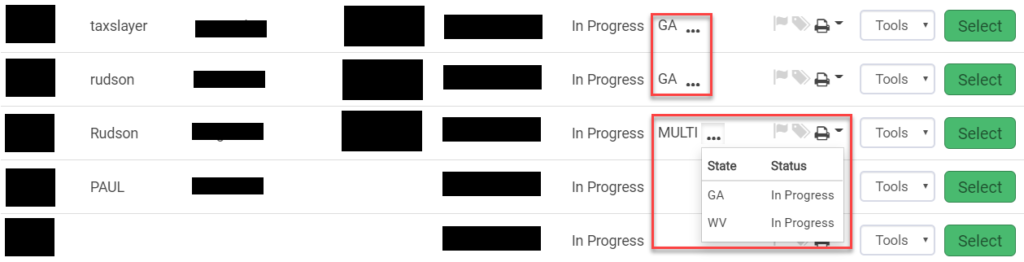
    • We strongly recommend that you open each return and recheck the calculations for returns created between January 17th and January 27th
      • Screenshots are posted on the blog about how to do this
  • Monday, January 27th:  Turn on the ability to send federal and state e-files
    • Turn on after the mad rush of other vendors sending returns
    • Do not expect acks back within 8-15 minutes on day 1
    • If the return has an e-file block in it due to the extenders, make sure you use a return tag
    • Send state only will be turned off for a few days
  • Controlled Launch:  TaxSlayer is currently participating in Controlled launch for the commercial offices.
    • Making changes as we find things during the e-file process
    • We will have a day next week where we will open e-file for a few hours so volunteers can send some returns
      • We will post information to the blog

States:

  • All of the states are currently available in the Practice lab and will be available in your production sites
  • All states are approved for e-file except Delaware
  • If there is a “DO NOT MAIL” strip on the state form,  it is still OK to electronically file the return.
    • The strips will be removed once the state has given us print approval.
      • This is usually later than e-file approval

Blog:

  • “What we Know” posts
    • List federal items that have been reported as issues that are open and those that are resolved.
    • There is also a link to a PDF of known state items
      • These are primarily issues that impact the tax calculation of the state
  • Release Note posts
    • Currently and for the next couple of weeks, we are doing daily deploys so we can get updates out quicker
      • These deploys start at 5:00am ET and there is typically only a small window of time where the returns are in maintenance mode
    • We try to give you an idea of what changes are coming the night before
    • Craig updates the post with what has been delivered as soon as he walks through each one

Software Orders:

  • All software orders that we have received have been processed
    • All sites that we have not received an order for have been marked as inactive.
    • All FSA Standalone links have been emailed out
    • All FSA Fusion links have been emailed out
  • We recognize this leaves some sites without an active software order.
    • As soon as the IRS can send us the orders, they will be processed and marked as active
    • DO NOT be creative and add an inactive EFIN as an ERO to an active site…the returns will not pass validation and be sent to the IRS
    • Under no circumstances, should multiple EFINs be entered in ERO setup for Pro Online
  • New Site Administrators
    • Review the instructions on the blog and send your requests to vita support
      • EFIN
      • Site Name
      • Site Admin Name
      • Site Admin phone number
      • Site Admin email

Groups

  • All groups have been setup from the orders we have received
  • AARP sites need to reach out to AARP Foundation if they are missing someone from their group.
  • Relational Groups:  check your offices to ensure they are all there.  We have already assigned the required Relational consent to all sites.  If you are missing a site, they must be added prior to them starting returns because we have to add them to the group, assign the consent and the consent is  not retroactive

Virtual/Ad Hoc Site

  • Review the Blog post titled “Pro Online 2019: Virtual/Ad Hoc Setup”
  • The SIDN that goes in the e-file is the one assigned to the user via Preparer Setup
  • Make sure you copy the Customer ID and Office Identifier to the new ERO when you are setting the Virtual/Ad Hoc sites to print on the return

FSA Fusion and FSA StandAlone

  • All links have been distributed for the orders we have received
  • Craig will be conducting a webinar on the TaxSlayer FSA program at 3:00 PM EST on Wednesday, January 22nd.
    • Once we have a registration link, we will post to the blog if you wish to attend

Office Setup

  • Site Administrators, we strongly recommend you go in and review the office configuration located under office setup.  We recommend the following be selected for all sites
    • Disable Third Party Designee Prefill
    • Offer 8888
    • Display Summary using 1040 View
    • Hide Preparer Name on 1040 Print
    • Always print Schedule A

Suggestion Box

  • Open year around for software enhancement suggestions
  • If you believe there is a defect in the software, you need to reach out to support
    • Recommend email with screen shots if applicable, detailed explanation of issue, EFIN and last 4 of the SSN
    • They will review this and put in an issue so the development team can review and resolve if applicable

The following are questions and corresponding answers that we received on the Partner Call that was held on Thursday, January 16th. We are posting questions that are most applicable to all sites.

Q1: Our site opens Sunday the 26th. Will TaxSlayer be open by then?

  • Yes, Start New Return for 2019 will begin on January 17th.

Q2: Can we e-file state returns attached to 1040-NR returns?

  • No, state returns added to a 1040-NR return must be paper filed. The 1040-NR can be e-filed.

Q3: Can you go over what is starting on January 17th vs January 27th?

  • January 17th is when sites can begin to prepare 2019 tax returns. January 27th is when the IRS opens for e-file and we will allow sites to transmit returns. We recommend opening any tax return prepared prior to January 27th to ensure the latest updates are applied to the return before e-file.

Q4: What is the best way to send in long requests via the Suggestion Box that may include pictures?

  • We recommend not including any pictures with your suggestion as we will reach out to you via e-mail for any additional information needed.

Q5: How do you receive the FSA URL?

  • FSA/Fusion orders are placed by your SPEC RM. Reach out to them if you will operate a FSA/Fusion site.

Q6: Can prior years be e-file before January 27th?

  • No, they cannot. January 27th

Q7: Do enhancements mentioned apply to prior years as well?

  • Enhancements are generally applicable to the current year and forward.

Q8: Can you deactivate returns that have not been e-filed?

  • Yes, if they are “In Progress” or “Review Failed” and you have a Security Template that supports deactivating returns.

Q9: Where can I access the VITA/TCE Blog?

Q10: 1040-SR – Is it going to be available to include in a print set?

  • 1040-SR can be added to a custom print set created at the group or site level, but will not be supported in default print sets delivered with the software.

Q11: Does Site Admins need to do anything in prep of January 17th?

  • Just make sure all of your volunteers are set up with logins so they can hit the ground running!

Q12: How to set up consents?

  • Prior year consents will still be available at your site, but edits/updates can be made within Configuration > Consents menu.


Release Notes: Thursday, January 16th at 5:00am ET

15 Jan 20
Craig Smith
No Comments

The site will be placed in maintenance on Thursday, January 16th beginning at 5:00am ET to release the below updates. Note that deployments may take up to 3 hours to complete. During this time, access to the program may be limited.

MARYLAND

  • Correct an issue where Spouse Capital Losses were allocated to the TP for Two-Income Subtraction (Issue 4074)
  • Correct an issue where Capital Loss Carryover is not being applied to Two-Income Subtraction (Issue 4077)

NEW YORK

  • Correct an issue where IT-360.1 menu is blank when return is MFJ (Issue 4094)

WISCONSIN

  • Correct an issue where Form 1, Line 11, Subtraction Code 03 was not being limited when applicable (Issue 4091)


*Click here to download a PDF of our Cumulative Release Notes & Program Enhancements.