Author Archives: %s

Scanned Documents: Available to all Pro Online Sites for TaxSlayer 2021

27 Jul 21
Kim Manuel
No Comments

We are super excited to announce that all TaxSlayer Pro Online sites will have access to the Scanned Document feature. Access will be controlled at the site level with the use of Security Templates. By default, the security templates assigned by TaxSlayer will have access to Scanned Documents.

  • Sites must have the ability to scan documents to PDF
  • Sites must have the ability to securely store the document until they upload it to the tax return
  • PDF files will be automatically deleted in November of each tax year (not every 14 days)

Are there any file size limitations?

Yes, each individual file cannot exceed 5 meg and total file size per tax return is 25 meg

Does the preparer have the ability to delete the documents associated with the return?

Yes, this is based on the security template assigned to the user


Site Cannot be reached [RESOLVED]

19 Jul 21
Kim Manuel
No Comments

The site is currently experiencing connection issues:  Our IT team is currently working to resolve the issue.

This site can’t be reached

vita.taxslayerpro.com unexpectedly closed the connection.

Try:

ERR_CONNECTION_CLOSED

Unexpected errors (Update 8:44 am)

06 Jul 21
Kim Manuel
No Comments

Update 8:44 am:  If you receive the error that the calculations are not available when opening a return in TaxSlayer 2020, close the return and open it again.  The calculations are rendering on the 2nd open of the return.  This is not impacting the ability to Start a New 2020 return.

Our engineers are continuing to work on a resolution

__________________________________

We are experiencing intermittent “unexpected errors” when opening existing returns and transmitting returns.  We have opened a ticket with our engineers to resolve.  This is affecting TaxSlayer 2020, 2019 and 2018.

2020 States: Program has received an unexpected error [RESOLVED]

21 Jun 21
Kim Manuel
No Comments

6/22/21 – 2:12pm ET

We are no longer seeing or hearing reports of issues accessing the state programs.

6/22/21 – 8:03am ET

We are continuing to investigate issues with accessing the state programs as additional reports were received throughout the evening.

6/21/21 – 12:30pm ET

We are no longer seeing or hearing reports of issues accessing the state programs.

6/21/21 – 11:26am ET

Our engineers are still actively investigating, however, 2020 states should be accessible at this time.

6/21/21 – 8:29am ET

We are generating intermittent errors when accessing states.  This is not impacting all states.  If you are also receiving the error after continuing through Personal Information, hit the back button on your browser, change the Resident State as of 12/31/20 to “None” and continue through Basic Information. Our engineers are working to resolve.

End of Season: Did all of my state returns get filed?

18 May 21
Kim Manuel
No Comments

How can I determine which state returns were electronically filed and which state returns were marked as Paper?

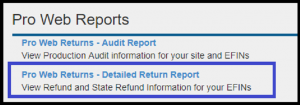
We recommend running the Pro Web Returns – Detailed Return Report located under Management Reports


  • Defaults to Tax Year 2020
  • Enter a Start Date and End Date
  • Select the checkmark next to the EFIN

You can either select Run Report or Run report for Export.  Either way, you may want to export the data so you can sort it

What information does this report give me?

  • Group Name (Will be blank)
  • EFIN
  • Last 4
  • First Name
  • Last Name
  • Status (status of the federal return)
  • Federal Return Type (e-file, paper, direct deposit, direct debit, etc)
  • Federal Refund (negative if balance due)
  • State (state abbreviations…If the return had more than 1 state, the return will have multiple rows)
  • State return type
    • You are looking for Paper or PR with ??
  • State Refund
  • Stated date (date return was started)

Note:  New for TY2020, this report also had 1040X columns

Can I filter the columns?

Yes, each column allows you to sort in Ascending or Descending order.  You can also filter by selecting a certain criteria such as Paper or PR

The filter below on the state return type column will display a list of all returns where the state was marked as paper


You can now export this filtered list so it is easier for you to work with


End of Season: What should I do with my returns and users?

18 May 21
Kim Manuel
No Comments

My site is closing for the season, what should I do with my returns?

There is no action required for returns.  DO NOT deactivate the returns because this will render them unavailable for prior year carry forward.

My site is closing for the season, what should I do with my volunteer’s user names?

We strongly recommend that you mark all user’s as inactive except for the site administrator.

Filing Season Message from Frank Nolden

17 May 21
Kim Manuel
No Comments

Every year, I’m impressed by the accomplishments of IRS-SPEC employees and VITA/TCE partners. But your work this filing season truly leaves me in awe.

Despite many challenges – including the pandemic, tax law changes and a filing season that was over a month longer than anticipated – you found safe ways to provide free and accurate tax return preparation. Millions of people benefitted from the work of the VITA/TCE program his year. This shows that VITA/TCE is more than just a program… it is a cause.

In addition to free tax return preparation, you also educated your communities by sharing outreach messages. Thanks to your dedication, taxpayers are benefitting from tax credits and other benefits. These refunds and payments make a real difference for families across the country.

Though this filing season is over, I’m excited for the rest of the year. Our employees and partners are already developing training and resource materials. We are reviewing the best practices and suggestions we’ve received. We’re planning additional outreach to underserved communities. And partners are submitting their grant applications. All of this will help us deliver another spectacular filing season in 2022.

Thank you!


Frank Nolden

Director, Stakeholder Partnerships,

Education and Communication (SPEC)

1040X: Which report gives me e-file information

17 May 21
Kim Manuel
No Comments

Navigate to Reports>> Management Reports>> Pro Web Returns – Detailed Return Report

There are three 1040 X columns to identify returns that have had a 1040X added to the return and if the return was electronically filed.

The client status will identify if the 1040X was accepted or rejected

Acknowledgements for 1040X returns are available via the IRS Acknowledgement report and Old IRS Acknowlegement reports