Author Archives: %s

Release Notes: Thursday, July 25th at 5:00am ET

25 Jul 19
Kim Manuel
No Comments

The following items were delivered to production Thursday, July 25th.

PUERTO RICO

  • Corrected an issue where MFS returns and bona fide residents of PR were being required to use F1040 instead of being able to choose either F1040, F1040-PR, or F1040-SS (Issue 2930)

REPORTS

  • Added the telephone number to the Return Tags report to assist in contacting the taxpayers (Enhancement)

TRANSMISSION MENU

  • Split the first name and last name column. This will allow you to sort the page by taxpayer last name (Enhancement)

PRINT SET

  • Corrected capitalization for TN Form INC 250 (Issue 3605)

CLIENT LIST

  • Changed the default drop-down on Client List to display 100 returns instead of 10 returns (Enhancement)

MASSACHUSETTS

  • Corrected a print issue on Schedule X, Line 2 where the number was printing outside the worksheet value field (Issue 3751)
  • Added option to allocate gambling winnings not reported on W-2G inside MA Other Gambling menu. Entries carry to Line 3 of Schedule X (Issue 3749)

MY ACCOUNT/ACCOUNT HUB

  • No longer receiving error when logging into My Account/Account Hub (Issue 3671)

WEST VIRGINIA

  • Corrected an issue where values on Line 3 of IT-140 were being added instead of subtracted (Issue 3753)


*Click here to download a PDF of our Cumulative Release Notes.

What’s New: Group Login can assign default Print Set

24 Jun 19
Kim Manuel
No Comments

Users that have logins to manage a group of sites, now have the ability to set the default Print Set when assigning print sets to the sites.

  1. Login with your group login (MSA or Relational)
  2. Navigate to Group Configuration
  3. Select Print Set Templates
  4. Select Assign
  5. Select “Set Assigned as Default Print Set“
  6. Select the appropriate sites and click Continue

Coming Soon: New Security Protocols

12 Jun 19
Kim Manuel
No Comments

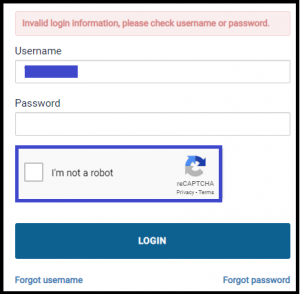
We will be implementing reCAPTCHA after the user has two invalid login attempts.  After two unsuccessful login attempts, the user will be required to select the “I’m not a robot” box (see below)

MFA Verification Codes

03 Jun 19
Kim Manuel
,
No Comments

MFA Verification codes are currently not being sent via email.  We are working to resolve this.  They are being sent via text.

*If you have a Gmail account, check your SPAM/JUNK folder for the MFA e-mails. We are still working to resolve why they are being filtered into SPAM/JUNK for Gmail accounts.

Printing: Application not generating the PDF (RESOLVED)

29 May 19
Kim Manuel
No Comments

12:01 pm est:  The printing issues have been resolved

Printing inside and outside of returns for all years is currently not generating the PDF.  We have our engineers looking at the error logs to determine the problem.


Message from North Carolina Department of Revenue

22 Apr 19
Kim Manuel
No Comments

The Department is aware of a delay in processing acknowledgements; however, acknowledgements are being processed.  We sincerely apologize for this delay and appreciate your patience.


VITA/TCE Phones are not currently available (RESOLVED)

22 Apr 19
Kim Manuel
No Comments

The phone system is not currently taking calls.  We are working to resolve.  Please reach out to VITA/TCE Support via chat or email

2018 States not Loading (Resolved)

17 Apr 19
Kim Manuel
No Comments

This was resolved

Update:  Press Ctrl+F5 to reload the page

We are getting reports that certain states such as NY, MA, WV and NJ are not loading.  We are currently investigating