Purpose: To provide an update regarding the American Opportunity Tax Credit (AOTC) for bona fide residents of Puerto Rico
End of Season: Did all of my State returns get electronically filed?
How can I determine which state returns were electronically filed and which state returns were marked as Paper?
We recommend running the Pro Web Returns – Detailed Return Report located under Management Reports
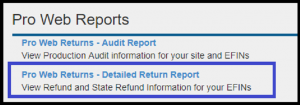
- Defaults to Tax Year 2018
- Enter a Start Date and End Date
- Select the checkmark next to the EFIN
You can either select Run Report or Run report for Export. Either way, you may want to export the data so you can sort it
What information does this report give me?
- Group Name (Will be blank)
- EFIN
- Last 4
- First Name
- Last Name
- Status (status of the federal return)
- Federal Return Type (e-file, paper, direct deposit, direct debit, etc)
- Federal Refund (negative if balance due)
- State (state abbreviations…If the return had more than 1 state, the return will have multiple rows)
- State return type
- You are looking for Paper or PR with ??
- State Refund
- Stated date (date return was started)
Can I filter the columns?
Yes, each column allows you to sort in Ascending or Descending order. You can also filter by selecting a certain criteria such as Paper or PR
The filter below on the state return type column will display a list of all returns where the state was marked as paper

You can now export this filtered list so it is easier for you to work with
End of Season: Filing Season Deadlines
The IRS Core team has posted the following TY 2018 Due Dates
Release Notes: Friday, March 22nd at 5:00am ET
We will be putting the returns in maintenance on Friday, March 22nd to release the below software updates.
CONNECTICUT
- Add the ability to adjust out CT Military wages from being taxed when withholdings were withheld in error and return is being filed for a refund (Issue 3223)
RRB-1099-R
- Correct a display issue in the AGI Display when adding the Simplified Method Worksheet, the taxable amount is not reflected until exiting the RRB-1099-R entry menu (Issue 2467)
*Click here to download a PDF of our Cumulative Release Notes.
Volunteer Time: Wednesday, March 13th is VITA Awareness Day
Click here to launch the 2019 VITA Awareness Day toolkit.
This year also celebrate’s the 50th anniversary of the VITA.

Printing not rendering a PDF (RESOLVED)
10:49 am EST: All returns for all years should be rendering PDFs as expected
10:17 am EST: The PDF is generating for new returns, both inside and outside of the return. There is still period of time where already created returns will not render a PDF for both 2018 and 2017
9:37 am EST: We are currently working to resolve this. We have identified the issue.
The PDF is not generating from the client list, submission page or Print/Summary in the following years:
- 2018
- 2017
We are currently working to resolve this.
Suggestion Box: Wrapping up 2018 and moving to 2019
Click here to view PDF
Click here to submit a suggestion
There are three attachments
- Attachment #1: Dedicated to application and federal suggestions
- Attachment #2: Dedicated to State suggestions
- Sorted by State
- Attachment #3: TaxSlayer Suggestion Status
- Broken into categories
- Duplicates have been removed and only list the TaxSlayer Responses
- Column indicating when the item is expected to be delivered (TS 2017 or TS 2018)
- Column indicating if the item was added or updated since the last document (as always…prone to human error!!)
An example of the status column can be found by Tracking ID 269372 (Ctrl+F allows you search in the document)
Check out Attachment 3 to see the rest of the new and/or update items.
We are still reading through a few of last years request and will be starting on the exciting new suggestions you have already submitted.
Click here to view PDF
The link will launch a Brainshark video with instructions on how to view the file.
Sites in the Northeast area: Cannot hit IP Address when logging in
A major internet backbone is having an outage in the area. If you are getting an error that you cannot hit the IP Address when trying to login to the site, you should contact your IT team or your ISP (Internet Service Provider) to see if they use Level3 as their internet backbone.
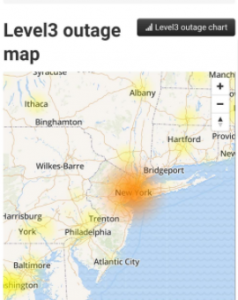
This potentially impacts those using cellular service of AT&T and Verizon for hotspots.
Spectrum (formerly Charter Spectrum) offers cable television, internet and home phone service is also impacted in this area.