2/24/25 – It appears we spoke too soon. Initial testing on our pre-production levels with Issue 2543 passed successfully in all environments but the deploy to production did not pass in the live VITA environment. At this time Capital Loss Carryover is not being included in carryover when following the below guidance. Over the weekend, Issue 2990 was opened to correct the VITA environment. Once fixed, the below guidance will work as expected.
This is related to Issue 2543 that was recently corrected on 2/17/25 where the Capitol Loss Carryover from the prior year was not being included in the current year when carryforward was available and used. The below instruction will only work for Site to Site Carryforward and not Global Carryforward.
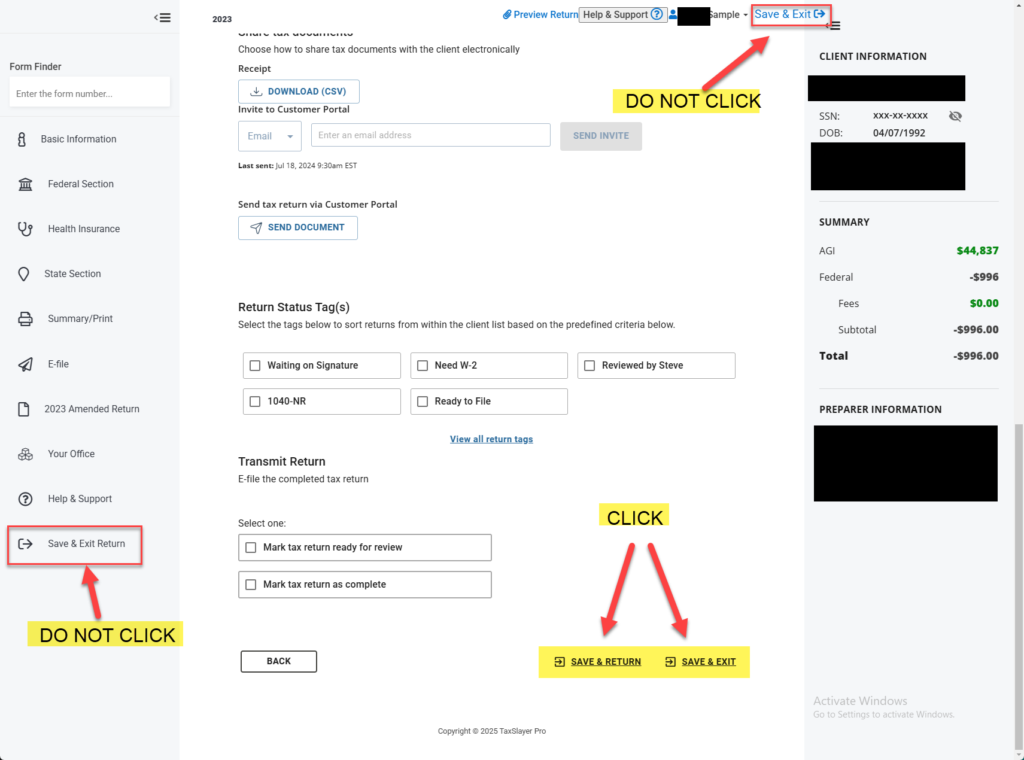
To allow for the prior year capital loss carryover to be included when beginning a new 2024 return, the 2023 return needs to be accessed and re-saved by going through E-file and clicking “Save & Exit” on the Submission page. Look at the screenshot below so you are clicking the correct “Save & Exit” buttons. This needs to be done before the 2024 return is started. Re-saving the 2023 return on the Submission page will allow the Capital Loss Carryover to be saved in the appropriate database to be correctly stored and used when starting a 2024 return.
To help assist in identifying potential returns with Capital Loss Carryover, we recommend running the Site Production Detail Report – Electronic or the Federal Return Summary reports in Management Reports. Each of these reports has a Schedule D column. Identifying returns in 2023 that had a Schedule D present will narrow the search to identify returns that may have had a Capital Loss Carryover.