Category: e-File

Efile: The following items have been pushed to production (2/8/2022 2:00 PM EST)

08 Feb 22
Kim Manuel
No Comments

The following corrections to the e-file section have been pushed to production

  • Questions are now displaying in alphabetical order.  The questions will always be number 1 – (the end number of available questions at the site), but now you will notice IRS questions 109 are listed first and then any additional questions assigned to or created at the site will fall in alphabetically
  • Consents:  The wording next to the accepted and declined options now reflect the accurate title of the consent
  • Drivers License:  You can now enter an expired NY drivers license as NY accepts this as proof of identity
  • Efile confirmation:  We now display a successful efile transmission dialog box when you transmit the return from the submission page
  • Consent PINs: We no longer require a Consent PIN to be entered when the return is MFJ and there is a deceased date for the TP or SP

Federal Returns: Reject Code F8379-021

08 Feb 22
Craig Smith
No Comments

From the IRS:

Business Rule F8379-021 is erroneously rejecting returns due to an incorrect element name in the business rule. Please refrain from submitting a tax return with a Form 8379 attached if you are claiming ‘NonrefundableCreditsAmt’ until this has been resolved. The Business Rule will be updated in a future release for Tax Year 2021.
Please do not resubmit any Federal returns rejected with this code. This post will be updated once we receive word from the IRS this has been corrected.

North Carolina Returns: Reject Code X0000-005 – Invalid Schema

07 Feb 22
Craig Smith
No Comments

If your site filed a NC return and it is rejected with Reject Code X0000-005, we will resubmit impacted returns by the end of this week. No action is required on your end. North Carolina updated their schema to a new version not yet in production. Any currently e-filed NC returns have the old (now outdated) schema and will reject.

Note: NC will not begin processing acks until sometime in February. The exact date is not known at this time.

Unable to Advance Past 1st Page of E-file After Federal Return Accepted [RESOLVED]

04 Feb 22
Craig Smith
No Comments

2/8/2022 – This is now resolved.


We are aware of an issue where users are getting a validation message indicating a required selection is needed for the Federal return type after the Federal return has been accepted. This is prohibiting users from advancing past the Return Details page of e-file. Currently, this means if you are attempting to resubmit a previously rejected state return OR attempting to transmit a State Only return, you are unable. If you simply need to print a copy of a return and are trying to access the Submission Page, we recommend generating a PDF from Client List instead.

We have opened a high priority ticket (Issue 6620) with development.

Pro Online E-file section: Release Information February 4, 2022

04 Feb 22
Kim Manuel
No Comments

Required Return Tags

The users will now see the message associated with returns tags not being selected if they are required in office setup


Customer Portal Invitation

The users will now see when the last time the portal link was sent to the taxpayer


Required designator on Spouse email when email addresses are not marked as required in Office Setup

The required designator symbol has been removed.  It was erroneously showing on all spouse email fields

TY2021: Expansion of EITC to include age 18 in certain conditions

04 Feb 22
Kim Manuel
No Comments

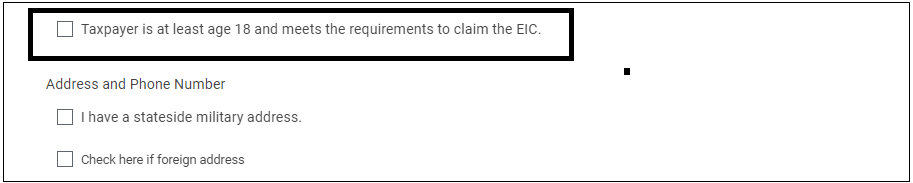
New for TY2021, the IRS expanded EITC to age 18 for taxpayers that meet certain qualifications as outlined on page 17 of Publication 596.  “If you are a qualified former foster youth or a qualified homeless youth, you need to be least age 18”.

The ability to calculate this new condition for EITC has been added to the application.  To trigger this condition, you will need to select the appropriate check box located on the personal information page.  Once you make the appropriate selection, the software make the appropriate calculations based on other entries in the return.  You should refer to IRS guidance on how to make the appropriate vetting process to make the determination if the selection should be checked.


Steps for identifying any returns that may have already been prepared and filed prior to the new tax law being implemented into the application.

  • Navigate to Reports
  • Select Management Reports
  • The following reports include Filing Status, Taxpayer Date of Birth, AGI and EIC
    • Site Production Detail Report – Electronic
    • Site Production Detail Report – Paper

You can utilize the built-in filters to narrow your taxpayer results to those born in 2003 and who have AGI less than the EITC threshold for taxpayers with a filing status of Single


Pro Online 2020 and 2019: IRS Reject 202

03 Feb 22
Kim Manuel
No Comments

This reject occurs when we do not have the site listed with an order for TY2020 so we cannot insert the appropriate Vendor Control Number into the e-file.

If you receive this reject for TY2020 or possibly TY2019, please email VITA/TCE support with your EFIN and reject reason so they can adjust your account record.  We do not need a list of the rejected returns.

Once your account record has been adjusted, you will be able to resubmit the e-files.


Submission Page: Ability to collapse the right panel

03 Feb 22
Kim Manuel
No Comments

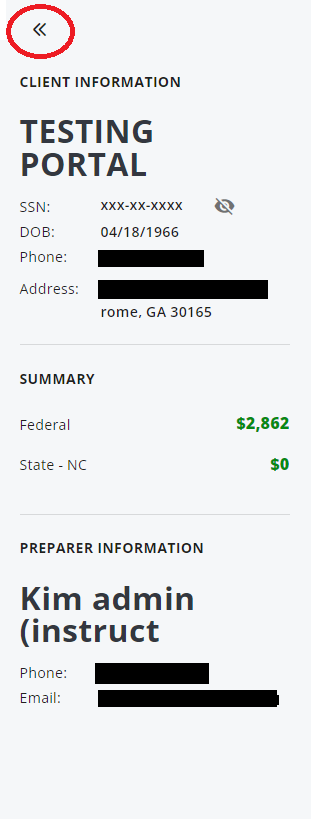
Just a reminder that we have added the ability to collapse the right panel while you are working in the efile section if the screen is visible to the taxpayer.

Select the arrows to collapse the panel


Select the Pin to open the panel once collapsed