Category: e-File

Pro Online 2021 Security Template: Do Not Force Return Review

01 Feb 22
Kim Manuel
No Comments

The redesign of the e-file section has caused some confusion over when to use the security template option of “Do not Force Return Review”

How do I force a preparer to mark a return for review?

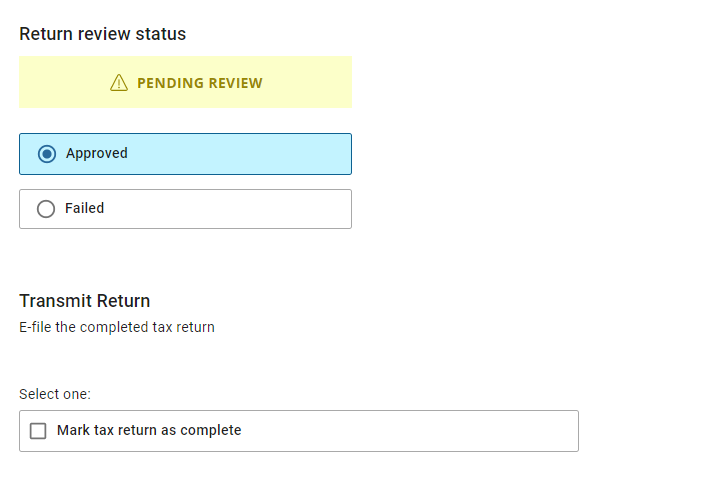
Review your security template and make sure the following option does not have a checkmark next to it.  This will force the user to mark the return for review prior to saving and exiting the return.

 

The Mark Return Complete option does not automatically display when my reviewer approves the return

Edit the security template associated with the reviewers username and select the checkmark next to “Do not Force Return Review”.  This will allow the “Mark Tax Return as Complete” box to automatically appear


Why does TaxSlayer recommend using a different username to review the return?

The application is designed to capture key changes in the client history.  If the preparer and quality reviewer are using the same username, any changes to key items such as AGI, RTN, ACCT, refund/balance due are logged as the same user which could make it harder to track down changes to the return.
Pro Online 2020 and 2019 prior year efiles [RESOLVED]

29 Jan 22
Kim Manuel
No Comments

This has been resolved as of 2/1/2022.


Scenario:  I have transmitted efiles for 2020 and 2019 and they are still in Transmitted Status

Resolution:  Issue 6527:  This has been reported our development team and will provide a resolution when resolved.

Status of E-file Availability

29 Jan 22
Kim Manuel
No Comments

Current year 1040, 1040NR, 1040PR = On

Current year 1040X = ETA week of 2/6

Current year State Only  = 1/31

2020 1040, 1040NR, 1040PR, 1040X and State only = On

2019 1040, 1040NR, 1040PR, 1040X and State only = On

Message from Arizona: Pause in Acks

28 Jan 22
Craig Smith
No Comments

Software vendors received the below messaging from Arizona. No acks will be returned until Monday morning after 8am MST.

“Arizona’s MeF Production system is scheduled to be unavailable from 4:00 PM MST, Friday, 1/28/2022 through Monday, 1/31/2022 at 8:00 AM MST. During the maintenance period, all processing will be paused (returns filed during this timeframe will be queued at the IRS). Returns will be retrieved and processed after the maintenance period.”

TaxSlayer Pro Online 2021: Prior Year E-file Now Live

26 Jan 22
Craig Smith
No Comments

E-filing prior year returns is now live. The IRS allows the current + 2 prior years for electronic file. For this filing season, this means 2021, 2020, and 2019 Federal returns can be electronically filed. Most states with the exception of Rhode Island also allow prior year state e-files.

IRS Reject Trending today: F1040-065-04

25 Jan 22
Kim Manuel
No Comments

F1040-065-04: At least one of the following must have a non-zero value on Form 1040: ‘TotalIncomeAmt’ or ‘AdjustedGrossIncomeAmt’ or ‘TaxAmt’ or ‘TotalTaxBeforeCrAndOthTaxesAmt’ or ‘TotalCreditsAmt’ or ‘TotalTaxAmt’ or ‘TotalPaymentsAmt’.;

Returns in this condition cannot be electronically filed.


Pro Online 2021: Drivers License Optional [RESOLVED]

24 Jan 22
Kim Manuel
No Comments

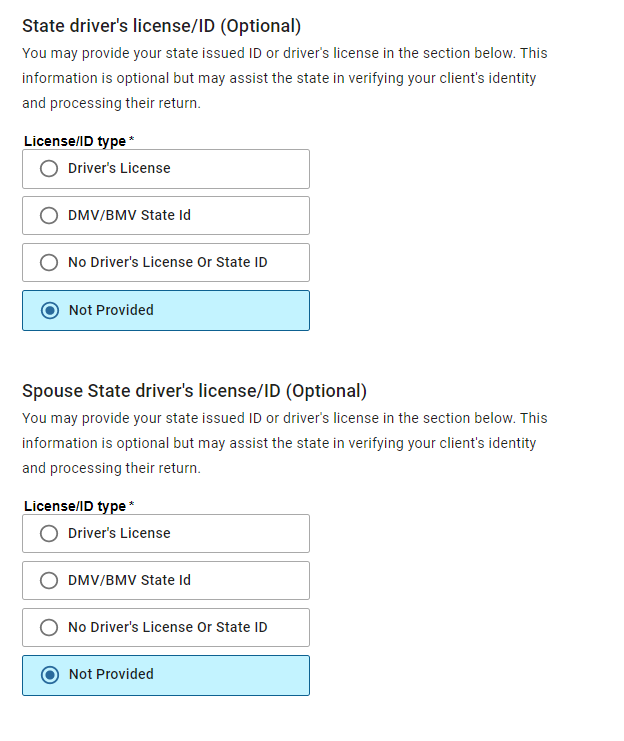
Scenario:  The drivers license is supposed to be optional for my state, but the efile section is requiring it IF i select the drivers license page via the horizontal menu or click continue from the previous efile page

Solution:  We have reported this to our development team (Issue 6491)

Alternative solutions:  DO NOT click continue from the previous page and select the next page you need from the horizontal menu or DO NOT click on the drivers license menu if you know the driver’s license is not required.

How do I get off the page, if I am stuck on it.  Select “Not Provided” and click Continue or select the Back button to leave the page and then select the next section you want to navigate to from the horizontal  menu.


Pro Online 2021: Turning on E-file January 24th (Current year e-file is on)

23 Jan 22
Kim Manuel
No Comments

Update:  We have turned on current  year e-file.  We will not be turning on “Send state only” or prior years until later this week.  We are going to allow the e-files to queue up for a little while before we send them to the IRS.  The states that come in with the federal return will be made available to the states once the federal return has been accepted


Just a reminder that we will be waiting a few hours to allow the mass amounts of electronic files be sent to the IRS prior to turning on the ability in Pro Online.  This allows us to help set expectations for ack times, rejects, etc.  We do not have a definitive time yet, but we will update this post when we do.

We strongly recommend you open and review all returns prior to electronically filing them.

We sent some VITA/TCE electronic files to the IRS during Controlled Launch.  The only reject code we saw trending had to do with the IP PIN.  Remember, a new IP PIN is issued to the taxpayer each year.