Category: e-File

Message from New Mexico: Error Code 366

22 Feb 23
Craig Smith
No Comments

Software vendors received the below message from New Mexico. Impacted returns can be resubmitted today.


We are aware that a number of vendors have noted receiving rejections, for PIT TY22 filings, with error code 366: “Schedule PIT-ADJ, line 23. Amount cannot exceed $10,000.” We understand that this has prevented the submission of returns, filed as Married Filing Jointly, where both primary and spouse are claiming the armed forces exemption and where the amount on PIT-ADJ line 23 is $20,000. After review, we have revised this business rule to allow returns filed as Married Filing Jointly to claim $20,000 on PIT-ADJ line 23. All other filings will continue to have the $10,000 limit for this exemption. This correction will be available in our production environment as of the morning of 2/22/23, and you may resubmit any returns incorrectly rejected with error code 366 after that time.

We apologize for any confusion resulting from this issue, and we appreciate the outreach by those of you who first noted the problem.

Message from GA DOR: Delay in Acknowledgements

21 Feb 23
Craig Smith
No Comments

Software vendors received the below messaging from GA DOR.

“FYI – We are experiencing a delay in acknowledgements being sent.  Thank you in advance for your patience as we work to resolve this issue.”

E-file Validation Appearing on Submission Page: “Must Have Efile Fee Record Saved to Efile” [RESOLVED]

20 Feb 23
Craig Smith
No Comments

2/22/23 – this has been resolved.


If your site is seeing the below e-file validation showing on the Submission page, you are likely tracking fees at your site. If the e-file validation does appear for you from the Submission Page, you will be unable to e-file the return from Submission temporarily. Instead, mark the return complete > save and exit. You can transmit from the Transmission menu. We have an open work item in with development to remove this validation so it is not visible to VITA/TCE sites. We expect this to be resolved by end of this week.

Minnesota Reject Code 0628 for Frontline Worker Payments (UPDATE)

16 Feb 23
Craig Smith
No Comments

2/16/23 – 3:30pm ET: MN has indicated they have corrected the erroneous reject and any impacted MN returns can be resubmitted at this time.


We have confirmed with MN that Reject Code 0628 is being issued in error. If you have an impacted MN return, please hold the return until this post is updated indicating that you can resubmit those returns. Details of the reject are below.

Severity: ErrorM1M line 29 must not be more than 488 for single, HOH or MFS, and no more than 976 for MFJ. Xpath: M1M Line 29: ReturnState/ReturnDataState/SchM1M/FrontLineWorkerPayAmt

Connecticut Returns That Validated After E-file – Please Resubmit

15 Feb 23
Craig Smith
No Comments

If any CT returns at your site(s) received the below validation error, simply go back into the returns and resubmit from the Submission page. There is no change to the calc on the returns, only elements being included in the e-file in error. This has been corrected and impacted returns can be resubmitted. To see if your site has any validated CT returns, access the “Reject Clients” menu and change the dropdown to reflect Validation Errors. You can also run the State Non-accepted Returns report or State Acknowledgements report.

Error = The element ‘SchCTIndUseTax’ in namespace ‘http://www.irs.gov/efile’ has incomplete content. List of possible elements expected: ‘StateUseTax’ in namespace ‘http://www.irs.gov/efile’.

Pro Online 2022: E-filing rejected returns

15 Feb 23
Kim Manuel
No Comments

By default the “Mark tax return as complete” stays selected when the return has been IRS Rejected.  If your site process is to remove the completed checkmark, you must select “Mark tax return as complete” and “Ready for retransmit” for it to be available to transmit from the Transmission menu


Arizona Reject Code 991 – 140PTC Reject

10 Feb 23
Craig Smith
No Comments

Impacted AZ returns with the below reject can be resubmitted at this time.

AZ Reject Code 991 – 140PTC reject.

AZ is updating their system for this reject code, if the user claimed 140PTC credit but the taxpayer was not over age 65 but the spouse was then they received this reject, AZ is updating it to look at the spouse DOB now so it should be accepted.


TaxSlayer Pro Online: E-file Menu Update to Mask Preparer Phone & E-mail

01 Feb 23
Craig Smith
No Comments

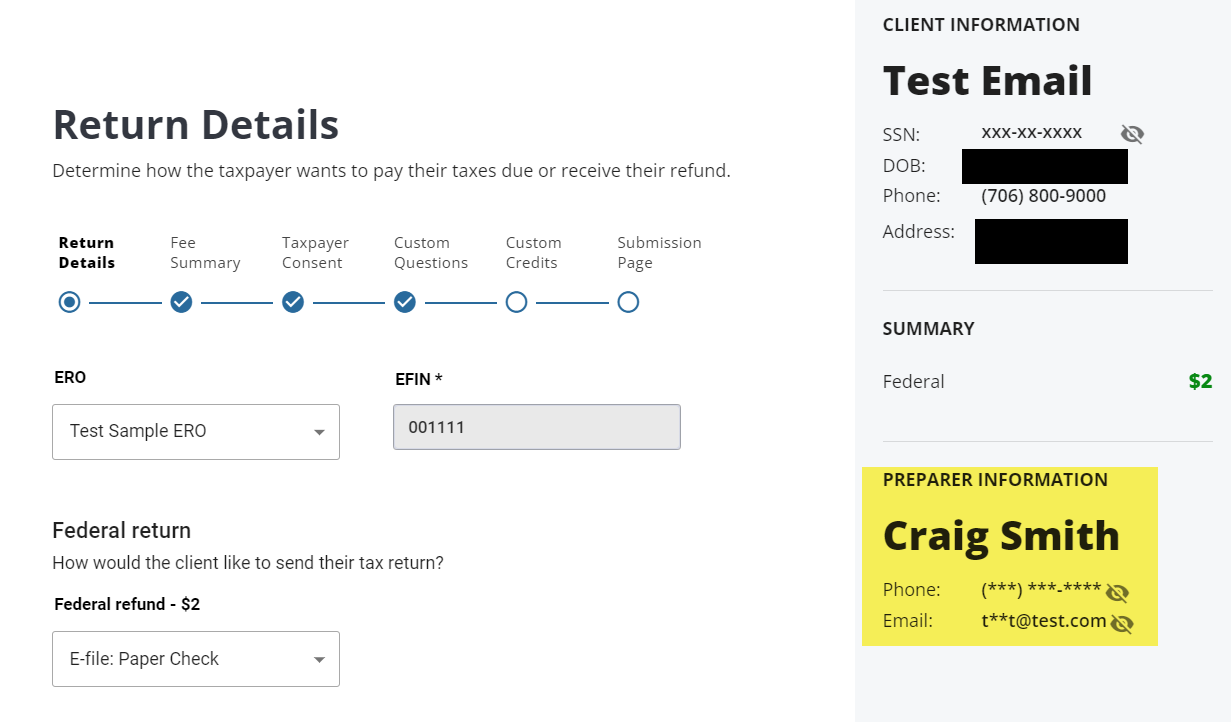
With the deployment this morning (February 1st), we delivered an update to the e-file pages where the Preparer Phone Number and E-mail on the right hand side is masked. If you wish to have this information visible, select the “eye” icon.

Note:  If you DO NOT want the volunteer name to show,  we have verified with our SPEC Relationship Manager and SPEC Program Manager that you can use either First Name, Last initial or First Initial, Last Name for their username account.