Category: RESOLVED

2017 TaxSlayer Pro Online in Maintenance (RESOLVED)

04 Aug 20
Craig Smith
No Comments

12:25pm ET: This issue has been resolved and 2017 returns are now accessible.


12:07pm ET: We have opened Issue 5016 for development to investigate why accessing 2017 tax returns is presenting the Maintenance screen.

Missouri State Returns (RESOLVED)

31 Jul 20
Craig Smith
No Comments

Update August 4, 2020: With this mornings deploy, the issue with MO sporadically loading blank should be resolved.


Update July 31, 2020:  We are continuing to work to resolve the issue with sporadic MO returns that will not open.  Our updated resolution time frame will be the week of August 3rd.


We have received sporadic reports of some MO returns not loading within the TaxSlayer Pro Online application. We have opened Issue 4997 as a High Priority for development to investigate/resolve. We expect impacted returns to be resolved in a deployment next week.

Message from Ohio: Delay in Acknowledgements [RESOLVED]

20 May 20
Kim Manuel
No Comments

5/21/2020

Ohio has indicated they have resolved the issue. Sites with outstanding OH acknowledgements should have acks at this time.


5/20/2020

We received the following message from the Ohio Department of Taxation

Ohio is currently experiencing some technical issues that has delayed the processing of submissions and delivery of acknowledgments.  The issues started in the early evening of Tuesday May 19th and we are currently working to resolve the issue.  We will let you know once this issue has been resolved.


2018 TaxSlayer Pro Sporadically No Calcs [RESOLVED]

19 May 20
Craig Smith
No Comments

10:08am ET

The issue has been resolved.


10:00am ET

We have heard of a few reports of sites using the 2018 program and returns are not rendering any calcs. Essentially, this means the Summary/Print menu will not load, but is instead stuck in a loop trying to load. To break the loop, click Basic Information from the left-hand navigation menu and you can continue preparing the return(s). Note: Generating a PDF may not be available as a by-product.

Our development team is actively investigating.

E-file: Future Direct Debit Date (RESOLVED)

20 Apr 20
Craig Smith
No Comments
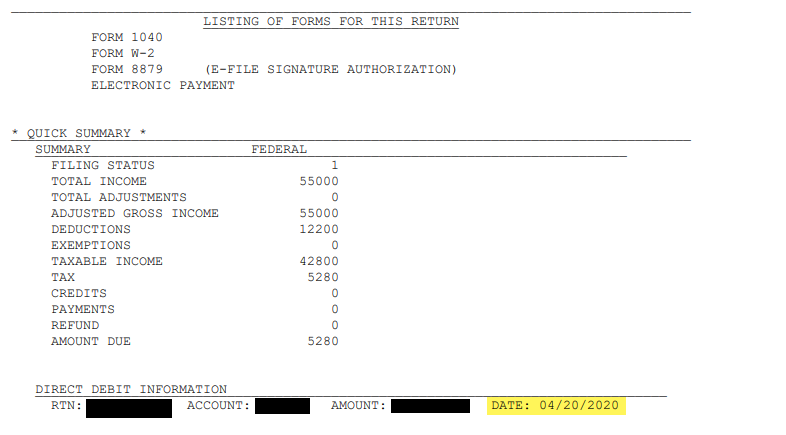
4/20/2020 – 11:15am ET: Development was able to find and resolve the issue and the fix is live in production. Any Federal direct debit returns with a future date past the current date can be transmitted at this time.

We have received a report for one instance where the future direct debit date appears to be wrong on the return transmitted after the original 4/15 deadline. We are currently investigating this in Issue 4815. When you quality review the return, please be sure to review the PDF, specifically the Client Forms Listing Summary as shown below. This is where  you can verify the direct debit date prior to electronically filing the return.  If the date is not what you expected, please do not e-file the return until this post has been updated.

State Programs Sporadically not Loading (RESOLVED)

14 Apr 20
Craig Smith
No Comments

3:15pm ET: The remaining issue with 2017 state returns has been resolved.


9:51am ET: The state program loading issue(s) have been resolved for 2016, 2018, and 2019 program years.

*2017 state returns currently are still experiencing an issue.


8:35am ET: We are currently aware and working an issue related to some state programs sporadically not loading in all years. You may experience intermittent issues with accessing state programs during this time. We will update this post as more information is available.

Michigan: Home Heating Credit – Issue 4779 (RESOLVED)

06 Apr 20
Craig Smith
No Comments

4/7/2020 – Issue 4779 is now resolved.


4/6/2020 – The fix for Issue 4779 is scheduled to be deployed on the morning of Tuesday, April 7th.


On 4/1/2020 Issue 4779 was opened to address an issue where in some cases, the Home Heating Credit was not calculating when applicable, or generating the necessary PDF forms. Until this issue is resolved, sites with impacted MI returns can do the following…

The root cause of the issue, is when first accessing the Home Heating Credit menu, the first question below is defaulting to YES. When providing the necessary data then saving to exit the state return, the flag is not getting set to calculate the credit.


What you need to do: Change the “YES” to “NO” for the above question and exit the state return to save. Then, edit the MI return, change the “NO” back to “YES”, provide the needed information for the credit, and exit the state return as normal. This will set the needed flag to calculate the credit if applicable and generate the needed PDF forms.


Blank Pages inside State Returns (RESOLVED)

09 Mar 20
Craig Smith
No Comments

5:05:pm ET – Issue 4670 has been resolved. You should no longer see any blank pages at this time.


We were made aware of an issue that was introduced through this mornings deployment as it relates to our State Program. We have opened Issue 4670 to resolve an issue where users are attempting to access a state menu, but instead see a blank page. This occurs only on state menus where either the Taxpayer Picklist or W-2/1099-R Picklists exist. We are working to resolve this as quickly as possible.

Examples of impacted state pages include:

  • CA – Form 3532 to add an individual
  • MI – Retirement and Pension page to choose a 1099-R
  • PA – Adding a 1099-R to Income Subject to Tax page
  • PA – Adding a Schedule UE when needing to choose a W-2
  • PA Local – Adding a W-2 within Income page