Category: RESOLVED

Message from Illinois: IL Reject Code IL1040-4000-2 (RESOLVED)

06 Mar 19
Craig Smith
No Comments

Update from Illinois. Any impacted IL returns can be resubmitted at this time.

We have corrected the problem with our code that was causing returns to erroneously reject for Business Rule IL1040-4000-2.  The correction has been tested and was deployed to production at around 2:00 PM CST. You will need to retransmit the returns that were rejected by us for IL1040-4000-2 yesterday and today.

We are also in the process of running through the returns that we held since shutting down the acknowledgement process this morning. It should take less than 30 minutes to run the backlog of returns through.”


Software vendors received the below correspondence from Illinois today. Illinois will provide another update once impacted returns can be resubmitted for processing.

We are aware of the issue with erroneous rejects for Business Rule IL1040-4000-2. We made a coding change yesterday and deployed it to production around noon. As you know by the rejections you are receiving, there is an issue with the code. We have stopped the acknowledgement process until we have a correction in place. I will email you all again once we have made the correction and deployed it.”

TaxSlayer Pro Online: “Client Status” Error (RESOLVED)

06 Mar 19
Craig Smith
No Comments

3/8/2019 – This issue has been resolved.


3/6/2019 – 11:15am ET – Client Status is now available again. Note: The underlying issue is related to the “Client Return Audit History” section of Client Status and is currently turned off until the next scheduled deployment.


We have opened Issue 3088 for development to resolve an issue accessing “Client Status” from the Tools drop-down menu in Client List. Currently, clicking on “Client Status” renders an “Unexpected Error” message. If you get this page, click the “Main Menu” option on the left-hand navigation bar to return to your main site menu.

Arizona: Reject Code 603 (RESOLVED)

27 Feb 19
Craig Smith
No Comments

Update 2/27/2019

Software vendors just received the below messaging from Arizona Department of Revenue. It seems the state may have implemented changes without allowing vendors adequate time to implement these updates internally. AZ is in the process of rolling back updates. Any impacted AZ returns with Reject Code 603 or 636 can be resubmitted at this time.

Business Rule 603 and 636 Communication: We apologize for the inconvenience and the late notification on these changes. We will roll back the changes within the next few hours, to provide you with more time to implement them. We will send another notification when the changes have been rolled back.  We plan to relaunch these changes on March 28, 2019.


We have opened Issue 2993 regarding the below Arizona reject code some sites have received. Please hold impacted AZ returns until we mark this post as resolved to resubmit impacted AZ returns.

Reject Code: 603 – ATT – If the itemized indicator is checked, a Federal Schedule A must be attached to the Arizona XML; ATT – An AZ Schedule A series or Federal Schedule A, Itemized Deduction form, was not attached to the return.

Site Slowness – Cannot start new return (RESOLVED)

23 Feb 19
Kim Manuel
No Comments

Update 10:00 am:  The site is now running at normal speeds.  If you are still experiencing any error or slowness, we recommend you log out, close the entire browser (not just your tab), Open a fresh instance of a browser and log back in.

Update 9:48 am:  We are seeing start a new return work, but slower than expected.  We are still looking at the slowness, we are restarting the webservices in the event you get kicked off

Update 9:31 am:  We have identified the area of slowness and working to resolve it

9:15 am:  We have been notified that the the site is running slower than normal and you are receiving unexpected errors starting a new return.  We have opened a ticket and our engineers are looking at this.

Schedule D: Cap Gains and Loss Items: Unexpected Errors (RESOLVED)

21 Feb 19
Kim Manuel
No Comments

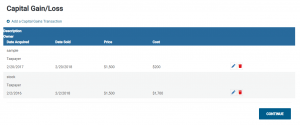
Update 2/22 7:59 am EST:  We have reverted the Capital Gain summary screen back to the same grid style as all other summary pages, with the pencil icon to edit and more importantly, the trashcan to delete.  All other data is still presented.


Update 10:45 am EST:  The error has been resolved, however, there is currently no way to delete an entry.  We are working to resolve this.

Update 10:26 am EST:  We are in the process pushing out the fix for this

Update 9:32 am:    We have found the cause of the error and are in the process of applying a fix on our QA systems.

We are currently receiving “Unexpected Errors” when saving Capital Gain/Loss entries.

We are investigating.

We recommend you close your browser and totally log back into the application with a new instance of the browser.  Tag the return so you know which ones to come back to as soon as this resolved

TaxSlayer Pro Online: Arizona Credit Sub-menu(s) (RESOLVED)

20 Feb 19
Craig Smith
No Comments

2/21/2019 – This is now resolved.

We have opened Issue 2862 for development to review an issue where sub-menus within the Arizona Credits menu (specifically for Forms 321, 322, and 352) are opening blank. This is impacting taxpayers whose AZ returns need one or more of those forms. For any Arizona return needing Form 321, 322, or 352, please hold these returns until this issue is resolved.

TaxSlayer Pro Online: $18 Software Fee – Display Issue Only (RESOLVED)

19 Feb 19
Craig Smith
No Comments

2/21/2019 – This is now resolved.

We have opened Issue 2818 to correct a display issue showing on the Submission page of some returns. The below is only a display issue and no fee is actually assessed or required prior to submitting VITA/TCE tax returns. We apologize for any confusion this may have caused.

We anticipate having this display issue resolved with our next deployment this week.

TaxSlayer Pro Online: Illinois Reject Code -9999 (RESUBMIT)

19 Feb 19
Craig Smith
No Comments

Update – The latest IL schema was updated in the software before IL was ready to begin accepting the new schema electronically. As of 2/19, these IL returns with Reject Code -9999 can be resubmitted.


We have received several support contacts regarding Illinois Reject Code -9999 regarding an Invalid State Schema shown below.  We have opened Issue 2841 to work with IL to determine what may be causing this particular IL reject. If you have any IL returns rejected for this reason, please hold those returns until we provide an update on this post.