If you are a volunteer for a site and your username is marked as “Inactive” when you attempt to login, you MUST contact your site administrator. VITA/TCE support cannot mark your username as active because we do not know the procedures put in place for your site by the site administrator.
Pro Online 2021: Tips for printing from the Submission Page
Scenario: I do not see a PDF after the completion of the green progress bar
Solution: The PDF will open in a new tab. Look for the browser message that this pop-up is disallowed and allow for this type of pop-up

Tips for contacting VITA/TCE Support — Help us, help you
- If you are contacting us about something specific to your site via email or chat, please include the following
- EFIN (it is OK to send this to us)
- SIDN
- Username (if applicable)
- If you are contacting us via telephone, please have access to your computer
- If you are contacting us about anything specific to the return, we need the following information:
- EFIN
- Last 4 digits of the SSN
- Specific details about the issue or error you are receiving
- Please limit the number of participants on the email thread. You are more than welcome to forward any tips or resolutions to your group
- Take a minute to check out our blog. We try to keep it updated with known findings, as well as tips on how to do things in the application.
You should NEVER email the full SSN or put the full SSN in a chat conversation. We can look the return up by last 4 and EFIN
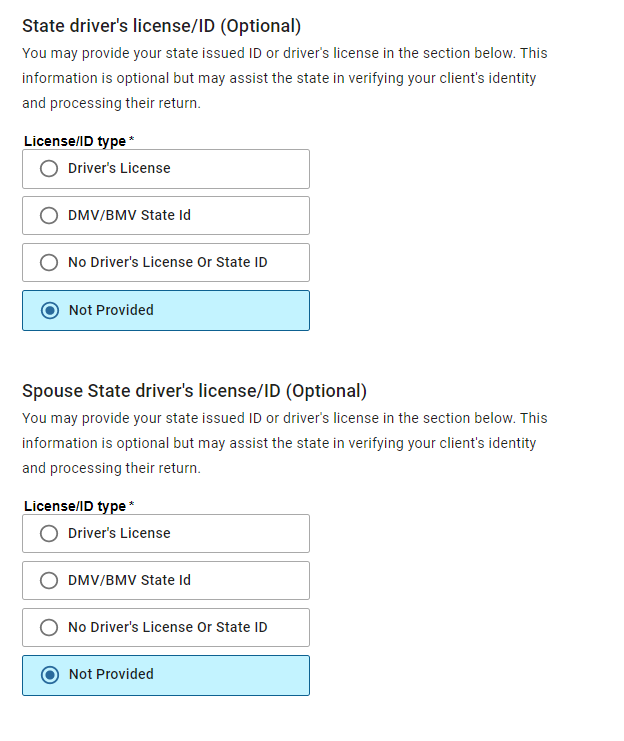
Pro Online 2021: Drivers License Optional [RESOLVED]
Scenario: The drivers license is supposed to be optional for my state, but the efile section is requiring it IF i select the drivers license page via the horizontal menu or click continue from the previous efile page
Solution: We have reported this to our development team (Issue 6491)
Alternative solutions: DO NOT click continue from the previous page and select the next page you need from the horizontal menu or DO NOT click on the drivers license menu if you know the driver’s license is not required.
How do I get off the page, if I am stuck on it. Select “Not Provided” and click Continue or select the Back button to leave the page and then select the next section you want to navigate to from the horizontal menu.
Pro Online 2021: Returns marked Paper displays the Transmit Return option
Scenario: The return has been marked as paper, but the transmit return option is enabled
Note: Selecting it does not transmit the return, it displays a generic error.
Solution: We have reached out to our development team for a resolution.
Alternative Solution: Click the Save & Exit option as you normally would when preparing a paper return.
Pro Online 2021: Fees display in E-file section
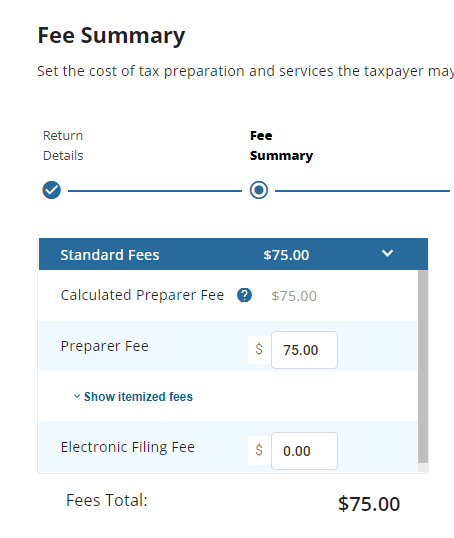
If your site is utilizing the Fees feature to track fees saved to the taxpayer, you will notice this information in a couple of new places this year.
(1) It will be displayed on the Fee Summary page
(2) You will see it displayed in the Right Navigation panel. This is to ensure that the quality reviewer can easily see that the fees calculated were entered into the return. This is now exposed to all users of the product, along with other pertinent taxpayer information that was formerly hidden (i.e. taxpayer name, ssn, etc.)
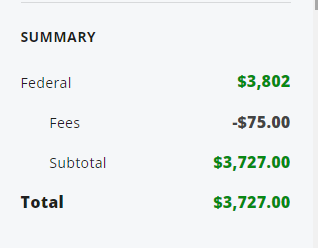
This does not go in the efile with the return for VITA/TCE returns…it is just a visual indicator that fees saved was used properly. You can verify this in client return history

This information will show up on the Fees reports that the site runs.
Pro Online 2021: Turning on E-file January 24th (Current year e-file is on)
Update: We have turned on current year e-file. We will not be turning on “Send state only” or prior years until later this week. We are going to allow the e-files to queue up for a little while before we send them to the IRS. The states that come in with the federal return will be made available to the states once the federal return has been accepted
Just a reminder that we will be waiting a few hours to allow the mass amounts of electronic files be sent to the IRS prior to turning on the ability in Pro Online. This allows us to help set expectations for ack times, rejects, etc. We do not have a definitive time yet, but we will update this post when we do.
We strongly recommend you open and review all returns prior to electronically filing them.
We sent some VITA/TCE electronic files to the IRS during Controlled Launch. The only reject code we saw trending had to do with the IP PIN. Remember, a new IP PIN is issued to the taxpayer each year.
Pro Online 2021: Printing from the Submission page
Scenario: I selected a print set and selected Print, but nothing happens other than the green bar telling me it is preparing the print
Solution: We are actively working to resolve this
Alternative: Click the print button a second time
Note: You may have to disable pop up blockers because it will open in a new browser tab.