Category: Software News

End of Season: What should I do with my returns and users?

18 May 21
Kim Manuel
No Comments

My site is closing for the season, what should I do with my returns?

There is no action required for returns.  DO NOT deactivate the returns because this will render them unavailable for prior year carry forward.

My site is closing for the season, what should I do with my volunteer’s user names?

We strongly recommend that you mark all user’s as inactive except for the site administrator.

1040X: Which report gives me e-file information

17 May 21
Kim Manuel
No Comments

Navigate to Reports>> Management Reports>> Pro Web Returns – Detailed Return Report

There are three 1040 X columns to identify returns that have had a 1040X added to the return and if the return was electronically filed.

The client status will identify if the 1040X was accepted or rejected

Acknowledgements for 1040X returns are available via the IRS Acknowledgement report and Old IRS Acknowlegement reports

TaxSlayer Pro Online: Error Page when Accessing E-file [RESOLVED]

05 May 21
Craig Smith
No Comments

9:50am ET

We have resolved the issue in all years resulting in the error message when going to e-file.


9:15am ET

We are still actively investigating but anticipate correcting the issue soon.


8:46am ET

Our engineers are actively troubleshooting to determine root cause of the error page.


8:13am ET

We are aware of an issue where an error page message is rendered when attempting to access the e-file menu. This appears to be impacting all years.

IRS Instructions for 2020 Reject Code F1040-071-05

23 Apr 21
Kim Manuel
No Comments

Pro Online:

The IRS has issued guidance on resolving Reject Code: F1040-071-05. In order for the return to be accepted, the IRS recommends preparers take the following steps before retransmitting these returns:

TaxSlayer Online Program

In 2020 Pro Online, open the return and take the following steps:

  1.  Add a $1 Capital Gain entry on Schedule D

Navigate to Federal Section > Income > Capital Gains and Losses > Additional Capital Gains Distributions > Enter $1 in the Additional Capital Gains Distributions field.

  1.  Add a -$1 Other Income entry on Schedule 1 with the description BR1

Navigate to Federal Section > Income > Less Common Income > Other Income Not Reported Elsewhere > Enter BR1 for the description of other income > Enter -1 in the amount of other income field.

*Do not mark the Earned income box.

For a list of returns that rejected with Reject Code: F1040-071-05, select Rejected Clients from the Welcome Menu of Pro Online. The list can be sorted using the up and down arrows in the Reject Information column.

**Please note that this guidance was issued by the IRS via an Industry Call
 

TaxSlayer Pro Online Reports: Fresh New Look!

23 Apr 21
Craig Smith
No Comments

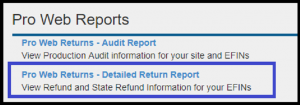
The Reports menu within TaxSlayer Pro Online received a new look. Check it out! Just in time for report season.

Subject: Delay in Processing Form(s) 1040,1040-X, and 1040-ES Payments Submitted via Modernized e-File

22 Apr 21
Kim Manuel
No Comments

Attention:  Return Transmitters and Authorized IRS e-file Providers/EROs

We identified a delay in processing Form 1040 balance due, Form 1040-X amended, and Form 1040-ES estimated tax payment requests submitted via Modernized e-File. The issue has been resolved, and pending payments are being processed. The taxpayer’s account will be credited with the original requested payment date(s). Taxpayers should not re-submit these payments.

If a taxpayer re-submitted  any of these payment requests due to the delay in processing they may cancel them by calling 1-888-353-4537. Cancellation requests must be received no later than 11:59 p.m. Eastern time, at least two business days prior to the scheduled payment date.

We apologize for any inconvenience this may have caused.

IRS Direct Debits

20 Apr 21
Kim Manuel
No Comments

The IRS has been in contact with industry regarding reports of not withdrawing balance due via direct debit.  This is happening industry wide and the IRS is working diligently to resolve this.  We will post additional information as we receive it from the IRS.

VITA/TCE Support Hours

15 Apr 21
Kim Manuel
No Comments

Beginning Friday, April 16th, TaxSlayer VITA/TCE support will have the following hours of operation:

  • Monday – Friday: 8am – 5pm ET
  • Saturday, May 8th: 9am – 5pm ET
  • Saturday, May 15th: 9am – 5pm ET