Category: Software News

Product Update Alert: Friday, April 6th @ 5:00 am

05 Apr 18
Kim Manuel
,
No Comments

We will be putting the returns in maintenance mode at 5:00 am on Friday, April 6th to perform a series of updates.

  • Zip Code Updates (Issue #1851)
    • 39840 – Cuthbert, GA
    • 77498 – Sugar Land, TX
  • Fix with ACA when filing MFS and claiming spouse exemption (Issue #1542)
  • Correct a print issue where F5695 was not generating in the PDF when no credit was being taken and it was all carryforward to next year (Issue #1848)
  • GA – Added a Interest Income adjustment field within the GA Retirement Worksheet menu (Issue #1570)
  • AL – Update to AL PY returns where non-allocated rental income was carrying to the AL Schedule E (Issue #1865)
  • HI – Entries for Spouse AGI within Food Excise Tax Credit menu were not saving inside the state program (Issue #1855)
  • MO – Added page validation for qualification questions for Property Tax Credit within Basic Information menu (Issue #1834)
  • OH – Resolved an issue where the Resident Credit was not calculating based on Gambling Winnings earned in Indiana (Issue #1823)

Product Update Alert: Monday, April 2 @ 5:00 am ET

31 Mar 18
Kim Manuel
,
No Comments

We will be putting the return in maintenance mode at 5:00 am on Monday, April 2nd for a series of updates.

  • Locate the W-7 from Forms Search.  Enter W and scroll down or ITIN to pull up Go to Application for ITIN
  • Correction to the wording on Adjustment Code D on Capital Gains page


Suggestion Box: Keep those suggestions coming

30 Mar 18
Kim Manuel

No Comments

The following PDF is an update on your suggestions.  This document will be updated periodically with new suggestions and responses.  As we move out of tax season into planning season, it will also be updated with an indicator of the suggestions that will be able to implement for the next filing season.

We tweaked the format a little to allow us to sort by Federal and State.

An example of the status column can be found by Tracking ID 269372 (Ctrl+F allows you search in the document)

What’s Trending:

  • Allow more filter options for Client Search
  • MFJ/MFS Comparison
  • 3 Year Summary

Don’t see your suggestion…don’t worry…suggestions will be added to the list as we pull them.

Don’t see a response next to your suggestion…we are reviewing each suggestion and will provide a response.

Click here to view PDF

The link will launch a Brainshark video with instructions on how to view the file.
Pro Online 2017: Loading Basic State Information in Basic Information

29 Mar 18
Kim Manuel
, ,
No Comments

We have turned on the feature that allows you to enter the basic state information that is required for your specific state after you complete the Taxpayer’s personal information.

Note:  This will appear on new returns and returns where the state is not already completed as a resident state

Step 1:

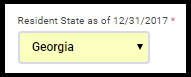
Select the Taxpayer’s resident state.  Note:  If this is not selected the state page will not display and the state will not automatically calculate until you add it in the state section.

Step 2:

Click continue after completing the Personal information page.  If the resident state is not loaded on an existing return or if this is a new return, the state basic page will load

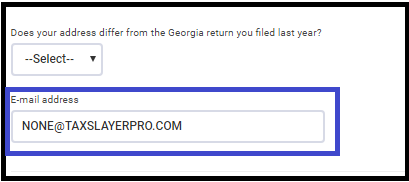
In this example of GA, I can answer the address question and enter an email address:  Note that [email protected] is a format template letting the user know the required format of the field.

Step 3 (optional)

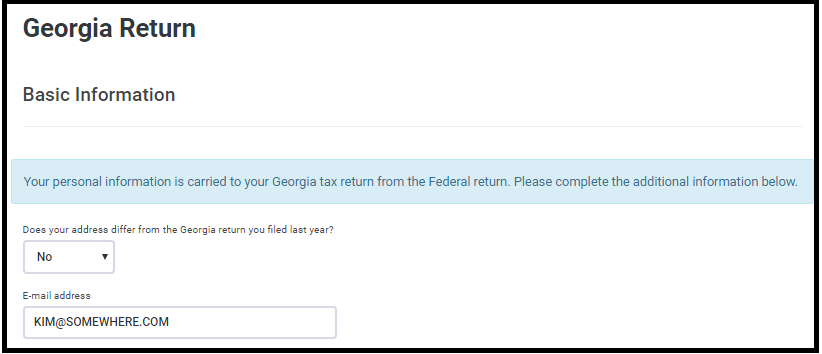
Verify the information flowed to the state return.  The purpose of this field is that if no additional changes are needed for the state, you can enter the data at this point rather than editing the state in the state section.

This is an example of answering “No” to the address question and entering [email protected] as an email address.

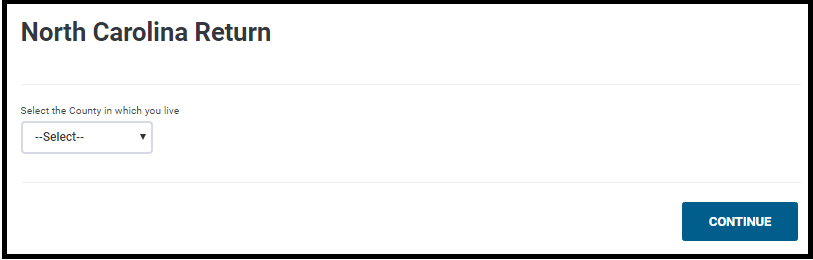
Example of NC Basic page in Personal Informatio

Blog Posted 03/29/2018

Suggestion Box: Check out the suggestions from your fellow volunteers

27 Mar 18
Kim Manuel
,
No Comments

The following PDF is the first of many updates on your suggestions.  This document will be updated periodically with new suggestions and responses.  As we move out of tax season into planning season, it will also be updated with an indicator of the suggestions that will be able to implement for the next filing season.

What’s Trending:

  • Make AGI visible
  • Ability to enter repeatable items (i.e. Interest, dividends) more efficiently
  • Display Calculated Age

Don’t see your suggestion…don’t worry…suggestions will be added to the list as we pull them.

Don’t see a response next to your suggestion…we are reviewing each suggestion and will provide a response.

Click here to view PDF

The link will launch a Brainshark video with instructions on how to view the file.
Product Update Alert: Monday, March 26th @ 5:00 am ET

23 Mar 18
Kim Manuel
,
No Comments

The returns will be put in maintenance mode at 5:00 am on Monday, March 26th to apply a series of updates.  The updates are scheduled to include:

  • Carry Forward of Child Provider information for Form 2441 (Issue ID 989)
  • Added the ability to enter IP PIN when completing a 1040PR (Issue ID 1480)
  • Correction to requirement on Foreign Earned Compensation (Issue ID 1528)
  • Change made to allow Combat Zone election to stay selected after re-opening the return (Issue ID  1705)


Suggestion Box: What is trending for suggestions

23 Mar 18
Kim Manuel
,
No Comments

The following PDF is the first of many updates on your suggestions.  This document will be updated periodically with new suggestions and responses.  As we move out of tax season into planning season, it will also be updated with an indicator of the suggestions that will be able to implement for the next filing season.

Our goal is to implement as many suggestions as possible, however, we will not be able to implement all suggestions for the upcoming filing season.  Even if we are not able to implement a suggestion for the upcoming filing season.

We will also be indicating if we will not be implementing a suggestion and why.

Don’t see your suggestion…don’t worry…suggestions will be added to the list as we pull them.

Don’t see a response next to your suggestion…we are reviewing each suggestion and will provide a response.

Click here to view PDF

The link will launch a Brainshark video with instructions on how to view the file.
Product Update Alert: Wednesday, March 21 @ 5:00 am ET

20 Mar 18
Kim Manuel
,
No Comments

We will be putting the returns in maintenance mode at 5:00 am ET to apply a series of updates.  The update is scheduled to include:

  • Auto filling Box 2a on the 1099R (Issue #1646)
  • Expanding the Form Finder display when searching for specific forms from the left navigation bar
  • Updated text within the 8880 menu to point out that current year distributions reported as income are automatically included in the 8880 calc to avoid double-entry
  • Zip Code Updates
    • 39854 – Georgetown, GA
    • 48193 – Riverview, MI
    • 85756 – Tucson, AZ
    • 60124 – Elgin, IL
    • 60418 – Crestwood, IL
  • Fixed an issue where the CF-1040 was not included in the PDF for 2016 MI returns (Issue #261)
  • Fixed an issue where adding the OH RITA locality form within the 2016 program would break the print (Issue #1527)