Category: Software News

Product Update Alert: Monday, March 19th @ 5:00 am EDT

16 Mar 18
Kim Manuel
,
No Comments

We will be putting the returns in maintenance mode at 5:00 am ET on Monday, March 19th to apply a series of updates.  The updates are scheduled to include:

  • Resolution for Issue ID 1640 (RRB-1099-R)
  • 1040 View for MFS returns displaying Spouse name in the wrong entry
  • Correction for VT Renter’s Renter’s Rebate (Issue #1589)
  • User Interface update to the drop-down menu display within Wisconsin state program
  • Fixed a display issue on the IN amended return where the county code was not showing on the PDF (Issue #1613)
  • Fixed a Kansas EIC issue where EIC was not calculating in instances where the KS EIC was the same amount as the tax liability (Issue #1589)
  • Update the drop-down options within the MA Schedule C menu for Costs of Goods Sold (Issue #1619)
  • Added back Oregon subtraction #308 for Tuition and Fees Deduction within Part Year OR returns (Issue #1615)
  • Update to the NM program that if an amount is owed and state return type is Direct Debit, do not generate the payment voucher (Issue #1571)

Pro Online:  Adding 1099-MISC Income to an existing Schedule C

16 Mar 18
Kim Manuel

No Comments

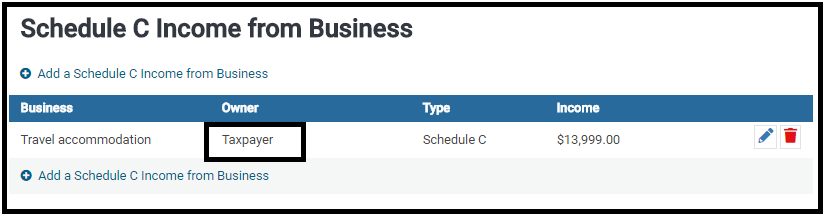
Scenario:  A schedule C has already been created for the taxpayer or spouse and you want to add additional income to the existing schedule C.

Example of existing Schedule C assigned to the Taxpayer

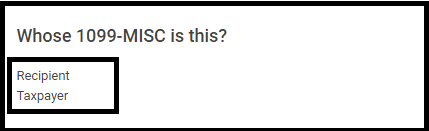
Next:  Add a 1099-Misc for the Taxpayer with a $ value in Box 7:  non employee compensation and click Continue

You will be presented with Where would you like to add the income?

Options:

(1) Click the Edit icon to add the income to an existing Schedule C. (Will add to the Income of the existing C)

(2) Click Create a New Schedule C income from business (Will add the income to a new Schedule C)

Product Update Alert: Thursday, March 15th @ 5:00 am EST

14 Mar 18
Kim Manuel
No Comments

We will be putting the returns in maintenance mode at 5:00 am on Thursday, March 15th to conduct a series of updates.

  • Fixed the issue where the PSO exclusion was deducting from Gross Distribution (Box 1) instead of the taxable amount (Box 2a)
  • Fixed the issue where users were unable to remove the PSO exclusion after saving the initial entry.
    • To remove a PSO exclusion, go back into the 1099-R Box 2a link>Public Safety Officer Exclusion>Enter $0 and then continue
  • Zip Code Update
    • 88013 – Las Cruces, NM

Product Update Alert – Tuesday, March 13th at 5:00am ET

13 Mar 18
Craig Smith
No Comments

We will be placing returns in maintenance on Tuesday, March 13th at 5:00am ET to release some updates.  This updated included the following:

  • Ohio RITA 37 – You can now load and calculate the form (Issue #1557)
  • Rejected Returns button — Reduced to one Call to Action blink
  • Form 8941 – Added the ability to enter a marketplace identifier if eligibility is answered yes to calculate Form 3800 (Issue #727)
  • Zip Codes – The following zip codes now auto-populate (Issue #1565)
    • 85755 – Tucson, AZ
      60403 – Crest Hill, IL
      60404 – Shorewood, IL
  • PA — Corrected an erroneous validation error for ‘ForeignAddress’ in namespace (Issue# 1583)
  • OH — (Desktop) Corrected an erroneous validation error for “Donation, TotalDonation, Refund’ in namespace (Issue #1588)


Pro Online 2017: New: Customer Retention Report

09 Mar 18
Kim Manuel
,
No Comments

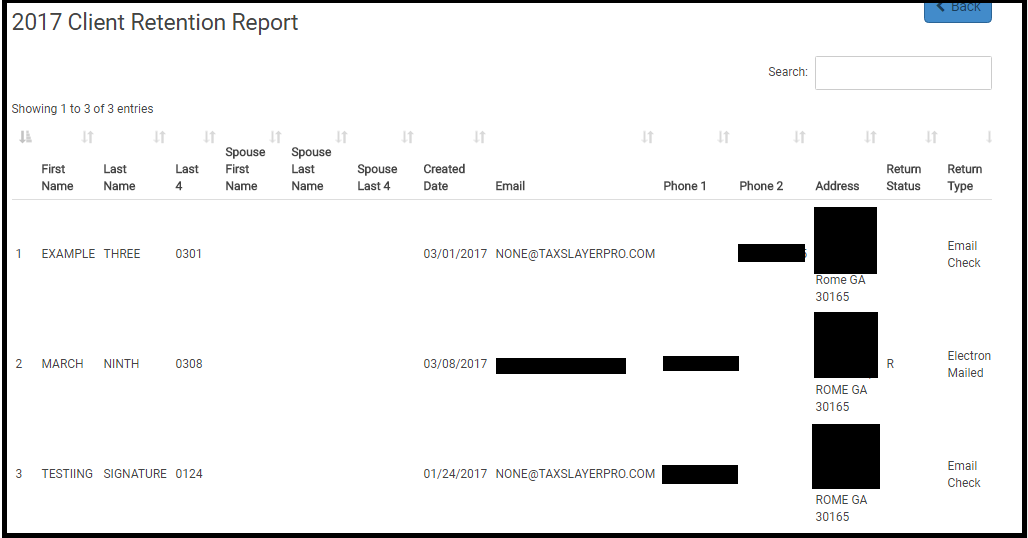
Purpose:  Allows you to quickly view the returns that were prepared at the site in the prior year during a specific time period that have not been prepared during the current year.

Benefit: Helps in planning and helps understand taxpayer retention patterns.

How do I use the report?

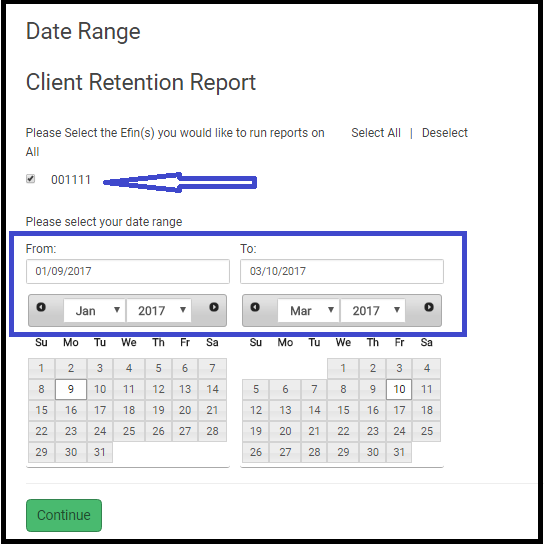
(1) Navigate to the Reports menu and click Select on Client Retention Report

(2) Select the EFIN and PRIOR year date range

(3) Click Continue.  The report will generate a list of clients that had returns prepared during that time period that have not had their returns prepared for the current year.

Pro Online: Product Update Alert – Friday, March 9th at 5:00am ET

08 Mar 18
Craig Smith

No Comments

We will be placing the site in maintenance on Friday, March 9th at 5:00am ET to release a series of updates.

  • Fix the issue keeping the Schedule E from being included in the PDF when applicable (Issue #1523)
  • Update to remove “Rejected” returns now marked as “Paper” from being included in the Rejected Returns Report (Issue #1511)
  • Update for the CO Amended Return to not pull in the Federal Amended Explanation Entry (Issue #1364)
  • Fix a display issue for Indiana where the Personal Representative information provided within Indiana Basic Information was not carrying to Schedule 7 (Issue #1403)
  • Fix a display issue for New Mexico where the State ID listed in E-file was not being included at the bottom of the NM return. (Issue #1490)
    • If Drivers License information was entered, it was carried to the PDF as expected
  • Adding Tropical Storm Harvey and California Wildfires to the Disaster Area picklist in Basic Information
  • Zip Code Update
    • 88007 – Las Cruces, NM (Issue #1512)
  • Removed Do not Mail strip from Rhode Island Non Resident returns

Weekly Maintenance Notification: Sunday, March 4th 1:00 am – 7:00 am EST

02 Mar 18
Kim Manuel
No Comments

We will be performing our March maintenance on Sunday, March 4th from 1:00 am – 7:00 am EST.  The sites will be unavailable during this time.

Blog posted 03/02/2018

Pro Online 2017: Acceptance Agent for W-7 Phase I

02 Mar 18
Kim Manuel

No Comments

We have released Phase I of having the ability to print the Certified Acceptance Agent information on the bottom of Form W-7 when applying for or renewing ITIN applications.

Navigate to the Preparer(s) menu in configuration

Edit an existing Preparer or Create a new one

There is a new section located between the Personal Information Section and Login Account Section

This is where you enter the information that will carry along with your preparer name to the Acceptance Agent portion of the W-7

Note: For EIN to carry to W-7, it needs to be entered in ERO Setup within Configuration

Phase II is scheduled to be delivered next week

Phase II is actually carrying the data to this section which is scheduled for the week of March 5th