Category: Software News

Pro Online 2017: Unexpected Server Errors (RESOLVED)

02 Mar 18
Kim Manuel
No Comments

Update 10:36 am EST — This has been resolved

Update 10:25 am EST —  We have found the issue in the code stream and are currently working to update it.  An alternative solution that works the majority of the time is to click the Back arrow button of the browser to take you back to the page you were on before and then click continue as normal.  We are seeing this work for most of the returns.

————————————————

We have received several calls about an Unexpected Server Error in Healthcare and E-file.  We are currently investigating this.

Rather than clicking log back in button, close the browser, and open a new instance of the browser, log back in.  This will route you to a different server.


Product Update Alert: Thursday, March 1st at 5:00 am EST

28 Feb 18
Kim Manuel
,
No Comments

We will be placing the returns in maintenance mode at 5:00 am EST on Thursday, March 1st to apply a series of updates.  The update is scheduled to include:

  • The add back of Form 5695 (Residential Energy Credit Form) per passage of extenders
  • Added Zip Code 89081 to the zip code database for North Las Vegas, NV
  • Form 1116 – Text update for country “Isle of Man” from the drop down menu (Issue #1361)
  • New Jersey – Fixed an issue where 1099-R income with Code 3 in Box 7 was double reporting on Line 19a (Issue #1343)
  • New Jersey – Fixed an issue related to the Property Tax Credit not calculating on Line 49 when applicable (Issue #1165)

Product Update Alert: Wednesday, February 28th at 5:00 am EST

27 Feb 18
Kim Manuel
,
No Comments

We will be putting the returns in maintenance mode at 5:00 am EST for a series of updates.

  • Added zip code 37934 to the zip code database for Knoxville, TN.
  • PA Local – Fixed an issue where the local tax rate entry was not carried to the PDF (Issue #1327)
  • Pennsylvania – Fixed an issue where the Schedule SP was not including the Resident Credit on line 13 (Issue #1376)
  • Kentucky – Fixed an issue where the “Enter Exempt Percentage” field for Retirement Income (Schedule P Part 1 Only) was not saving (Issue #1308)
  • Vermont – Fixed an issue where the percentage entries within the Homestead Declaration and Property Tax Adjustment menu, LC-142 and PR-141 were not holding (Issue #1336, 1337, and 1338)
  • Colorado Amended Return – Fixed an issue where the entry for “Enter the amount from your original return…” was not holding (Issue #1357)
  • Arizona – Fixed an issue where the Property Tax Factor percentage entry was not saving (Issue #1342)
  • Maine – Fixed a display issue where the “X” was not carrying to the Injured Spouse designation (Issue #1279)
  • Rhode Island – Fixed an issue where the RI-1040H was including “Direct Rollover” amounts as Household Income (Issue #1341)
  • Connecticut – Fixed a display issue where the “Y” was not showing next to the CT-8379 indicator when included in the return (Issue #1340)
  • Iowa – Fixed an issue where the IA Amended Return was not being removed from the PDF when selecting “NO” to completing the amended return (Issue #1330)
  • Utah – Fixed an issue where Part Year residency dates entered within Basic Information were not saving (Issue #1292)

Blog Posted 02/27/2018


Product Update Alert: Tuesday, February 27th at 5:00 am EST

26 Feb 18
Kim Manuel
,
No Comments

We will be putting the returns in maintenance mode at 5:00 am EST on Tuesday, February 27th to apply a series of updates.  The update included:

  • Extending the Taxpayer/Spouse last name field to 20 characters
  • You can now search by Last 4 of the SSN if your site has more than 499 returns
  • You can now search by hyphenated last name if your site has more than 499 returns
  • You can now send state only returns after the federal return has been accepted
  • MAGI in Schedule A immediately reflects change in AGI when income is added or removed from the return without having to exit and re-enter the return

Product Update Alert: Monday, February 26th at 5:00 am EST

24 Feb 18
Kim Manuel
,
No Comments

We will be putting the returns in maintenance mode at 5:00 am EST on Monday, February 26th for a series of updates.

  • Fixed an issue where the Schedule OI Tax Treaty Article selection was not holding if the menu was re-entered (Issue #1234)
  • Added zip code 85388 for Surprise, Arizona to the zip code database (Issue #1318)
  • Kansas – Fixed an issue within the K-40H/PT menu where “Other Household Members” was not holding the SSN entry (Issue #1159)
  • Michigan – Fixed an issue where Worksheet 4 for MI-1040CR was not calculating (Issue #1126)
  • Michigan – Fixed an issue where 1099-R entries within “Deductions for Taxpayers born before 1953” were not fully being cleared after information was removed. The Private or Public checkbox was still showing on the PDF (Issue #1288)
  • Pennsylvania – Fixed an issue in the Schedule UE menu where deleting entries for standard mileage rate to override automatically carried amounts from the Federal 2106 was carrying $0 to the PDF instead of the amounts from the Federal 2106 (Issue #1177)
  • California – Added a drop-down within the Tax menu to indicate if a taxpayer paid their Use Tax directly to CDTFA (Issue #1316)
  • Delaware – Fixed a display issue on the DE amended return where Line 6B was not showing the leading percentage number (Issue #1257)
  • Delaware – Fixed an issue where Line 7a was not calculating personal credits on the DE amended return (Issue #1258)
  • Louisiana – Removed “Motion Picture Resident” credit (Issue #1245)
  • Louisiana – Fixed a display issue where the description for subtraction code 21E was not carrying to the PDF (Issue #1300)
  • Louisiana – Fixed a display issue where the DOB for a dependent listed for the Military Serviceman menu was not showing in the correct format (Issue #1299)
  • Minnesota – Fixed an issue where the M1CD was calculating incorrectly when qualifying child was born during 2017 (Issue #1293)


Blog posted 02/24/2018

Pro Online 2017: Tuition and Fees; PMI Extenders are live

22 Feb 18
Kim Manuel

No Comments

The Tuition and Fees option is located on the 8863 to allow you to determine which is better for your taxpayer.

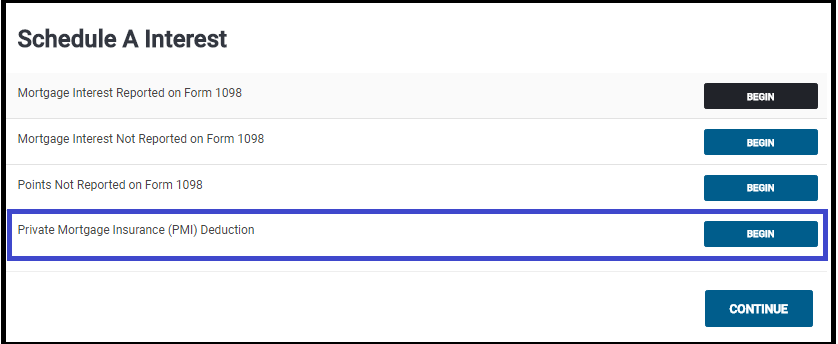
PMI is located in the Mortage and Interest section of Itemized Deductions

Important Note: 

Due to the recent passing of the Bipartisan Budget Act of 2018, certain expired federal provisions have been reinstated such as the Tuition and Fees deduction and the Mortgage Insurance premiums deduction. Each individual state will determine if and when they will conform with those federal changes.  If you file a state return prior to the state making their decision to conform or not you may be required to file an amended return.”

TaxSlayer recommendation:  Once we deliver these two items, we recommend that you create a return tag if the return has one of these two items in it and a state return.  As of today, we do not know if the state(s) are going to adopt the extenders.  Once your state makes a decision, you can run a “Tags report” and review the state returns to see if any adjustments need to be made.

Link to Post with State Extender Information

Blog posted 02/22/2018

Pro Online 2017: Taking the 933 Exclusion on the 1040

21 Feb 18
Kim Manuel
,
No Comments

Before taking the Section 933 Exclusion for exempt PR income, be sure you have first reported the earned Puerto Rican sourced income so that the exclusion is reducing the applicable amount. To first report the Puerto Rican sourced income on Form 1040 from the Income menu go to “Other Income” > “Other Income Not Reported Elsewhere”. Enter the description as “Puerto Rican Earned Income” and then the dollar value. Once these steps have been taken, use the steps outlined below to claim the Section 933 Exclusion.

(1) Navigate to the Income Section

(2) Click begin on the Other Income Line

(3) Click Begin on the Compensation Line located on the Less Common Income menu

(4) Select Begin on the Section 933 Excluded Income from Puerto Rico

(5) Answer the Bona Fide Resident question

(6) Answering Yes displays an entry that allows you to enter the amount to exclude.   Enter the amount and click Continue

(7) If you need to itemize deductions, navigate to Itemized Deductions.  The screen will display the percentage amount that you can enter for each item based on the income exclusion

(8) The excluded amount will be subtracted on Line 21

blog posted 02/21/2018


Pro Online: New Dialog box when transmitting from Submission Page

21 Feb 18
Kim Manuel
,
No Comments

We added a verification dialog box when “Save and Transmit” is selected on the submission page in e-file

Click OK to submit the return

Click Cancel to return to the page and then select Save and Exit return

Reason:  The boxes are the same color and similar size and returns were occasionally getting sent prematurely