Author Archives: %s

Pro Online: Slowness and Error Messages (RESOLVED)

02 Mar 20
Kim Manuel
No Comments

10:49 am EST:  As of 10:45 EST, all application services have been restored.  If you are experiencing an error message, please logout and close the instance of your browser and start a new one, or you can clear your cache.  We are continuing to monitor the application.


10:45 am EST:  You should now be able to login with an error, opening an existing return, create new returns, print, etc in 2019.  We are checking the prior years now.


10:30 am EST:  Our engineers are working to resolve the errors.  We are seeing some calculations and prints.


10:20 am EST:  You may also be experiencing a runtime error when trying to login to the site


Server Error in ‘/ProAvalon’ Application.


Runtime Error

Description: An exception occurred while processing your request. Additionally, another exception occurred while executing the custom error page for the first exception. The request has been terminated.

10:15 am EST:  We have opened an emergency ticket with our IT and Dev teams.  We are getting reports of slowness an errors.

Pro Online: Server Errors occurring after morning deploy (RESOLVED)

28 Feb 20
Kim Manuel
No Comments

Update 7:08 am EST:  The errors have been resolved.  You will want to close all instances of your browser to ensure the error is not stored in your cache or history.


Our development team is working to resolve the runtime errors that you are currently experiencing when trying to access the site.

Volunteer Time: National VITA/TCE Volunteer Call: Thursday, February 27 at 1:00 PM Eastern Time

27 Feb 20
Kim Manuel
No Comments

The conference begins at 1:00 PM Eastern Time on February 27, 2020; you may join the conference 5 minutes prior.

Dial-in: 888-251-2949 or 215-861-0694
Access Code: 2364004#

This an opportunity to hear from TaxSlayer about the software and the filing season.  Participants will have an opportunity to ask general software questions.  Keep in mind that TaxSlayer cannot answer tax return or site specific questions on this call.   TaxSlayer VITA/TCE Support is available to handle return and site specific questions.


FSA Kiosk: New Landing Page Coming Soon (NOW LIVE)

26 Feb 20
Kim Manuel
No Comments

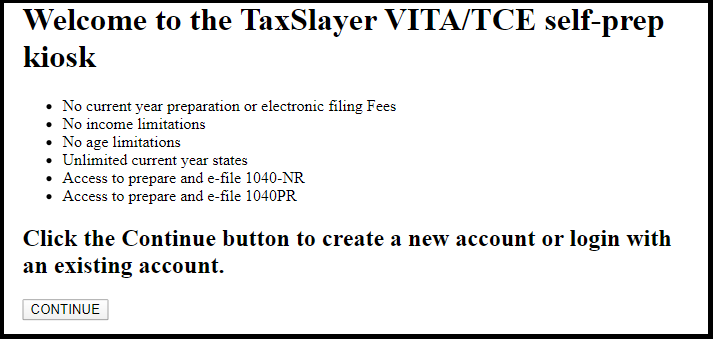
2/27/2020 – The new Kiosk Landing Page is now live.


For sites that have a site specific FSA URL (Fusion, Stand Alone, or Remote), we will be launching a new landing page soon.

Benefits:

  • If you start from the URL we sent you via email., the new landing page will retain that URL which will allow you to more easily use the bookmark and pin features of your browser.
  • Easier for your certified volunteers to know the taxpayer is starting from the correct page
  • Clicking continue will take the taxpayer to the familiar login and/or Create Account page

E-file to Submission: Intermittent Error Page (RESOLVED)

25 Feb 20
Kim Manuel
No Comments

Update 2:00 pm EST:  This has been resolved.  You may now complete the e-file process for the impacted returns.


Update 10:56 am EST:  We believe we have identified the root cause of the error message on the e-file page.  We know if the return has one or two of the following conditions, it will render the error:

  • Schedule A for Medical and Dental Expenses,
  • F5695 for Nonbusiness Energy

This is most likely related to the e-file blocks we recently removed.  We are  having our development team look at the code.  During the meantime, you will need to tag these returns from the Client List (you will not be able to access them from the submisison page)  so you know to come back and e-file them once this is resolved.


We have had a few reports of volunteers getting an Error Page when clicking Save on the E-file page.   We have opened an issue 4541 and also opened an internal IT ticket to see if we can isolate where the error is coming from.


Pro Online not generating a PDF (Update 1:30 pm EST) [RESOLVED]

24 Feb 20
Kim Manuel
No Comments

1:30 pm EST:  We are seeing successful prints and calculations on returns.  The speed of calculations have improved significantly over the past 10 minutes.  If you are experiencing any type of issue with the calculation of returns or printing of returns, we strongly recommend that you log out, close all instances of the browser (not just your tab), open a new browser.  We apologize for the inconvenience this has caused to the volunteers and taxpayers at your site.  We will continue to monitor the changes that were made throughout the day.


1:15 pm EST:  We are seeing successful calculations on New Returns and when opening existing returns.  The calculation when opening an existing return is a bit slower than normal at the moment.  We expect this to speed up over the next few minutes.  We strongly recommend that you log out, close all instances of the browser (not just your tab), open a new browser.  You can also clear your cache if you were receiving any errors.  We are continuing to monitor.

_____________________________________________________________________________________________________


1:00 pm EST:  We are still working to resolve the issue with the calculations spinning when you open an existing return or complete the personal information on a new return.  If you are stuck with the return spinning or just sitting on calculating return, click one of the available items on the left navigation bar to break the calculation spin.  This will allow you to Save and exit the return.  Stopping the calculation allows you to enter data into the return, but it will not calculate.


12:45 pm EST:  Things that can be performed at the site:  You can now print returns from the client list.  You can send any electronic files that are marked completed and are ready to send per your site’s procedures from the Transmission menu option on the welcome page.  We are continuing to look at why calculations stopped rendering at approximately 11:59 am EST


12:30 pm EST:   You can now render the PDF for printing from the client list.  We are still looking at why the returns are not rendering a calculation when you open them.  This is for all years


Update 12:15 pm EST:  The engineers and developers are aware that you are not able to print or calculate a return.  If you are stuck on Summary/Print calculating the return, you can click anywhere on the left navigation bar (i.e. Personal information) to break the continuous calculation spin.  This will allow you to Save and exit the return.


Update 12:00 pm EST:  We are receiving reports that some of you are getting slowness when calculating returns.  We have made the developers and engineers aware.

____________________________

Update 11:45 am EST:  We currently do not have an estimated time on when the application will begin generating a PDF.  This is our top priority to resolve so you can follow site procedures and give your taxpayer a completed copy of their tax return.  Reminder:  This is not impacting the ability to prepare the tax return.


Update 11:30 am EST:  Our IT engineers and development team continue to work to resolve the inability to render a PDF.  For the sites just now opening for the day, this does not impact your ability to prepare and calculate returns.  You can utilize returns tags to know which returns you need to go back and print for the taxpayer so they will have a completed copy.


Update 11:15 am EST:  We are still working on the print queues.   We apologize for the inconvenience this creates when you cannot provide the taxpayer with a completed copy of the tax return.


Update 11:00 AM EST:  We are still working diligently to resolve the issue with the application not rendering the PDF.  We are also getting reports that MFA emails are not being received.  Once we resolve the printing situation, we will look at MFA emails.  MFA text messaging is not impacted.


Update 10:43 AM EST:  We have identified the Message Queues that are not processing the print requests.  We are currently working to restart them in an effort to flush out the queues.


Update 10:30 AM EST:   We are continuing to determine why printing is not rendering a PDF.   This is not impacting the calculations of the return, however, it does impact generating a PDF for prior year returns.


Update 10:16 AM  EST:  We are currently looking to see what is causing the PDF to not generate.  As soon as we understand what stopped, we will be able to determine an estimated resolution.


We have opened an emergency ticket with our IT team and development engineers.  We will keep this post updated as we receive additional information
MN: Newly expanded Working Family Credit (RESOLVED)

21 Feb 20
Kim Manuel
No Comments

2/24/2020 – Issue 4520 for the Working Family Credit was resolved with this mornings deployment.


Issue ID 4520

Minnesota has implemented new requirements for the Working Family Credit this year to expand the population of people that qualify for the credit.   In prior years, you must have been eligible to receive the federal Earned Income Tax Credit (EITC) to receive the Minnesota Working Family Credit. Beginning with tax year 2019, you may be eligible for the credit if you are between the ages of 21 and 64 with no qualifying children or have income that exceeds the limitations of federal EITC.

We are currently working to make this change with the goal of pushing the change live on Tuesday or Wednesday of next week.

If you feel like you have taxpayers over the weekend that qualify for this credit, you can go ahead and file their federal return, tag the return and file MN as state only once the change has been deployed.

Coming Soon: UI Upgrades to Configuration and other areas outside of the return

21 Feb 20
Kim Manuel
No Comments

Nothing to worry about, the functionality will remain the same.  At some point in the near future we will be moving away from the red and green backgrounds on the action buttons that are located on the Welcome page, configuration and other pages outside of the return.

We will be moving to a more pleasant look that utilizes our existing Blue action buttons.  You will see more combinations of Blue and white.