Category: Customer Portal

Customer Portal: Making a document available to the portal

29 Jan 22
Kim Manuel
No Comments

Scenario:  I upload a PDF to scanned documents and I do not have the option for “Add to Customer Portal”

Solution:  The taxpayer needs to register their customer portal.  They must have an established portal in order to have the ability to add a PDF that they can access via “Files from my Preparer”

Customer Portal: Failed to Send Document Message

29 Jan 22
Kim Manuel
No Comments

Scenario:  You selected Send Document from the Submission page and received the Failed to Send Document Message box

Solution:  The taxpayer has not established/registered their customer portal.  We do not allow the document to be sent if the customer does not have a registered portal.

Customer Portal: Display issue with signature [RESOLVED]

27 Jan 22
Kim Manuel
No Comments

You will see the signatures displayed on the Submission page once they have been signed.
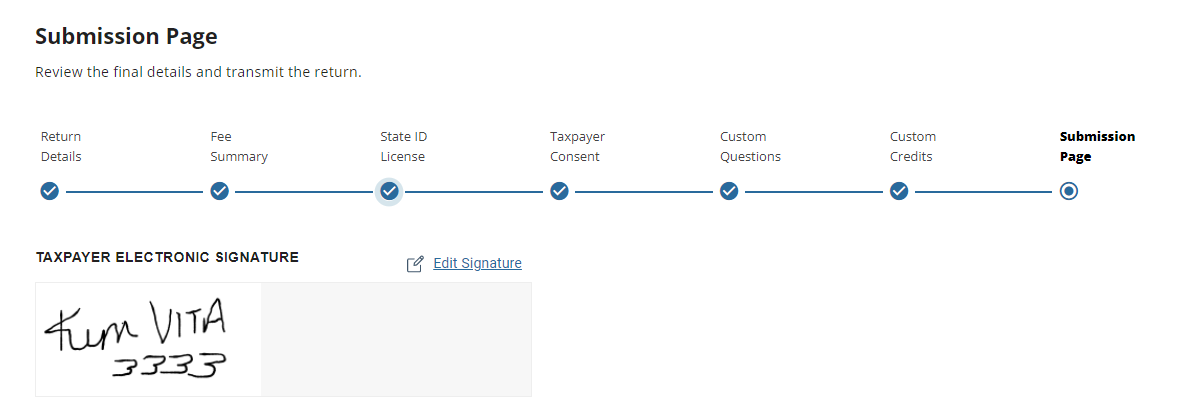


You can then print the return from any print option to see the signatures on the 8879, 1040, accepted consents and any applicable state docs (not all state docs have signatures)

You can then select “Send Document” (currently you have to generate a PDF first) to make the signed documents available tot he taxpayer.


Scenario:  We are not seeing the signature being applied to all forms, only the accepted consents.

We are actively working to resolve this so you can visibly see the signature on the appropriate forms.



Customer Portal: How do I send a tax document to a Taxpayer?

20 Jan 22
Kim Manuel
No Comments

Scenario: You navigate to the submission page and the “Send documents” option is not enabled

  1. It should not be if the taxpayer has not completed registration
  2. It should be enabled because the taxpayer has completed registration….however, in order to ensure the most recent copy is made available you will need to click Print and generate a PDF.  Then the Send Document button will be available

Customer Portal: What’s new

19 Jan 22
Kim Manuel
No Comments

We delivered the following enhancements to Customer Portal

  • Removed the preparer email address from the Customer Portal link email
  • Preparers that have access to Scanned Documents can  now upload a PDF (limit 5 meg) and make it available to the taxpayer via their established customer portal
  • Any user that has the ability to see all returns can now message/chat with any taxpayer via customer portal
    • Note:  If the user can only their own returns, they can only chat/message  the taxpayers they created the returns for via customer portal

Customer Portal: Which email do I use for MFJ returns?

18 Jan 22
Kim Manuel
No Comments

Question:  What email address should I use to setup the customer portal for a MFJ return?

Answer:  It doesn’t matter which one you choose.  Choose the one that is going to be the most accessible by the taxpayer and/or spouse.  Both will need to establish a signature once they register their customer portal account.  The key is that you can only create one customer portal per return because the portal is tied to the return.


Customer Portal: Taxpayers that cannot create a portal [RESOLVED]

18 Jan 22
Kim Manuel
No Comments

Update:  You can now send correctly formatted portal links from any access point from within the return.  Reminder:  You can resend the link if the taxpayer is  having challenges registering their account.


Scenario:  You sent your taxpayer a customer portal link from the left navigation or taxpayer drop down from inside the return

Problem:  The taxpayer cannot get their account created through registration

Reason:  Incorrect link

Solution:  We will be correcting this with an update in the morning.  This update will also remove the preparer’s email address

Alternative:  Navigate to the e-file section and send the link to the taxpayer from there

Customer Portal: Taxpayer Access to Tax Documents

07 Oct 21
Kim Manuel
No Comments
Q: How long can a Taxpayer access their tax documents in their Customer Portal account?
  • A: Current year return access is available through November of the current year.
    • Future Enhancement: The goal for a future year enhancement is to allow the taxpayer to have access to multiple year returns associated with their secured customer portal.
Q: Does a Taxpayer need a new Customer Portal login each year it is used?
  • A: Short answer: No, the same login can be used by the taxpayer, but only the current year return (at this time) will be available until access to multiple years is available.
  • A: Longer answer: If the taxpayer uses Customer Portal in Year 1. In Year 2, the preparer will still need to send a link to the taxpayer for Customer Portal for that year. The Taxpayer can use the new link to login to their existing Customer Portal account, which will automatically link to the current year return.