Category: Release Notes

Release Notes: Thursday, August 16th at 5:00am ET

15 Aug 18
Craig Smith
No Comments

We will be releasing the below items on Thursday, August 16th at 5:00am ET.

REPORTS

  • Site Production Detail Report (SPDR) – Correct an issue where the apartment number was not always showing in the address line (Issue #2049)

STATE RETURNS

  • Expand the default SSN entry field within the state programs so users can see the full 9-digit entries (Issue #1777)

Release Notes: Tuesday, August 14th at 5:00am ET

13 Aug 18
Craig Smith
No Comments

The site will be placed in maintenance on Tuesday, August 14th at 5:00am ET to release the below item in addition to mostly back-end updates.

CARRYFORWARD
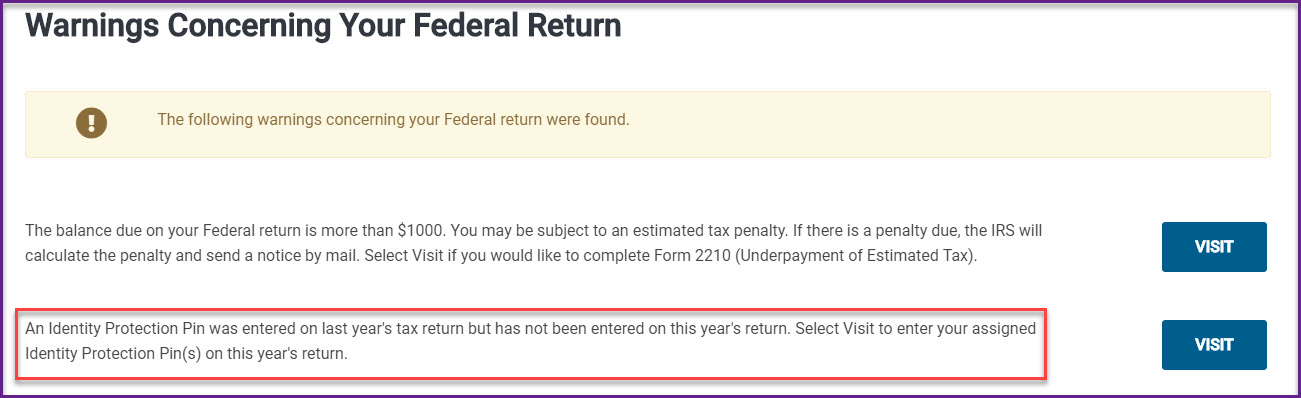
  • IP PIN Warning: A carryforward item being implemented will be a warning when creating the E-file in the current year that a current year IP PIN has not been entered but one existed on the prior year return.
    • Let’s say a 6-digit IP PIN was entered for the taxpayer in 2017. When preparing the 2018 return for the same TP, if the preparer tries to create the e-file but the IP PIN for 2018 was not entered, a warning will pop to let the preparer know to an IP PIN existed in the previous and to double-check to see if an IP PIN needs to be entered for the current year
      • This warning will pop in the above scenario for spouses and dependents

Release Notes: Thursday, August 9th at 5:00am ET

08 Aug 18
Craig Smith
No Comments

The site will be placed in maintenance on Thursday, August 9th at 5:00am ET to release the below updates along with back-end updates.

CLIENT STATUS

  • Adding the ability to generate a PDF of an e-filed tax return. This will allow preparers and quality reviewers to view a PDF of a transmitted return in the event an adjustment was made to a return after submission. There is a print icon to the right next to the Federal and State Transmission. Clicking the printer icon will generate the e-filed PDF in a new window. If a new window does not open, check to make sure your pop-up blocker is disabled.


E-FILE

  • Consents will no longer require a PIN and DATE if the consent is marked DENIED


Release Notes: Tuesday, August 7th at 5:00am ET

06 Aug 18
Craig Smith
,
No Comments

We will be placing the site in maintenance on Tuesday, August 7th at 5:00am ET to release the below enhancement and back-end work.

FEDERAL

  • Federal AGI Display: An enhancement being released is the AGI Display available during return preparation. This will allow users to always know the Adjusted Gross Income when inside of a taxpayers return, including state return preparation. This will eliminate the need to always visit the “Summary/Print” page to view the AGI.


Note: If your AGI Display looks like the below image, clear your cache in your Internet browser and refresh the page.

Release Notes: Thursday, August 2nd at 5:00am ET

01 Aug 18
Craig Smith
No Comments

The site will be placed in maintenance on Thursday, August 2nd at 5:00 ET to release a series of updates.

FEDERAL

  • With the recent addition of Form 8919 to the application, “8919” will now be a searchable form using the Form Finder inside the Federal Section (Issue #2037)

STATE APPLICATIONS

  • The “CANCEL” button will be changed to “BACK” to maintain consistency with the Federal application

MARYLAND

  • Correct a print issue where the deceased Taxpayer’s code of 321 was not carrying under Line 51c of the PDF (Issue #2082)
  • Correct an issue in the Nonresident program where Line 6b of Form 505NR was pulling an incorrect figure from Line 17 of Form 505 (Issue #2072)

MICHIGAN

  • Fix an issue where the “Renters – Homestead Information (2)” menu would not load when clicked (Issue #2095)

MINNESOTA (M1PR)

  • Fix an issue where the “Type of Owner/Renter” menu within the M1PR program was loading blank (Issue #2094)
  • M1PRX explanations not carrying to the PDF print (Issue #2098)

NEBRASKA

  • Correct a print issue on Form 1040X-N where the Social Security Adjustment, when applicable, was not displaying on the PDF (Issue #2081)

NEW YORK

  • Fix an issue where the Estimated Payment screen within the NY return was loading blank (Issue #2093)

OREGON

  • Correct an issue where the OR Foreign Tax subtraction was not limited/eliminated when the applicable Federal Tax Subtraction was fully claimed (Issue #2071)

VERMONT

  • Correct a print issue on the VT Form HI-144 “Other Persons Living” area where first and last names were reversed on the print (Issue #721)

Release Notes: Tuesday, July 24th at 5:00am ET

23 Jul 18
Craig Smith
No Comments

The site will be placed in maintenance on Tuesday, July 24th at 5:00am ET to release primarily back-end items. No front-facing (customer facing) updates are scheduled to deploy.

Release Notes: Thursday, July 12th

11 Jul 18
Kim Manuel
,
No Comments

Form 4835:  Farm Rental Income and Expenses

Navigate to Income and select Begin/Edit on Other Income

Select Begin on the Farm Rental Income and Expenses line

Complete the applicable information on the page and select Continue

Click Continue on the Farm Rental Income Summary Page

Federal Message

Issue ID: 1827 Added a Fair Market Value message indicating if you contribute property with a fair market value that is more than your basis in it, you may have to reduce the fair market value by the amount of appreciation

Form 6251

Issue ID 2068:  Made a correction to line 43 (previously was not entering the amount based upon the filing status)

Kansas

Tracking ID 279662:  Added the ability to enter direct deposit information for K-40H/PT

New Mexico

Issue ID 2016:  The New Mexico amended return now renders the PDF when printing (previously rendered an error message)

Louisiana

Correction to Line 39 to print the appropriate number when the Federal return type is E-File: Direct Deposit and the state return type is Paper with Direct Deposit

Pennsylvania

Issue ID 2075:  PA Schedule B line 6 now subtracts to a number less than zero (previously, it was only calculating to zero)


Release Notes: Tuesday, July 10 @ 5:00 AM EST

09 Jul 18
Kim Manuel

No Comments

Federal Relations screens were delivered for the following states:

  • CT
  • DE
  • LA
  • MS
  • OH
  • UT
  • NY Subtractions from Itemized Deduction menu for LT Care Premiums
What is a Federal Relations screen?

Displays the amounts entered for the taxpayer/spouse in the Federal return at the state level to aid the preparer and quality reviewer in state tax preparation