Category: Software News

Sneak Peek 2021: Changes to the E-file Section (Part 9)

25 Oct 21
Kim Manuel
No Comments

We are excited to begin introducing changes to the e-file section of the application.  These changes are designed to increase efficiency and to produce a more quality return.  As we begin seeing these changes internally, we will introduce them to you to make you aware of any changes that could impact the day to day operations of your site.

Bank Account: 8888 View

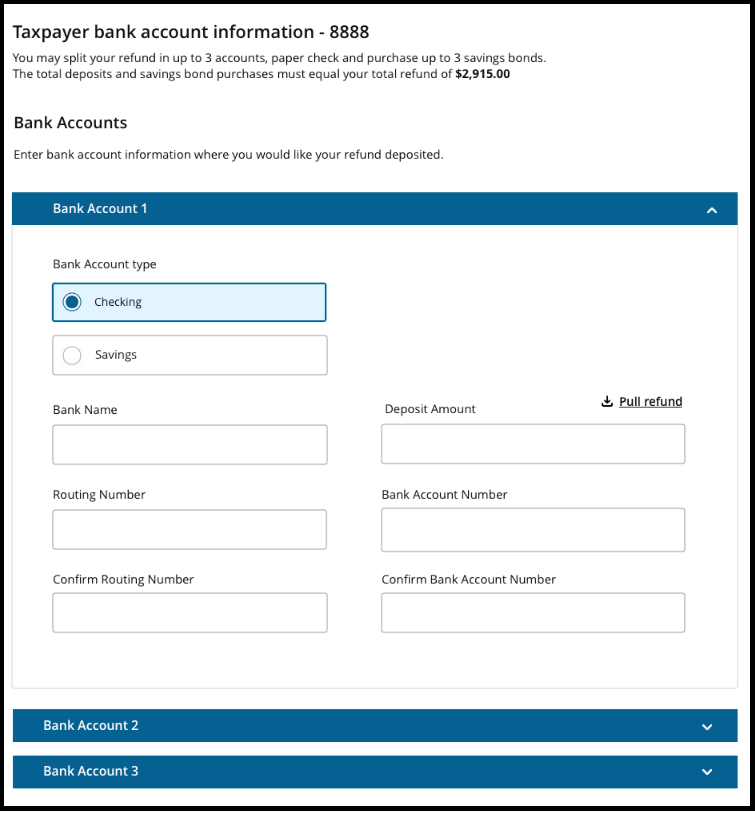
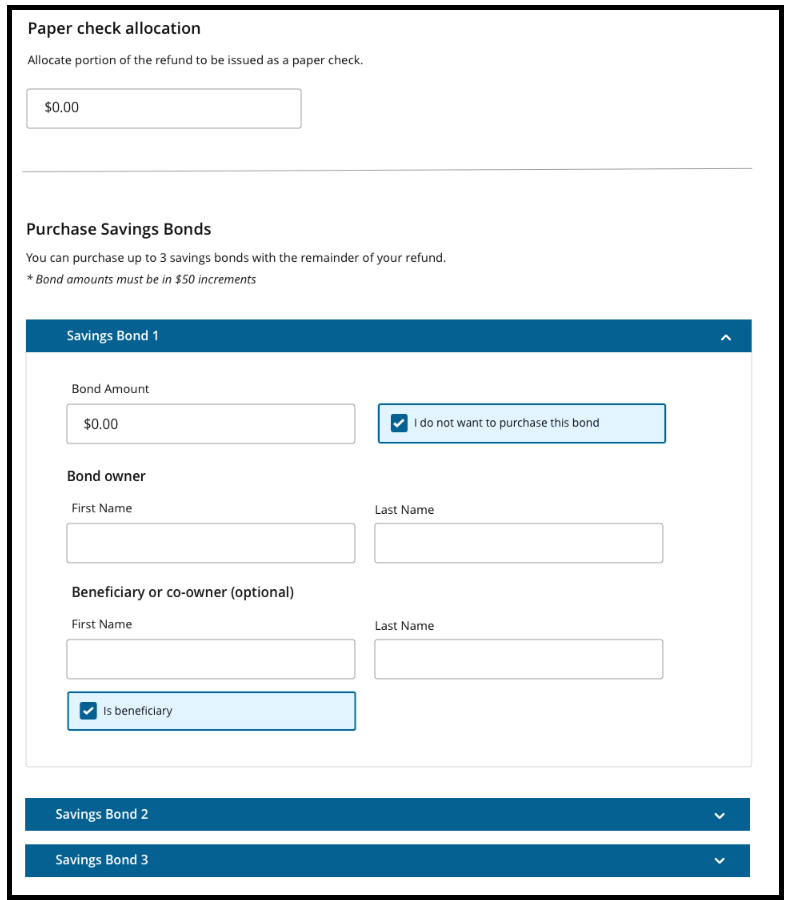
The bank account tab will allow you to enter direct deposit and/or direct debit information based on the Federal and/or State return type.  The basic functionality of it remains the same as it does in the current application.  We recommend setting selecting to use Form 8888 in office setup.  This will allow you easy access as you promote savings to have a deposit split into multiple accounts and/or allow the taxpayer to have a portion of their refund allocated to savings bonds.  Advantage:  The new layout only displays one active account at a time.  This makes it less confusing for the taxpayers that only want their refund deposited into one account.  If the taxpayer wants the refund deposited into multiple accounts, the user will expand the 2nd and then 3rd account.


Sneak Peek 2021: Changes to the E-file Section (Part 8)

22 Oct 21
Kim Manuel
No Comments

We are excited to begin introducing changes to the e-file section of the application.  These changes are designed to increase efficiency and to produce a more quality return.  As we begin seeing these changes internally, we will introduce them to you to make you aware of any changes that could impact the day to day operations of your site.

Bank Account: Non-8888 view

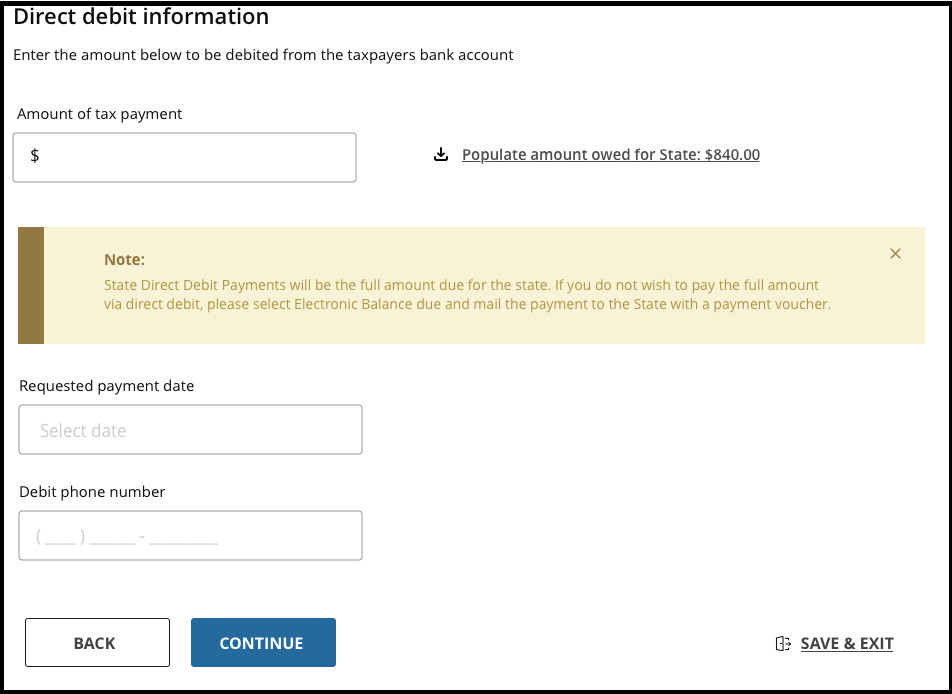
The bank account tab will allow you to enter direct deposit and/or direct debit information based on the Federal and/or State return type.  The functionality of it remains the same as it does in the current application.  The sample below is a Federal Direct Deposit and a State Direct Debit.  Clicking continue validates and saves the bank account information.

Sneak Peek 2021: Changes to the E-file Section (Part 7)

22 Oct 21
Kim Manuel
No Comments

We are excited to begin introducing changes to the e-file section of the application.  These changes are designed to increase efficiency and to produce a more quality return.  As we begin seeing these changes internally, we will introduce them to you to make you aware of any changes that could impact the day to day operations of your site.

Fees Section:  More Detailed Information

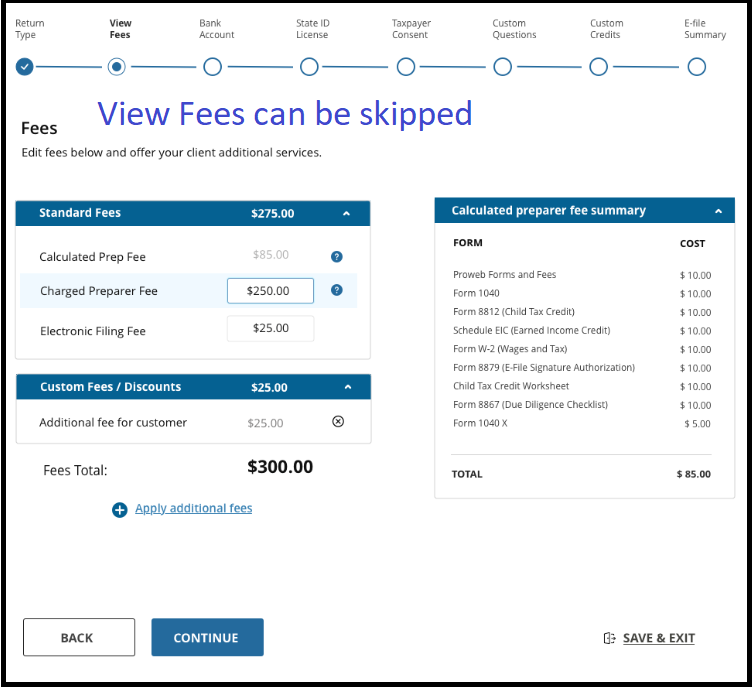
For sites that are tracking “fees saved” to the taxpayer, the fees tab displays more information on a per form level.  This also allows you to quickly see what forms are in the return if you are tracking “fees saved” to the taxpayer.  Advantage:  For those not tracking “Fees Saved” you can advance directly to the Bank Account tab and bypass this tab.

Sneak Peek 2021: Changes to the E-file Section (Part 6)

21 Oct 21
Kim Manuel
No Comments

We are excited to begin introducing changes to the e-file section of the application.  These changes are designed to increase efficiency and to produce a more quality return.  As we begin seeing these changes internally, we will introduce them to you to make you aware of any changes that could impact the day to day operations of your site.

Federal and State Return Types

We have moved the Federal and state return types closer together.  This allows the preparer to immediately move from making the federal selection to making the state selection(s).  This change will also allow the quality review user to see that all returns types have been selected.  Advantage:  This change should reduce the number of states that are marked as paper returns rather than electronic.

Sneak Peek 2021: Changes to the E-file Section (Part 5)

21 Oct 21
Kim Manuel
No Comments

We are excited to begin introducing changes to the e-file section of the application.  These changes are designed to increase efficiency and to produce a more quality return.  As we begin seeing these changes internally, we will introduce them to you to make you aware of any changes that could impact the day to day operations of your site.

Refund Summary Remains Visible

The refund summary for federal and state return(s) will be visible in the right navigation panel while in the e-file section.  This will allow for a more efficient review process when selecting and/or verifying how the taxpayer wants their refund/balance due filed.


Sneak Peek 2021: Changes to the E-file Section (Part 4)

20 Oct 21
Kim Manuel
, ,
No Comments

We are excited to begin introducing changes to the e-file section of the application. These changes are designed to increase efficiency and to produce a more quality return. As we begin seeing these changes internally, we will introduce them to you to make you aware of any changes that could impact the day to day operations of your site.

Return Type: Select your ERO

The first action you will take is to select the ERO if you are preparing and transmitting for adhoc/virtual sites that have their own unique SIDN. Note:  Check with your SPEC Relationship Manager regarding the requirements for your ad hoc/virtual sites.

Note: This does not impact how you setup your user accounts for each different SIDN.

Click here for Adhoc/Virtual instructions

Sneak Peek 2021: Changes to the E-file Section (Part 3)

20 Oct 21
Kim Manuel
No Comments

We are excited to begin introducing changes to the e-file section of the application.  These changes are designed to increase efficiency and to produce a more quality return.  As we begin seeing these changes internally, we will introduce them to you to make you aware of any changes that could impact the day to day operations of your site.

Ability to Add Notes

Users with the ability to Add Notes will be able to add notes from anywhere in the E-file section.


Sneak Peek 2021: Changes to the E-file Section (Part 2)

19 Oct 21
Kim Manuel
, ,
No Comments

We are excited to begin introducing changes to the e-file section of the application.  These changes are designed to increase efficiency and to produce a more quality return.  As we begin seeing these changes internally, we will introduce them to you to make you aware of any changes that could impact the day to day operations of your site.

Access to Return Menu

You will now have the ability to see and more easily navigate back to the return while you are in the e-file section.

Advantages:  More efficient quality review process