Category: Software News

Subscribe to VITA/TCE Blog

24 Jan 20
Craig Smith
No Comments

To subscribe to the VITA/TCE Blog, follow the below steps. Subscribing will allow you to receive automatic e-mail updates highlighting recently published blog articles (generally around 10:00am ET). These come in handy during tax season!

STEP 1:

  • Visit the VITA/TCE Blog and open any blog post.

STEP 2:

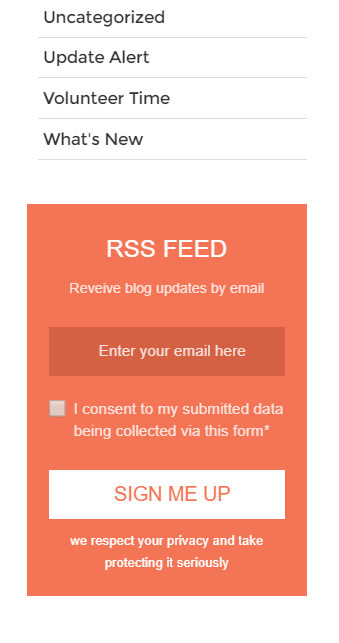
  • Scroll down the page until you see the below “RSS Feed” option on the right-hand side of the screen.
  • Enter your e-mail address, check the consent checkbox, then select “Sign Me Up”


STEP 3:

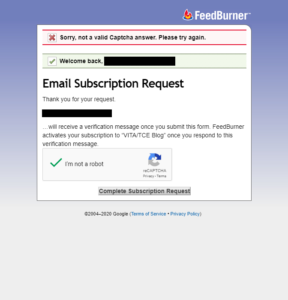
  • Check the reCAPTCHA box then select “Complete Subscription Request”


STEP 4:

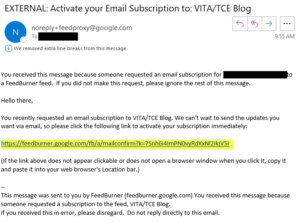
  • Check your provided e-mail account to finalize the subscription process.


Software Orders: Status Update

24 Jan 20
Kim Manuel
No Comments

Update 1/24/2020:  The IRS has released 300+ orders to TaxSlayer.  We are processing them.  This takes up to 48 hours.  TaxSlayer support will not know if a specific order was included until at least noon today (Friday, January 24th).  At that point they will be able to verify whether we have the order or not.  The contact person in the order will receive email notification within the next 48 hours.

Background:  TaxSlayer software ordering season began on October 2, 2019. All orders under the existing procurement order were fulfilled.  Due to an issue impacting the procurement of additional software licenses, TaxSlayer has to delay the processing of the remaining 2019 software orders, pending IRS approval.  The IRS is working diligently to resolve this issue.  Please continue to submit your orders.  You can reach out to your SPEC Relationship Manager to check the status of software ordering submissions.  Volunteers for the sites can continue to use the Practice Lab for training purposes.

ADMINISTRATOR Security Template is missing (FOUND)

23 Jan 20
Kim Manuel
No Comments

1/23/20 9:15am Update: As we progress towards a long-term solution, currently, any security template at your site(s) cannot be edited or deleted. New security templates can still be created, if needed.

1/22/20 7:30pm Update:You will need to use the security template titled  ADMINISTRATOR (TS) rather than using the ADMINISTRATOR at the top of your security template list in the Preparer’s menu.

1/22/20  6:08pm Update:  We are working on a solution that will prevent this from happening in the future, but it is still missing…hum…”Where’s Waldo?”

1/22/20 3:43pm Update:  We are still working to resolve this issue.

1/22/20 – Update: The Administrator (TS) template has been mistakenly removed again.


Update: Update:  You will need to use the security template titled  ADMINISTRATOR (TS) rather than using the ADMINISTRATOR at the top of your security template list in the Preparer’s menu.

Important Information

  1. Due to having to recreate and assign to users that inadvertently lost their ADMINISTRATOR account, if you had a blank security template it is now filled with ADMINISTRATOR (TS).  DO NOT try to remove it to blank, ADMINISTRATOR (TS) has the same privileges as the blank security template when you setup your admin accounts from the TaxSlayer link you received
  2. You will see ADMINISTRATOR (TS) in your security template list and it will be assigned to the users that used to have a blank security template and ADMINISTRATOR.  DO NOT delete it.
  3. You may also see ADMINISTRATOR (TS) twice in your list when  you select a security template when setting up a preparer.  You can use either, the first one in the  list is the one located in your Security Template page and 2nd one is the one we assigned down.  Both have the same privileges.

Below is an example of what ADMINISTRATOR (TS) looks like under your site’s Security Template page:


Update:  If you temporarily saw ADMINISTRATOR 21 in your list, it has now been renamed to Administrator.  Remember you can run your User Name report to ensure that all users have the appropriate user name assigned to them.


Sounds like something from a made for TV movie, but yes…the ADMINISTRATOR security template we assigned to every site is missing.  It was inadvertently removed from the system and we are working to recover it.


Controlled Launch 2020: Countdown to Send Time: Thursday, January 23 12:00 PM – 3:30 PM EST (TURNED OFF)

22 Jan 20
Kim Manuel
No Comments

Update 1/23 3?30 pm EST:  E-file has been turned off.  We will resume electronic filing for all years (2019, 2018 and 2017) on Monday around 11:00 am EST.

Update 1/23 1:45 PM EST:  We will be turning e-file off at 3:30 to ensure we receive acknowledgements.  The IRS will be shutting down MeF at 4:45 today in preparation for Monday.  Sending is a manual process through controlled launch.  We have submitted approximately 200 e-files so far.

Update 1/23 12:00 PM EST:  We have turned e-file on for 2019.  Please remember to review the returns prior to sending the electronic file.


Update 5:51 PM EST:  We have received our federal ack from this morning.  Here is what we know:

  • The Rejected Returns Report is returning an error page rather than information
  • The Federal Non-Accepted Returns report is returning an error page rather than information
  • The rejected link on the client status is not displaying information (however, the detailed reject information is located under “Rejected Clients” and “Client Status”


REMINDER:  We strongly recommend that you open each return and exit through the Submission screen of E-file by clicking the Save and Exit return button. This allows the most recent forms/calculations to be saved with the return.

You can then navigate to Client Status for the return by selecting Client Status from the Tools menu on the Client List.

Compare the AGI and Refund calculated today with the last time you were in the return before sending the file electronically (January 27th).

Update 3:46 pm EST:  We are continuing to work to receive our first acknowledgement.   Our goal is to allow early participation on Thursday, January 23rd from 12PM – 4 pm EST.

Update 12:15 PM EST:  We have delayed turning this on until we receive an ack back on the first e-file we sent. 


The IRS is moving into week two of controlled launch.  We are Tentatively planning to open e-file for TY2019 returns for a short period of time on Wednesday, January 22nd from 12 PM – 4 pm EST.

During this period, we will send VITA/TCE returns to the IRS and receive acknowledgements.

This date and time is subject to change or the process is subject to stop based on feedback from the IRS.
TaxSlayer FSA Overview 2020 Webcast

22 Jan 20
Kim Manuel
No Comments
TaxSlayer FSA Overview 2020
Wednesday, January 22, 2020
3:00 PM Eastern Time
This is a discussion about TaxSlayer’s Faciliated Self Assistance (FSA) option for partners using TaxSlayer.com and will provide an overview of the software, reports and other features.  A question and answer session will follow.

What you will learn:

  • Overview of TaxSlayer FSA software and benefits to partners
  • Recap of ordering procedures
  • Q&A
Speakers:
Craig Smith, TaxSlayer
Dan Maier, Cheif, SPEC National Partnerships

Controlled Launch 2020: Tentative Date and Time (Not quite ready yet)

21 Jan 20
Kim Manuel
No Comments

Update 3:46 pm EST:  We are continuing to work to receive our first acknowledgement.   Our goal is to allow early participation on Thursday, January 23rd from 12PM – 4 pm EST.

Update 12:15 PM EST:  We have delayed turning this on until we receive an ack back on the first e-file we sent. 


The IRS is moving into week two of controlled launch.  We are Tentatively planning to open e-file for TY2019 returns for a short period of time on Wednesday, January 22nd from 12 PM – 4 pm EST.

During this period, we will send VITA/TCE returns to the IRS and receive acknowledgements.

This date and time is subject to change or the process is subject to stop based on feedback from the IRS.
TaxSlayer Pro Online: Print Issue – All Years (RESOLVED)

19 Jan 20
Craig Smith
No Comments

9:21am ET: At this time, prints for all years have returned to normal operations.


9:03am ET: The issue has been identified and actively being worked at this time. During this period, you may experience interruption with real-time calcs.


8:49am ET: We are currently investigating as to why generating a PDF is not rendering for all years.

Volunteer Time: Q&A from All Partner Call – 1/16/2020

16 Jan 20
Craig Smith
No Comments

Below are bullet points from our opening presentation at the beginning of the All Partner call before opening up for Q&A from the field.

  • Friday, January 17th:  Turning on Start a New Return at the production site levels
    • We strongly recommend that you open each return and recheck the calculations for returns created between January 17th and January 27th
      • Screenshots are posted on the blog about how to do this
  • Monday, January 27th:  Turn on the ability to send federal and state e-files
    • Turn on after the mad rush of other vendors sending returns
    • Do not expect acks back within 8-15 minutes on day 1
    • If the return has an e-file block in it due to the extenders, make sure you use a return tag
    • Send state only will be turned off for a few days
  • Controlled Launch:  TaxSlayer is currently participating in Controlled launch for the commercial offices.
    • Making changes as we find things during the e-file process
    • We will have a day next week where we will open e-file for a few hours so volunteers can send some returns
      • We will post information to the blog

States:

  • All of the states are currently available in the Practice lab and will be available in your production sites
  • All states are approved for e-file except Delaware
  • If there is a “DO NOT MAIL” strip on the state form,  it is still OK to electronically file the return.
    • The strips will be removed once the state has given us print approval.
      • This is usually later than e-file approval

Blog:

  • “What we Know” posts
    • List federal items that have been reported as issues that are open and those that are resolved.
    • There is also a link to a PDF of known state items
      • These are primarily issues that impact the tax calculation of the state
  • Release Note posts
    • Currently and for the next couple of weeks, we are doing daily deploys so we can get updates out quicker
      • These deploys start at 5:00am ET and there is typically only a small window of time where the returns are in maintenance mode
    • We try to give you an idea of what changes are coming the night before
    • Craig updates the post with what has been delivered as soon as he walks through each one

Software Orders:

  • All software orders that we have received have been processed
    • All sites that we have not received an order for have been marked as inactive.
    • All FSA Standalone links have been emailed out
    • All FSA Fusion links have been emailed out
  • We recognize this leaves some sites without an active software order.
    • As soon as the IRS can send us the orders, they will be processed and marked as active
    • DO NOT be creative and add an inactive EFIN as an ERO to an active site…the returns will not pass validation and be sent to the IRS
    • Under no circumstances, should multiple EFINs be entered in ERO setup for Pro Online
  • New Site Administrators
    • Review the instructions on the blog and send your requests to vita support
      • EFIN
      • Site Name
      • Site Admin Name
      • Site Admin phone number
      • Site Admin email

Groups

  • All groups have been setup from the orders we have received
  • AARP sites need to reach out to AARP Foundation if they are missing someone from their group.
  • Relational Groups:  check your offices to ensure they are all there.  We have already assigned the required Relational consent to all sites.  If you are missing a site, they must be added prior to them starting returns because we have to add them to the group, assign the consent and the consent is  not retroactive

Virtual/Ad Hoc Site

  • Review the Blog post titled “Pro Online 2019: Virtual/Ad Hoc Setup”
  • The SIDN that goes in the e-file is the one assigned to the user via Preparer Setup
  • Make sure you copy the Customer ID and Office Identifier to the new ERO when you are setting the Virtual/Ad Hoc sites to print on the return

FSA Fusion and FSA StandAlone

  • All links have been distributed for the orders we have received
  • Craig will be conducting a webinar on the TaxSlayer FSA program at 3:00 PM EST on Wednesday, January 22nd.
    • Once we have a registration link, we will post to the blog if you wish to attend

Office Setup

  • Site Administrators, we strongly recommend you go in and review the office configuration located under office setup.  We recommend the following be selected for all sites
    • Disable Third Party Designee Prefill
    • Offer 8888
    • Display Summary using 1040 View
    • Hide Preparer Name on 1040 Print
    • Always print Schedule A

Suggestion Box

  • Open year around for software enhancement suggestions
  • If you believe there is a defect in the software, you need to reach out to support
    • Recommend email with screen shots if applicable, detailed explanation of issue, EFIN and last 4 of the SSN
    • They will review this and put in an issue so the development team can review and resolve if applicable

The following are questions and corresponding answers that we received on the Partner Call that was held on Thursday, January 16th. We are posting questions that are most applicable to all sites.

Q1: Our site opens Sunday the 26th. Will TaxSlayer be open by then?

  • Yes, Start New Return for 2019 will begin on January 17th.

Q2: Can we e-file state returns attached to 1040-NR returns?

  • No, state returns added to a 1040-NR return must be paper filed. The 1040-NR can be e-filed.

Q3: Can you go over what is starting on January 17th vs January 27th?

  • January 17th is when sites can begin to prepare 2019 tax returns. January 27th is when the IRS opens for e-file and we will allow sites to transmit returns. We recommend opening any tax return prepared prior to January 27th to ensure the latest updates are applied to the return before e-file.

Q4: What is the best way to send in long requests via the Suggestion Box that may include pictures?

  • We recommend not including any pictures with your suggestion as we will reach out to you via e-mail for any additional information needed.

Q5: How do you receive the FSA URL?

  • FSA/Fusion orders are placed by your SPEC RM. Reach out to them if you will operate a FSA/Fusion site.

Q6: Can prior years be e-file before January 27th?

  • No, they cannot. January 27th

Q7: Do enhancements mentioned apply to prior years as well?

  • Enhancements are generally applicable to the current year and forward.

Q8: Can you deactivate returns that have not been e-filed?

  • Yes, if they are “In Progress” or “Review Failed” and you have a Security Template that supports deactivating returns.

Q9: Where can I access the VITA/TCE Blog?

Q10: 1040-SR – Is it going to be available to include in a print set?

  • 1040-SR can be added to a custom print set created at the group or site level, but will not be supported in default print sets delivered with the software.

Q11: Does Site Admins need to do anything in prep of January 17th?

  • Just make sure all of your volunteers are set up with logins so they can hit the ground running!

Q12: How to set up consents?

  • Prior year consents will still be available at your site, but edits/updates can be made within Configuration > Consents menu.