Tag: Prior Year Data

Pro Online 2016 & 2015: Returns in transmitted status since 2/2 (Updated Info)

07 Feb 18
Kim Manuel
, ,
No Comments

Updated Info:

This does include prior year returns transmitted prior to 2/2/2018.  For 2016 returns, to determine if your “transmitted”r return falls into this situation; select the Client Rejects button on the Welcome page, switch to 2016 and select Validation errors from the drop down.  If the 2016 return is not on the validation list, it is impacted by this issue

For 2015 returns, to determine if your “transmitted” return falls into this situation, navigate to Reports >> Validation Errors and run the report.  If the 2015 return is not on the validation list, it is impacted by this issue

~~~~  Original Blog Post ~~~~

Scenario:  You have transmitted a prior year e-file and the return is still in transmitted status and you are not showing any validation errors.  These appear to be returns submitted after 2/1/2018. Issue ID 1001

Current Status:  We are actively researching this and will update this post when we have a resolution or additional information.

Blog posted 02/07/2018

Pro Online 2016/2015: Consent to Disclose Tax Return Information to VITA/TCE Tax Preparation Sites

01 Feb 18
Kim Manuel
,
No Comments

Scenario:  The Consent to Disclose Tax Return Information to VITA/TCE Tax Preparation Sites is showing up in my 2016 and 2015 return.

Why? The consents are currently designed to be year agnostic.  We are looking to modify this behavior in the future.

What do I do? Since the consent does not apply to the tax years 2016 and 2015, you can simply select deny, enter a PIN and date.

Blog Posted 02/01/2018

Pro Online: Paper Global Carryforward Consent Form

17 Jan 18
Kim Manuel
, ,
No Comments

The following was sent out by the IRS Core team:

This filing season 2018; taxpayers using volunteer sites will need consent annually on whether they want their tax return information accessible to all sites participating in the VITA/TCE program. A taxpayer who consents will be able to visit any volunteer site in the subsequent year and the site will be able to populate the return with data from the prior year. This is a two-year process.

Based on IRC 7216, if the return preparer is entering the consent PIN and date into the tax preparation software the taxpayer must sign and date a paper consent form before entering the consent PIN and date into the tax preparation software. The site may give the signed paper consent form to the taxpayer or maintain at the site. Whether the signed copy is given to the taxpayer or maintained at the site, a copy of the consent in the tax preparation software with the PIN must be provided to the taxpayer for his/her records.

Many taxpayers do not want to enter their own PIN, so we have been asked about guidance for paper consents to ensure sites are compliance.  Attached is the consent form approved by Counsel with the mandatory language for a paper Global Carry Forward consent based on IRC 7216.  Use of this paper consent is only required for sites when the return preparer is entering the Global Carry Forward consent PIN on behalf of the taxpayer.

Click here to download PDF

Blog Posted 01/17/2018 3:42 pm eastern


Pro Online 2017: Carry Forward Data 1099-R

16 Jan 18
Kim Manuel
,
No Comments

Scenario:  The data being pulled forward includes the 1099-R

Problem:  The Taxpayer street address is not being pulled with the information, just the City, State and Zip to the 1099-R that pulled forward

Workaround:  You will have to manually enter the street address

Solution:  We will correct this in a future update.

Blog Posted 01/16/2018

Pro Online: Consent to Disclose Tax Return Information to VITA/TCE Tax Preparation Sites

16 Jan 18
Kim Manuel
,
No Comments

Why is this consent showing up in all of my returns?

This Consent has been assigned to all locations.  The consent must have a PIN and date for Taxpayer/Spouse in order to validate the E-file  page.  This is step 1 of a 2 year process to allow taxpayer information to be available if the taxpayer/spouse goes to an active VITA/TCE site the next year.

Can this be removed from my site?

No. This is part of the Global Carry forward program implemented for VITA/TCE.

Will I still have same site to same site carry forward data available if the consent is denied?

Yes.  This does not impact normal same site to same site carryforward

Explanation of process with a positive/accept consent (Scenario A)

  • Return is prepared at VITA/TCE Site A for Tax Year 2017
  • Consent is granted
  • Taxpayer goes to VITA/TCE Site B in Tax Year 2018
  • The taxpayer’s information is made available to pull forward at Site B because they accepted the consent

Explanation of process with a positive/accept consent (Scenario B)

  • Return is prepared at VITA/TCE Site A for Tax Year 2017
  • Consent is granted
  • Taxpayer returns to VITA/TCE Site A in Tax Year 2018
  • The taxpayer’s information is made available to pull forward at Site A because it is same site to same site

Explanation of process with a negative/deny consent (scenario A)

  • Return is prepared at VITA/TCE Site A for Tax Year 2017
  • Consent is denied
  • Taxpayer goes to VITA/TCE Site B in Tax Year 2018
  • The taxpayer’s information is NOT made available to pull forward at Site B because they denied the consent

Explanation of process with a negative/deny consent (scenario B)

  • Return is prepared at VITA/TCE Site A for Tax Year 2017
  • Consent is denied
  • Taxpayer goes back to VITA/TCE Site A in Tax Year 2018
  • The taxpayer’s information is  made available to pull forward at Site A because it is same site to same site

Known issues:

  • The Consent is not printing the appropriate wording if the taxpayer denies consent.  We are working towards a resolution that will be applied in a future update.

Pro Online: Prior Year Carry Forward Screens

16 Jan 18
Kim Manuel
,
No Comments

Pull Data to Current Return:

The top portion of the Pull Data to Current Return screen displays the specifics of the items that will be pulled forward.  This is a good opportunity to check through what the taxpayer has provided to see if they have forgotten something.  For example:  If you have three  W-2s listed (as I do below) and the taxpayer has only provided you with two W-2s, this is a good opportunity to ask about the third.  If they no longer have a W-2 from that employer, simply remove the checkbox.

Note:  Being prompted to Pull Data to Current return only occurs one time when you initially create the return.

Selecting to Pull Data to the return

The bottom half of the screen, displays the items that have no data to pull forward.  You have the opportunity to do three things at this point:

  1. Show All — expands the listing of data that does not carry forward (this example is from a different return than the screenshot above that did not have dependents or W-2s)
  2. No Thanks – Will start a blank return
  3. Yes, Import my Data — Will import that data for the items selected
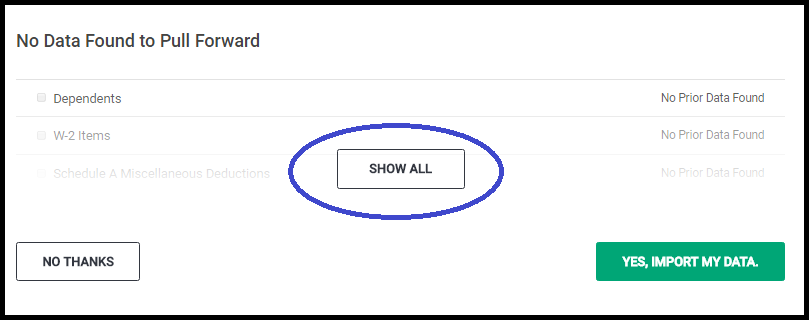
Selecting Yes, Import My Data will land you on the Filing Status Page

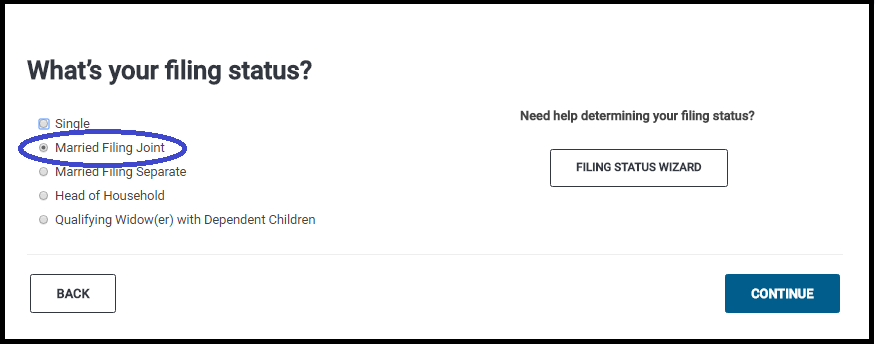
The Filing Status of the prior year return will be selected.  You have the opportunity at this point to make changes.  In the screenshot below my prior year return was MFJ.  Click Continue to review the Taxpayer/Spouse demographic information and make any corrective changes.
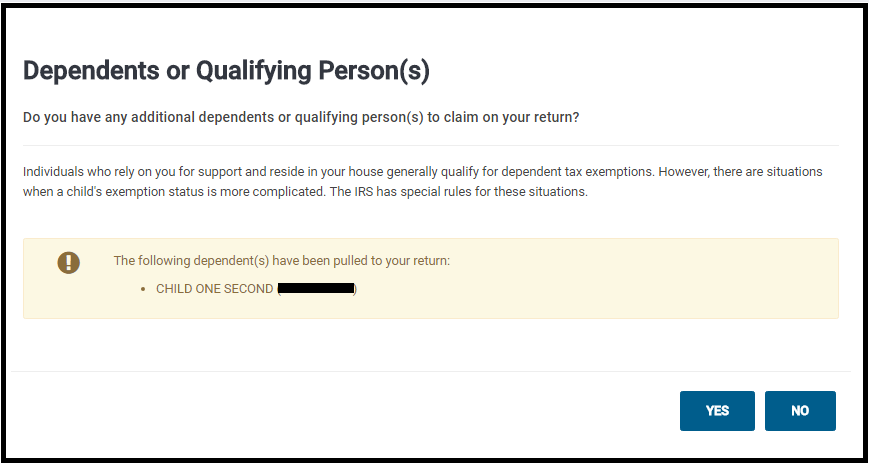
Dependents or Qualifying Person(s) screen.

This screen will display the dependents that were selected in the dependent section.  If you have additional dependents or want to make modifications select Yes, otherwise, selecting no will take you to the Federal Section.
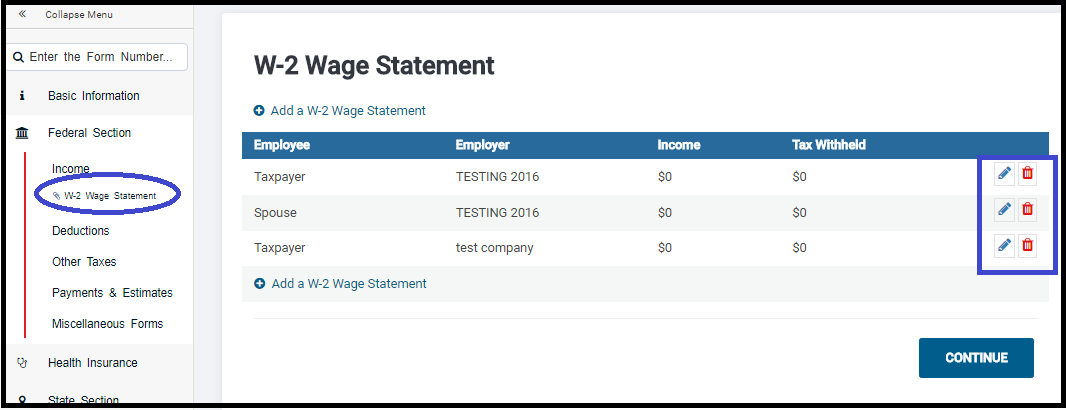
Example of pulling forward the W-2 Information.

This example has three W-2s selected to pull forward.  Note:  Removing the check will prevent the information from pulling forward.

This is what your screen will look like after pulling the data forward. At this point, you can edit the income document and enter the current year income information.  Note:  If you changed the address in the Personal Information Section,  you will also need to change it on the income document you pulled forward.  Notice it loaded the W-2 Wage Statement as part of the Forms Completed feature.  Simply click on it to manage the W-2s.
Blog Posted 01/16/2017  7:54 am eastern