Tag: Pro Online

Product Update Alert: Wednesday, March 21 @ 5:00 am ET

20 Mar 18
Kim Manuel
,
No Comments

We will be putting the returns in maintenance mode at 5:00 am ET to apply a series of updates.  The update is scheduled to include:

  • Auto filling Box 2a on the 1099R (Issue #1646)
  • Expanding the Form Finder display when searching for specific forms from the left navigation bar
  • Updated text within the 8880 menu to point out that current year distributions reported as income are automatically included in the 8880 calc to avoid double-entry
  • Zip Code Updates
    • 39854 – Georgetown, GA
    • 48193 – Riverview, MI
    • 85756 – Tucson, AZ
    • 60124 – Elgin, IL
    • 60418 – Crestwood, IL
  • Fixed an issue where the CF-1040 was not included in the PDF for 2016 MI returns (Issue #261)
  • Fixed an issue where adding the OH RITA locality form within the 2016 program would break the print (Issue #1527)
 

Information from SPEC HQ: Possible Scam Reporting of Elder Care Wages

20 Mar 18
Kim Manuel
, ,
No Comments

Background:  We received a report of a possible scam involving taxpayers claiming Elder Care Wages to receive a larger refund that includes refundable credits such as Earned Income Tax Credit.  The taxpayers visiting the site provided a handwritten document claiming to be from an individual stating they paid the taxpayer for elder care.

Message for Relationship Managers:

  • Share the possible scam with partners.
  • Advise partners that the Site Coordinator has the discretion to decline tax preparation services if sufficient documentation is not provided by the taxpayer.

Message for Partners:

  • Be vigilant in identifying possible scams.
  • Report possible scams to your local SPEC representative.
  • Use the below reference documents to assist with reporting possible scams.

Reference Tools:

Pro Online: 1099-R PSO Exclusion Subtracting from Gross Distribution when Box 1 and 2a are Different (RESOLVED)

20 Mar 18
Craig Smith

No Comments

3/22/18 – RESOLVED – We recommend accessing each impacted return to verify the 1099-R and PSO exclusions are correctly reflected prior to filing.

Issue #1703 has been opened to resolve an issue that started on Monday, March 19th, after updates were deployed (after 6:00am ET).

What is the issue?

  • Claiming the PSO Exclusion within the 1099-R, shows the exclusion amount being subtracted from the Box 2a (taxable amount) entry. However, what is carrying to the 1040 and included in the calculation of the return is the PSO excluded amount subtracted from the Gross Distribution (Box 1).

What returns may be impacted?

  • Returns reporting a 1099-R with a PSO Exclusion where the amount in Box 2a (taxable amount) is different than the amount in Box 1 (Gross Distribution). Do not file impacted returns until this post has been marked as RESOLVED.

What returns are not impacted?

  • Returns reporting a 1099-R with a PSO Exclusion where Box 2a (taxable amount) is the same as the amount in Box 1 (Gross Distribution) before the exclusion is applied.
  • Returns reporting a 1099-R and the Simplified General Rule Worksheet is used to determine the taxable amount and also taking the PSO Exclusion from the SGRW calculated taxable figure.

Product Update Alert: Monday, March 19th @ 5:00 am EDT

16 Mar 18
Kim Manuel
,
No Comments

We will be putting the returns in maintenance mode at 5:00 am ET on Monday, March 19th to apply a series of updates.  The updates are scheduled to include:

  • Resolution for Issue ID 1640 (RRB-1099-R)
  • 1040 View for MFS returns displaying Spouse name in the wrong entry
  • Correction for VT Renter’s Renter’s Rebate (Issue #1589)
  • User Interface update to the drop-down menu display within Wisconsin state program
  • Fixed a display issue on the IN amended return where the county code was not showing on the PDF (Issue #1613)
  • Fixed a Kansas EIC issue where EIC was not calculating in instances where the KS EIC was the same amount as the tax liability (Issue #1589)
  • Update the drop-down options within the MA Schedule C menu for Costs of Goods Sold (Issue #1619)
  • Added back Oregon subtraction #308 for Tuition and Fees Deduction within Part Year OR returns (Issue #1615)
  • Update to the NM program that if an amount is owed and state return type is Direct Debit, do not generate the payment voucher (Issue #1571)

Pro Online:  Adding 1099-MISC Income to an existing Schedule C

16 Mar 18
Kim Manuel

No Comments

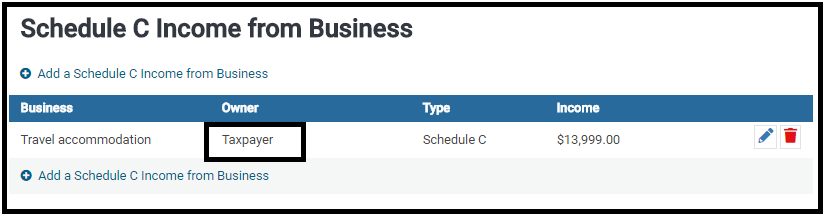
Scenario:  A schedule C has already been created for the taxpayer or spouse and you want to add additional income to the existing schedule C.

Example of existing Schedule C assigned to the Taxpayer

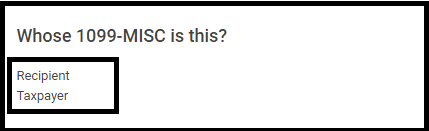
Next:  Add a 1099-Misc for the Taxpayer with a $ value in Box 7:  non employee compensation and click Continue

You will be presented with Where would you like to add the income?

Options:

(1) Click the Edit icon to add the income to an existing Schedule C. (Will add to the Income of the existing C)

(2) Click Create a New Schedule C income from business (Will add the income to a new Schedule C)

IRS Reject: IND-158

16 Mar 18
Kim Manuel
, ,
No Comments

Scenario:  The return was prepared for taxpayer/spouse whose between the age of 25 and 64 with Earned Income, however the IRS rejected the return for the following:

IRS reject:  Reject Code IND-158
Message If ‘EarnedIncomeCreditAmt’ in the return has a non-zero value and Schedule EIC (Form 1040A or 1040) is not present, then the Primary or Spouse must be at least 25 but less than 65 years old.
Data Value XX

Why did it get rejected?  The IRS master file has a date of birth on file for rejected person that puts the age out of the above range.

Solution:  The taxpayer/spouse will need to contact the Social Security Administration to determine what they have on file for the SSN and then request the information be corrected and/or updated in the IRS system.

Product Update Alert – Friday, March 16th at 5:00am ET

15 Mar 18
Craig Smith
,
No Comments

We will be placing the site in maintenance on Friday, March 16th at 5:00am ET to release a series of updates.

  • Update the year shown on Spanish Form 8879 within 2017 program (Issue #1568)
  • Adding CA Schedule X as a configurable print set form (Issue #1590)

Pro Online: 1099-R Box 2a Not Displaying Gross Distribution Amount (RESOLVED)

15 Mar 18
Craig Smith

No Comments

3/21/2018 – RESOLVED

We have opened Issue #1646 to correct a display issue when first creating a 1099-R in a return. The Gross Distribution reported in Box 1 is not displaying in Box 2a. If creating a new 1099-R and reporting the Gross Distribution, you don’t catch that Box 2a didn’t auto-fill, don’t worry, the value is still saved when clicking “Continue” to exit the 1099-R. There is no impact to a return in this situation.

  • When creating a new 1099-R, entering $10,000 in Box 1, saving the entry without also entering a value in Box 2a, the 1099-R will save the taxable amount as if it automatically carried over from Box 1 (which it still does)
  • When creating a new 1099-R, entering $10,000 in Box 1, then making a manual entry in Box 2a of $9,000, the manually entered Box 2a amount of $9,000 is what saves and carries to the return as taxable
  • When creating a new 1099-R, entering $10,000 in Box 1, then completing either the Simplified General Rule Worksheet and/or PSO exclusion, the correct taxable amount will carry to Box 2a and be included with the return

This is only a display issue when tabbing off of the 1099-R Box 1 field and not seeing the same value auto-fill within Box 2a.