Author Archives: %s

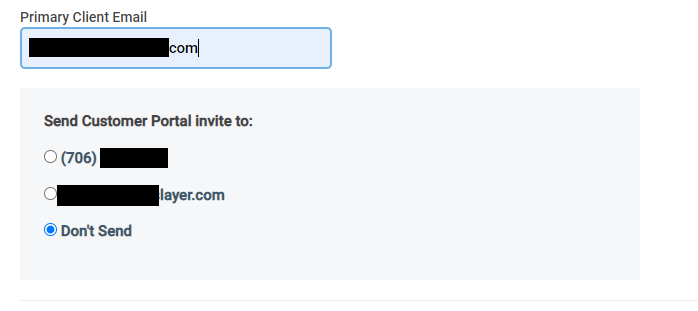
Customer Portal 2022: Send link from Personal Information Page

16 Jan 23
Kim Manuel
No Comments

You can now send your taxpayer their Customer Portal link from the Personal Information Page.  The option will appear once you enter their email address on the personal information page.   It defaults to “Don’t Send”.  It automatically populates the email address and telephone number entered on the personal information page.  Once you click continue on the page, an email is sent to the taxpayer with a link for them to register their account

Security Manager: New definition added

06 Jan 23
Kim Manuel
No Comments

We have added the following definition to Security Manager “Allow entry into Accepted Returns”.  It is enabled by default for all of the TaxSlayer assigned templates.

What is the purpose?

If you remove the checkmark, the user will not be able to open an accepted return to make modifications to it.  This feature can be used instead of using the “Hide Accepted Returns from Limited Users” definition.  The advantage is that they can still see the accepted returns in their list, but cannot open and modify them.

Pro Online: All Years — Setting up Ad Hoc Sites

05 Jan 23
Kim Manuel
No Comments

Ad Hoc Site Scenario:

Site has a “main” site and also has one or more “ad hoc” site .

  • The main site has an EFIN and SIDN (Snnnnnnn01)
  • Ad Hoc site #1 has its own SIDN (Snnnnnnn02) because the IRS wants the returns prepared at the ad hoc site to report under the correct SIDN.
  • Ad Hoc Site #2 has its own SIDN (Snnnnnn03)

Instructions for Setting up in TaxSlayer Pro Online:

  • Create separate Preparers for the volunteers who work at the ad hoc site.
  • Enter the SIDN of the Ad hoc site in the Preparer Setup. (The SIDN on the Preparer record is the one that carries to the PTIN field on Form 1040 and is captured in the e-file for reporting purposes)
  • Best Practice: Use something in the user name to indicate the site where they will be preparing returns.  For example:  KrisMain for preparing returns at the main site and then KrisAdhoc1 for preparing returns at the ad hoc site.

Note:  If a volunteer prepares returns at the main site and each ad hoc site, they will need a username for each to ensure the correct SIDN is in the e-file.  The preparer can use the same email address in this circumstance.

Click here to download a PDF of complete instructions

VITA/TCE Suggestion Box

19 Dec 22
Kim Manuel
,
No Comments

Your ideas and suggestions are important to us. The VITA/TCE Suggestion Box is designed for you to give us your feedback and ideas that will assist you in servicing your taxpayers. Each submission is designed to be one suggestion so we can more easily track the information and provide feedback. You can submit multiple suggestions.

A link to the VITA/TCE Suggestion Box is available on the left navigation bar within the TaxSlayer Pro Online application so you have access to it when you are logged in to either your site or The Practice Lab. The Suggestion Box is how you submit all software revision/enhancement requests. If you try to submit suggestions by contacting VITA/TCE Support, they will ask that your suggestion be submitted via the Suggestion Box.

The VITA/TCE Suggestion Box allows us to easily make all suggestion/enhancements available to the entire VITA/TCE community, along with implementation feedback directly to you.


Information you will need to submit a suggestion (all required)

What is your SIDN?

  • Enter the 8 numerical digits.  This allows us track all of the suggestions submitted by your site.

What is your email address?

  • This is very important in case we need to reach out to you to ask clarifying questions.

Program Type?

  • You will choose from the drop down list.

What is your primary role at your VITA/TCE site?

  • We know that many of you perform multiple roles at the site.  However, select the role that is your primary responsibility.  You also have the option of selecting “Other” and then specifying your role.

Software Type used at your site

  • Select either Pro Online or Pro Desktop

Select the Program Area for your suggestion/enhancement

  • This helps us categorize the requests.  If you select State, you will need to enter your State Abbreviation

Provide a detailed description of your suggestion/enhancement

  • The more detail you can give us the better.  We want to understand exactly what you are looking for.

How would the above suggestion/enhancement benefit your site

  • Tell us how this suggestion/enhancement would benefit your site. For example:  45% of the taxpayers that come to my site need to file Form XXXX.  If it were implemented in the software, it would save us a considerable amount of time manually preparing that form and we could e-file more returns.

Suggestion/Enhancement Classification

  • Calculation = The change impacts the calculation of the tax return
  • Usability Improvement = The change makes it easier and more efficient to complete a tax return
  • Quality Improvement = The change enhances the quality review process and/or the overall quality of the return

What is your priority ranking?

1 = Critical to prepare an accurate return.

2 = Important

3 = Nice to have

Click here to access the VITA/TCE Suggestion box

You will need to open a new instance of the link for each new suggestion.

Note: The VITA/TCE Suggestion box is powered by Survey Monkey


VTA 2023-02 Certification Testing Using Practice Lab

02 Dec 22
Kim Manuel
No Comments

Purpose
Volunteers should use caution when completing their certification tests using the Practice Lab.
Identified Issues
The Practice Lab has not yet incorporated all 2022 tax law changes. As a result, certain calculations may not be updated. This may cause users to make inadvertent errors when taking their certification tests.

It is recommended that volunteers generate the tax return PDF from the Client List or Summary/Print menu to see the return on a tax year 2022 draft Form 1040.

Message to Volunteers
Unless you have an immediate training need to certify for tax year 2022, volunteers should wait to take the 2022 VITA/TCE certification tests until the final tax forms are available in the Practice Lab.

The identified issue in the Practice Lab may affect your answers for any certification or practice return preparation scenarios that include:

■ Education credits
■ Business or medical mileage
■ Educator expense
■ PMI deduction
■ General sales tax

Other tax provisions may also be affected.

Again, volunteers not having an immediate need to certify should wait until the Practice Lab is updated. Volunteers are encouraged to check the TaxSlayer

VITA/TCE blog page for Practice Lab updates. Volunteers who have a need to certify early may discuss the impact and possible workarounds with their SPEC relationship manager.

Use caution when completing the following test and retest scenarios:

■ Advanced, Scenario 7
■      Question #18 calculation includes educator expense deduction
■ Federal Tax Law Update Test for Circular 230 Professionals, Scenario 4
■ Question #12 requires calculation for standard mileage rate
■ Question #15 calculation includes educator expense deduction.
■ Foreign Student and Scholar Test, Scenario 3
■ Question # 33 Due to the charitable contributions exemption not being extended the answer is A. True
■ Foreign Student and Scholar Test, Scenario 4
■ Question # 35 Due to the software calculating treaties at different times this year, the answer is A. True
■ Question # 35 Retest: Due to the software calculating treaties at different times this year, the answer is D. $15,220


Resources
For specific information refer to the following resources:

■ TaxSlayer VITA/TCE Blog
■ Pub 4491, VITA/TCE Training Guide, Important Changes lesson

Message for SPEC Employees, Partners, and Volunteers
Please use caution when completing the tests/retests.

For additional questions, please talk to your site coordinator, partner, or IRS SPEC relationship manager.

Thank you for volunteering and for your dedication to top QUALITY service!

2022 Orders have arrived

01 Dec 22
Kim Manuel
No Comments

We are processing our first set of orders from the IRS. Below is what you can expect:

Returning Sites

  • The email address submitted with the order will receive 1 email confirming that we have processed the order.

New Sites

  • The email address submitted with the order will receive 2 emails
  • The links are one time use only links
  • You must know your SIDN in order to create your Admin account
    • TaxSlayer support WILL NOT give you this information
    • If you do not know the SIDN associated with the order, you MUST reach out to your SPEC Relationship Manager
  • The default PIN = 98765
  • Print Sets, Security Templates, etc will be assigned to your site within 3 business days (Monday-Friday)

Relational and Multi-Site Groups

  • The goal is to have these setup and/or updated within a week of processing the order

We will receive orders weekly through the end of December.  Note that any site that we do not have a 2022 order for on 12/31 will be marked as inactive until we receive an order.  We will receive orders two times a week beginning in January.

Issue Number: Tax Tip 2022-182 There’s more to determining filing status than being married or single

29 Nov 22
Kim Manuel
No Comments

Some taxpayers are eligible for more than one filing status. As they get ready for the upcoming filing season, taxpayers should carefully review their options to pick the filing status that makes the most sense for them. Those who are only eligible for one filing status should be sure to review their situation after a major life event like marriage or divorce.

Filing status is important because it affects:

  • If the taxpayer is required to file a federal tax return
  • The type of return form the taxpayer needs to use
  • If they should file a return to receive a refund
  • Their standard deduction amount
  • If they can claim certain credits
  • The amount of tax they should pay

Here are the five filing statuses:

  • Single. Normally this status is for taxpayers who are unmarried, divorced or legally separated under a divorce or separate maintenance decree governed by state law.
  • Married filing jointly. If a taxpayer is married, they can file a joint tax return with their spouse. When a spouse passes away, the widowed spouse can usually file a joint return for that year.
  • Married filing separately. Married couples can choose to file separate tax returns. When doing so, it may result in less tax owed than filing a joint tax return.
  • Head of household. Unmarried taxpayers may be able to file using this status, but special rules apply. For example, the taxpayer must have paid more than half the cost of keeping up a home for themselves and a qualifying person living in the home for half the year.
  • Qualifying widow(er) with dependent child. This status may apply to a taxpayer if their spouse died during one of the previous two years and they have a dependent child. Other conditions also apply.

What Is My Filing Status?
If taxpayers are confused about their filing status, they can use the What Is My Filing Status? tool Interactive Tax Assistant tool on IRS.gov. This tool can also help taxpayers who are eligible for more than one status find the one that will result in the lowest amount of tax.

1040 Modernized e-File (MeF) Production Shutdown and Cutover — Transmissions

23 Nov 22
Kim Manuel
No Comments

All electronic files need to be submitted to TaxSlayer by 9:00 PM EST on Saturday, November 26, 2022


Shutdown begins on Saturday, November 26, 2022, at 11:59 p.m. Eastern time, in order to prepare the system for the upcoming Tax Year 2022 Filing Season.

Shutdown Deadlines on Saturday, November 26, 2022

Transmitters:

Transmitting Submissions (State & Federal) 10:00 p.m. Eastern  time.

Note: Our applications will still be available, but if you prepare returns, you will need to file them via paper until the IRS brings their 1040 MeF system back online in late January. When the 1040 MeF system comes back online, you will be able to electronically file the following years: 2022, 2021, and 2020.