Author Archives: %s

AZ Reject Code 702 (RESOLVED)

31 Mar 18
Kim Manuel
,
No Comments

RESOLVED 04/04 – Impacted AZ returns with Reject Code 702 can be resubmitted at this time if not already accepted.

Update 04/03

We made corrections to the e-file schema and replayed the existing AZ rejects.  We are currently testing a permanent solution that will be delivered through the update process.


Update 04/02:  We are making a program change to accommodate the changes that AZ put into place on Friday evening.  The goal is to have the update delivered by Wednesday.

Scenario:  My Arizona return was rejected for the following:

Reject Code: 702 | Category: Error | Severity: Reject
FRM – The amount on the Net Capital Gain line is not consistent with values on related lines.; FRM – The amount on the Net Capital Gain line is not consistent with values on related lines.

We are investigating the cause of the reject.  We recommend that you tag these returns and hold the state if rejected until we update the blog post


We received the following email from AZ late yesterday afternoon.  We are reaching out to them to understand why the change they made is impacting the returns.

Subject: BR702 Updates- No schema changes

Good Afternoon,

In order to streamline BR702 we have made the following changes:

Form 140, for loss only, line 18 loss limited to -1500 for married filing separate and -3000 for single/ married filing joint/head of household. If Line 18 is not null or zero, there must be an amount on line 19 or 20.

Form 140PY, if line 32 is not null or zero, there must be an amount on line 33 or 34.

Form 140NR, if line 32 is not null or zero, there must be an amount on line 33 or 34.

Form 141AZ, for loss only, line 15a loss limited to -3000. If Line 15a is not null or zero, there must be an amount on line 15b or 15c.

There is no schema change, just business rule logic change. These lines will no longer need to reference the federal form. These new changes are in effect as of today, March 30th. We apologize for any inconvenience.


Product Update Alert: Monday, April 2 @ 5:00 am ET

31 Mar 18
Kim Manuel
,
No Comments

We will be putting the return in maintenance mode at 5:00 am on Monday, April 2nd for a series of updates.

  • Locate the W-7 from Forms Search.  Enter W and scroll down or ITIN to pull up Go to Application for ITIN
  • Correction to the wording on Adjustment Code D on Capital Gains page


QSRA-2018-01: Intake/Interview & Quality Review Process

30 Mar 18
Kim Manuel
, ,
No Comments

Form 13614-C, Intake/Interview & Quality Review Sheet, is required for every tax return prepared. Certified volunteer preparers are required to complete the entire Intake/Interview Process when preparing tax returns. To promote accuracy, this process must include an interview with the taxpayer while reviewing Form 13614-C and all supporting documents.

Click here to download PDF

Volunteer Time: SHOUT OUT TO THE VOLUNTEERS IN PASCO COUNTY

30 Mar 18
Kim Manuel

No Comments

The Volunteers with the United Way of Pasco County in Florida are doing an EXCELLENT job! They have prepared more returns this year so far than they did last year and still going strong! WAY TO GO TEAM!!!

Thank you Kelly S for sharing this message


Suggestion Box: Keep those suggestions coming

30 Mar 18
Kim Manuel

No Comments

The following PDF is an update on your suggestions.  This document will be updated periodically with new suggestions and responses.  As we move out of tax season into planning season, it will also be updated with an indicator of the suggestions that will be able to implement for the next filing season.

We tweaked the format a little to allow us to sort by Federal and State.

An example of the status column can be found by Tracking ID 269372 (Ctrl+F allows you search in the document)

What’s Trending:

  • Allow more filter options for Client Search
  • MFJ/MFS Comparison
  • 3 Year Summary

Don’t see your suggestion…don’t worry…suggestions will be added to the list as we pull them.

Don’t see a response next to your suggestion…we are reviewing each suggestion and will provide a response.

Click here to view PDF

The link will launch a Brainshark video with instructions on how to view the file.

Volunteer Time: A PHENOMENAL Site! Grand Blanc Senior Center, MI

29 Mar 18
Kim Manuel

No Comments

The volunteers at this AARP site work so well together it is like they are a family. They go beyond the expected and norm, both with each other and with the individuals who come in to have their taxes prepared. For example, while I was there, the greeter saw a few clients were waiting to be called to the preparation room, so she filled the time by informing them of some of the fraudulent tax scams currently taking place. In addition, one of the clients had recently lost her husband and was/is still very emotional. When the greeter saw this, she immediately came to her side to console her and assured her that she was in good hands; that they would take very good care of her. (Her deceased husband had always handled the taxes.) I could continue to outline more examples of how the volunteers work seamlessly together but I think these two examples outline the exceptional volunteers at this site.

These are not volunteers who come together once a year to file taxes for people; these are individuals who welcome any and all to their community and provide the best service they can with a giving and open hearts.

Thank you for your volunteer service.

Volunteer Time: Shout out to CAP Utah

29 Mar 18
Kim Manuel

No Comments

Community Action Partnership of Utah (CAP Utah) continues to do an outstanding job coordinating the statewide VITA program in Utah.   From Logan to Saint George and all points in between, they have you covered!   Consisting of 9 geographical regions with their very own regional coordinator, the Earn It, Keep It, Save It! Utah Coalition has been around for over 10 years.   What also sets them apart is their impressive website at utahtaxhelp.org!  There you can find a VITA site, learn about MFT and even sign up to volunteer in one convenient location.   Check it out to see how CAP Utah does VITA in Utah and a big applause for their participation in VITA all these years!

Thank you for your volunteer service.


Thank you Kori and Leland for sharing

Pro Online 2017: Loading Basic State Information in Basic Information

29 Mar 18
Kim Manuel
, ,
No Comments

We have turned on the feature that allows you to enter the basic state information that is required for your specific state after you complete the Taxpayer’s personal information.

Note:  This will appear on new returns and returns where the state is not already completed as a resident state

Step 1:

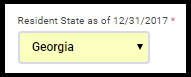
Select the Taxpayer’s resident state.  Note:  If this is not selected the state page will not display and the state will not automatically calculate until you add it in the state section.

Step 2:

Click continue after completing the Personal information page.  If the resident state is not loaded on an existing return or if this is a new return, the state basic page will load

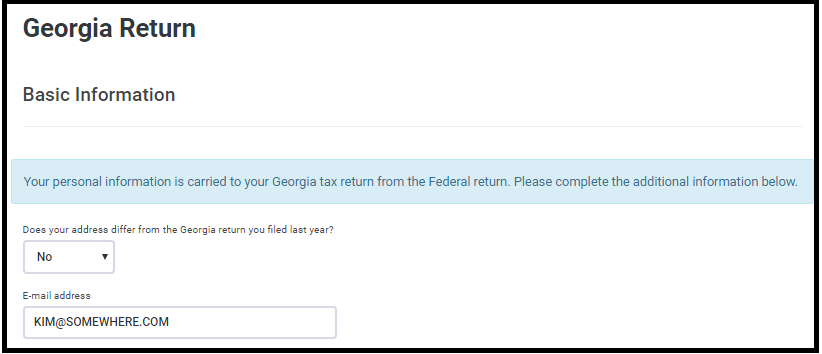
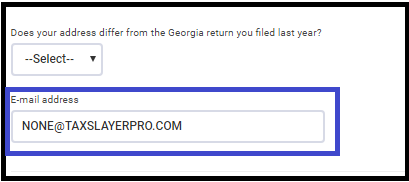
In this example of GA, I can answer the address question and enter an email address:  Note that [email protected] is a format template letting the user know the required format of the field.

Step 3 (optional)

Verify the information flowed to the state return.  The purpose of this field is that if no additional changes are needed for the state, you can enter the data at this point rather than editing the state in the state section.

This is an example of answering “No” to the address question and entering [email protected] as an email address.

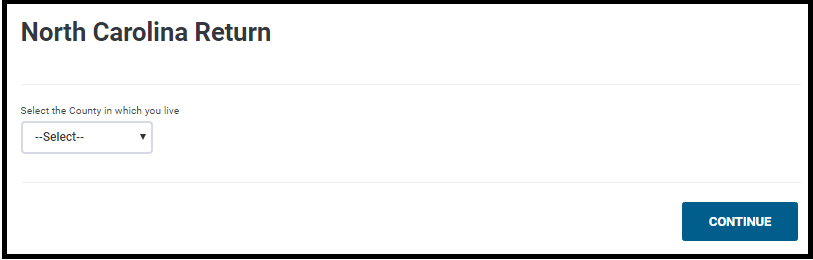
Example of NC Basic page in Personal Informatio

Blog Posted 03/29/2018