We are getting reports of slowness in printing or sporadic time outs when printing inside or outside of a return. We are currently investigating
TS Pro Online: Reviewing Return Page Validation [RESOLVED]
Issue 6721 has been opened to review a page validation occurring when attempting to click “Save & Exit” on the Submission page of e-file after marking a return “Approved” or “Failed”. The page validation that pops says “Invalid modification of client account status”. It appears to only impact returns that were in “Review” status prior to 1pm ET today.
TS Pro Online: Schedule C – Car and Truck Expenses [RESOLVED]
We are aware of the unexpected error message received when accessing the Car and Truck Expenses menu within the Schedule C (Issue 6691). The fix is scheduled to deploy Saturday morning (2/12/22).
Unable to Advance Past 1st Page of E-file After Federal Return Accepted [RESOLVED]
2/8/2022 – This is now resolved.
We are aware of an issue where users are getting a validation message indicating a required selection is needed for the Federal return type after the Federal return has been accepted. This is prohibiting users from advancing past the Return Details page of e-file. Currently, this means if you are attempting to resubmit a previously rejected state return OR attempting to transmit a State Only return, you are unable. If you simply need to print a copy of a return and are trying to access the Submission Page, we recommend generating a PDF from Client List instead.
We have opened a high priority ticket (Issue 6620) with development.
TaxSlayer VITA/TCE Support: Chat Unavailable [RESOLVED]
2/3/2022 – 4:09pm ET: Chat is now back available.
2/3/2022 – 4:00pm ET: We are currently looking into why the “Chat” option is not displayed within the “Help & Support” menu when inside of a tax return.
Pro Online 2021: Submission page “undefined” error when saving or transmitting return [RESOLVED]
Scenario: I have completed the e-file section and I receive the red error banner with no explanation when trying to Save & Exit or Transmit the return
Possible Reason: We are currently not displaying the appropriate message if the site has “Require Return Tag(s) for Saving Returns” selected in office setup.
Troubleshoot: Select a return tag to see if this resolves the error or navigate to Office Setup to see if the below option is selected. This may give you an indication of how to Save & Exit or Transmit the return.
Resolution: This issue is scheduled to be resolved with our Friday morning deploy

Pro Online 2020 and 2019 prior year efiles [RESOLVED]
This has been resolved as of 2/1/2022.
Scenario: I have transmitted efiles for 2020 and 2019 and they are still in Transmitted Status
Resolution: Issue 6527: This has been reported our development team and will provide a resolution when resolved.
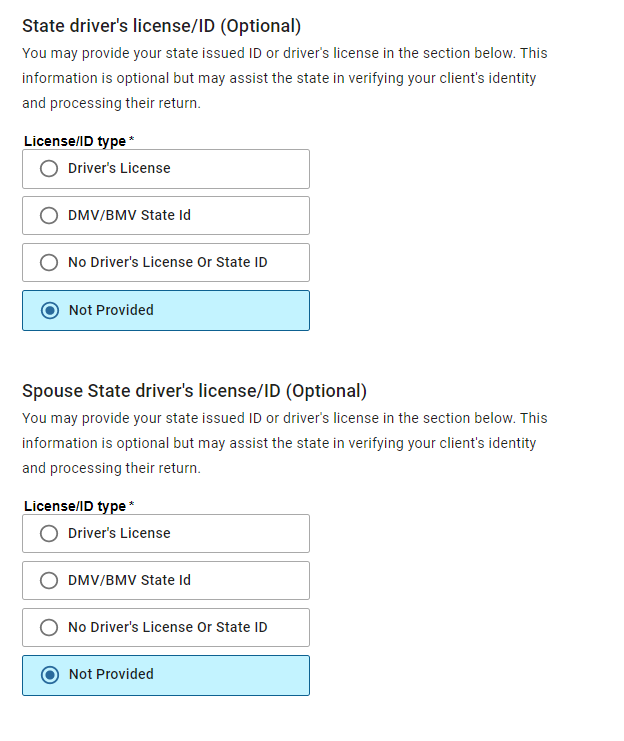
Pro Online 2021: Drivers License Optional [RESOLVED]
Scenario: The drivers license is supposed to be optional for my state, but the efile section is requiring it IF i select the drivers license page via the horizontal menu or click continue from the previous efile page
Solution: We have reported this to our development team (Issue 6491)
Alternative solutions: DO NOT click continue from the previous page and select the next page you need from the horizontal menu or DO NOT click on the drivers license menu if you know the driver’s license is not required.
How do I get off the page, if I am stuck on it. Select “Not Provided” and click Continue or select the Back button to leave the page and then select the next section you want to navigate to from the horizontal menu.