Category: Software News

Call Notes: TaxSlayer All Partner Call 3/06/2025 (Sorry for the late notes)

18 Mar 25
Kim Manuel
No Comments

Opening Comments

All Partner Call Notes – 3/6/2025

  • Over 920,000 returns filed since as of 3/3/25
  • QCD designation now available within 1099-R and value is subtracting from taxable amount
  • CO is now open – all outstanding CO acks have been processed
    • Note: Paper filed CO returns are not being processed yet
  • Issue of 1099-R’s duplicating state info should be fixed in Friday’s deploy
  • Capital Loss Carryover update – when it works, when it doesn’t
  • Subscribe to the blog
  • Brad Martin Joins us once again from United Way in Alabama
  • Housekeeping reminders: One question at a time. Multiple questions get back in the queue. Keep questions general and not return/state specific

Question and Answer Session

Comment:  We are still seeing slowness moving through the e-file section (sometimes)

TaxSlayer:  We have put in logging to capture this to see if we can do anything programmatically


Question:  Will you be providing a report on the returns that were impacted by the 1099-R duplication of the state information

TaxSlayer:  Once we have a good list of impacted returns we will provide a report


Comment:  8606 Carryforward loss from site to site has been fixed.  There is no longer a need to open the 2023 return


Question:  Are you aware that the Return Questions report is timing out?

TaxSlayer:  We are aware and working with development on a solution.  One of the challenges presented is that we are now assigning 21 questions on behalf of the IRS instead of 9


March 20, 2025 – TaxSlayer All Partner Call Information

15 Mar 25
Kim Manuel
No Comments

Title: TaxSlayer All Partner Calls
Date: Thursday, March 20, 2025
Time: 2:30 PM – 3:30 PM Eastern Time

Dial-in Number: 1-202-735-3323 or 1-888-978-8818
Access Code: 5155681#

Enhancement: QCD Now Inside 1099-R (Update)

09 Mar 25
Craig Smith
No Comments

3/6/25 – This bug has been resolved. The QCD entry within the 1099-R menu now subtracts from the Box 2a taxable amount. DO NOT manually reduce Box 2a prior to completing the QCD menu.


2/28/25 – A bug was introduced this morning and is expected to be resolved Monday, March 3rd.

Issue: Adding the QCD within the new 1099-R QCD menu is locking Box 2a and is not allowing the preparer to manually adjust out the QCD.

Workaround: Go back to how QCD’s were reported prior to the new 1099-R QCD menu. Go into the Nontaxable Distributions menu and check the QCD box. Then, go into the 1099-R and adjust Box 2a accordingly.


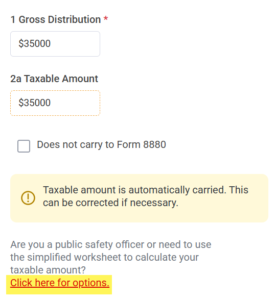
In this mornings’ deployment, a popular suggestion is now live in the software! Reporting a Qualified Charitable Distribution (QCD) can now solely be handled within the 1099-R entry! You no longer also have to visit the Nontaxable Distributions menu separately. Below is how it works currently.

Within the 1099-R, the link below Box 2a, where the Simplified Method Worksheet and PSO menus are, now also has a menu for Qualified Charitable Distributions (QCD).

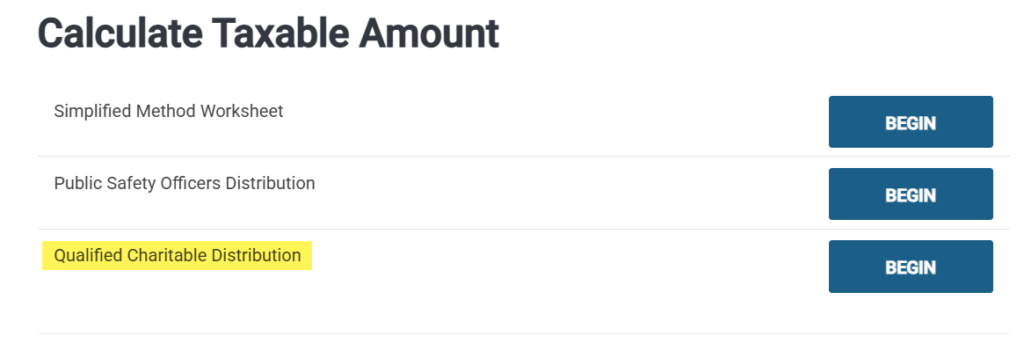
To add your QCD, select the “Click here for options” link.


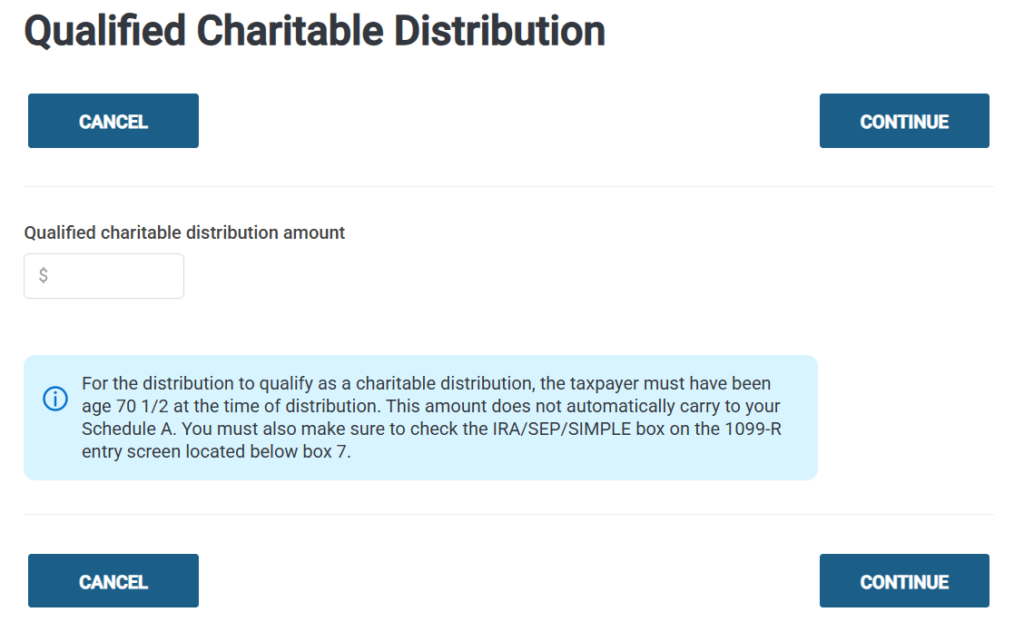
Next, select the “Qualified Charitable Distribution” menu.


Here is where you will enter the QCD amount. The QCD indicator will automatically carry to Form 1040 and the existing QCD checkbox will be automatically be marked within the Nontaxable Distributions menu.

Note: You will still need to manually reduce Box 2a by the QCD amount currently. A future update in the next week or so will allow for the QCD entry to automatically adjust the taxable amount in Box 2a as well.

Form 1099-R: Duplicating State Information [RESOLVED]

06 Mar 25
Craig Smith
No Comments

3/7/25 – This is now resolved. We are now in the process of identifying impacted returns that have been previously filed and working with the states to determine next steps (whether states will auto-adjust or if amended returns should be filed). Additional guidance will be provided when available. There is no action on your part at this time.


This is reported as Issue 3052 and the fix is scheduled to be deployed tomorrow morning, March 7th.

Issue: When going back into an existing 1099-R to either edit or review, the state information may be duplicated and shown twice within the 1099-R. Click the “Clear” option to remove any duplicate state information before continuing out of the 1099-R.

Next All Partner Call: March 6, 2025 2:30PM – 3:30 PM Eastern Time

05 Mar 25
Kim Manuel
No Comments

All partners are invited to join a series of conference calls during the upcoming filing season. TaxSlayer will be participating in these partner and volunteer only calls to provide updates on software, address concerns, and answer questions.

Call details will be sent separately for each call. The access code is different for each call and notate the time change for the start of the call which has been pushed back to start at 2:30PM (ET). Make sure to add this information to your calendar, so you do not the call.

 Title: TaxSlayer All Partner Calls
Date: Thursday, March 06, 2025
Time: 2:30 PM – 3:30 PM Eastern Time

Dial-in Number: 1-202-735-3323 or 1-888-978-8818
Access Code: 6526359#

TaxSlayer Pro 2024: Full state return displayed during basic info [RESOLVED]

26 Feb 25
Kim Manuel
No Comments

2/28/25 – This has been resolved.


We are getting intermittent reports of the full state menu being displayed after completing the personal page.  We are looking into this.  We recommend that you click Exit State Program at the bottom to move to the rest of the basic information section.  DO NOT complete your state return at this point (while in basic information).  You can prepare the state from the State Section of the return.


Call Notes: TaxSlayer All Partner Call 2/20/2025

25 Feb 25
Kim Manuel
No Comments

Opening Comments

  • Almost 500,000 returns filed since as of 2/17/25
  • IP PIN and 8962 reminders now available on carryforward page at start of return
  • QCD designation now available within 1099-R
    • Future update in the next week or so will auto adjust Box 2a
  • CO controlled launch started 2/18 – still no date of full open but you may have started to receive acks for a small number of returns.
    • Can still transmit CO returns to us
  • Duplicate transmissions – fix went out 2/19 and has appeared to resolve the issue at this time but we’re still monitoring
    • Impact was less than 1% of all transmissions
    • Currently determining if TaxSlayer can resend state transmissions that were killed due to this issue (We were able to programmatically resend any state returns that had not already been sent as state only by the sites)
  • Subscribe to the blog
  • Housekeeping reminders: One question at a time. Multiple questions get back in the queue. Keep questions general and not return/state specific

Question and Answer Session

Question:  How do I check on an open ticket?

TaxSlayer:  You can reach out to VITA/TCE support and they can give you an update on any open ticket.


Question:  Are  you aware of any error messages when trying to open scanned documents?

TaxSlayer:  We have an open issue with development on this.  Issue #2925.  This site preparers the return, uploads the scanned documents, closes the return, QA opens the return to review and gets an error when trying to open the docs that were just uploaded.


Question:  I have a volunteer that cannot mark a return for review?

TaxSlayer:  This is based on the role that is assigned to the preparer.


Question:  Can you sort the client list on status and return tag?

TaxSlayer:  Not currently.  We believe we already have a requirement in to allow this.


Question:  Carryforward of 5695  part 1 is out of scope, can we stop this from happening?

TaxSlayer:  No, we don’t program the software to “in scope” or “Out of scope”  If there is an issue where it is not carrying correctly, please reach out to VITA/TCE support.


Question:  Should we complete Form 2210?

TaxSlayer:  We recommend you reach out to your SPEC RM for guidance on the policies around completing the form or allowing the IRS to calculate penalties and interest after accepting the return.


Question: Is there any training on what the taxpayer sees via Customer Portal?

TaxSlayer:  Yes, there are training documents and videos on the Practice Lab.  You can also create a fake return and send yourself a portal link so you can experience what the customer experiences.


Question:  Is there a way to determine the number of local returns prepared at a site?

TaxSlayer:  No.  We recommend creating a return tag so you can identify the returns and run reports on them.


Question:  How do you print MFJ vs MFS?

TaxSlayer:  Once you complete the comparison, there is a print icon on the menu.


Question:  Is there any help for management reports?

TaxSlayer:  Yes.  There are user guides and training videos on the Practice Lab.  There is also a section in the User Guide found on the Springboard.

Carryforward Data: Capital Loss Carryover (Update 2/24/25)

24 Feb 25
Craig Smith
No Comments

2/24/25 – It appears we spoke too soon. Initial testing on our pre-production levels with Issue 2543 passed successfully in all environments but the deploy to production did not pass in the live VITA environment. At this time Capital Loss Carryover is not being included in carryover when following the below guidance. Over the weekend, Issue 2990 was opened to correct the VITA environment. Once fixed, the below guidance will work as expected.


This is related to Issue 2543 that was recently corrected on 2/17/25 where the Capitol Loss Carryover from the prior year was not being included in the current year when carryforward was available and used. The below instruction will only work for Site to Site Carryforward and not Global Carryforward.

To allow for the prior year capital loss carryover to be included when beginning a new 2024 return, the 2023 return needs to be accessed and re-saved by going through E-file and clicking “Save & Exit” on the Submission page. Look at the screenshot below so you are clicking the correct “Save & Exit” buttons. This needs to be done before the 2024 return is started. Re-saving the 2023 return on the Submission page will allow the Capital Loss Carryover to be saved in the appropriate database to be correctly stored and used when starting a 2024 return.

To help assist in identifying potential returns with Capital Loss Carryover, we recommend running the Site Production Detail Report – Electronic or the Federal Return Summary reports in Management Reports. Each of these reports has a Schedule D column. Identifying returns in 2023 that had a Schedule D present will narrow the search to identify returns that may have had a Capital Loss Carryover.