Category: Software News

Release Notes February 17, 2025: Carryforward

17 Feb 25
Kim Manuel
No Comments

Carry Forward

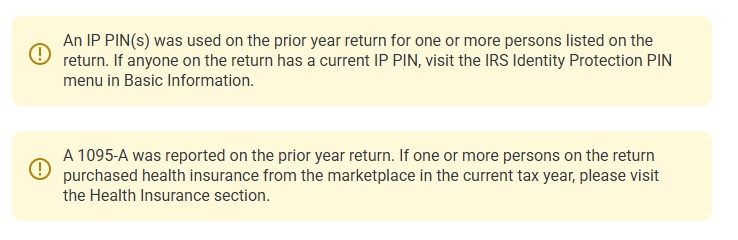
  • Added an informational alert to the carryforward screen if an IP PIN was used on the prior year return (Enhancement)
  • Added an informational alert to the carryforward screen in a 1095-A was reported in the prior year return (Enhancement)
  • Capital Loss Carryover worksheet not pulling loss carryover from prior year (Issue 2543)

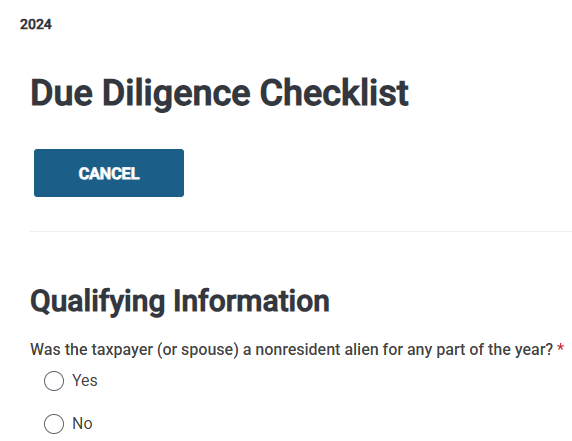
TaxSlayer 2024: New Cancel button on (Paid Preparers) Due Diligence Checklist page

07 Feb 25
Kim Manuel
No Comments

We have added a “CANCEL” button to the top of the Due Diligence Checklist (required for Paid Preparers Only), that auto loads as “Earned Income Credit” in the Forms tree when EITC is calculated in the return.  This is an effort to make it easier to the volunteers to exit the page.  For example, if they open it from the Left Navigation Tree and start completing the page, they can select Exit to exit and close the page.

2024 Consents Spinning when trying to click Continue [RESOLVED]

07 Feb 25
Kim Manuel
No Comments

Update:  The issue has been resolved.  If you are still stuck on that page,  you will need to click Back and/or Exit the e-file section and go back through e-file again.


We are currently working the issue where you cannot click continue on the Consent page.  You can click Back to get off the consent page.  We recommend you flag this return with a return tag so you can go back and revisit it to complete any missing consents.

You can continue to prepare returns, but we recommend completing the Global Carry forward or any other applicable consents prior to electronically filing the return

State Only E-file: Frequently Asked Questions

04 Feb 25
Kim Manuel
No Comments

How do I identify returns I may need to send as “state only”

  • Rejected state returns are listed in your Rejected Clients list located on the welcome page

Common reasons for filing a return as “State Only”

  • The federal return is accepted and the state return is rejected.
  • You have no federal filing requirement, but need to file the state for a credit
  • The taxpayer comes back after their already filed and accepted federal return and needs to file their State return
  • The taxpayer needs to add another state to their already filed and accepted return.

When should I NOT file a “State Only” return

  • While you are waiting for your state to acknowledge the return you filed with your Federal return.
  • Reminder:  States typically take longer to acknowledge their returns than the IRS MeF system.

Is there a report I can run that identifies states that are marked as “electronic” and have not been filed?

  • Navigate to Reports >> Management Reports >> Select the Pro Web Returns – Detailed Return Report
  • You can either export the report or filter it by the state return type
    • You are looking for any state return type other than Paper with a blank status
  • Note:  If you have multiple states on the return, there will be multiple rows per return

What return type do I need to select for the Federal Return?

  • TaxSlayer automatically marks the appropriate federal return type when you select the State Only box.
  • The federal return portion will be marked as stOnly in client status
  • The type of return under the Federal Return Section of the Submission page will reflect : State Only – Federal Return is NOT being submitted to the IRS

How do I transmit my “State Only” returns?

  • You must submit them from the Submission Page (Save and Transmit Return)


1040-NR: Schedule OI “Days Present in the U.S.” [RESOLVED]

03 Feb 25
Craig Smith
No Comments

2/7/25 – This is now resolved.


2/5/25 – The fix has been made in pre-production and is tentatively scheduled to be deployed to production on 2/7/25.


This currently impacts the 1040-NR return in both TaxSlayer Pro Online and FSA (Facilitated Self-Assistance).

  • Issue 2824: Navigating to the e-file menu for the first time in a 1040-NR return is removing the “Days Present in the U.S.” entries within the Schedule OI – General Information menu.
    • Workaround: After navigating to the e-file menu for the first time, exit e-file and go back to the Schedule OI – General Information page and re-enter the days present in the U.S. The entry will stay saved when navigating back to e-file.

Controlled Launch: Update on successes

23 Jan 25
Kim Manuel
No Comments
  • We sent around 390 e-files
    • 8% reject rate
    • Top rejects:
      • F8962-070:  E-file database indicates that someone on the return (TP, SP or Dependent) was enrolled in the ACA Marketplace
      • IND-181-01:  Primary taxpayer did not enter a valid IP PIN
      • IND-996:  Dependent/Qualifyin person did not enter a valid IP PIN
  • E-file opens January 27th
    • We will turn on e-file for VITA/TCE around 11 am for current year 1040 returns
      • We will monitor rejects throughout the day
      • We will post dates on when we will turn on “State Only” and Prior year Returns (Typically towards the middle or end of the week)


During this period, we will send VITA/TCE returns to the IRS and receive acknowledgements. We strongly recommend you open and review the return before sending, especially if you created the return when we opened on the 8th. Federal and state calculations changed frequently during this time period.   You must send these returns from the Submission menu during the controlled launch period.

This date and time is subject to change or the process is subject to stop based on feedback from the IRS.

The following states are also participating in Controlled Launch:

MI, ME, NJ, WV, KY, HI, NE, WI, SC, GA, NM, OH, MD, AZ, OR, ID, UT, DC, VA, PA, IN, VT, ND, CA

Can I expect acks during controlled launch?

Yes, the IRS will be returning acknowledgements during this period.  However, the refunds will not be processed any faster by the IRS.

Controlled Launch: What is trending?

21 Jan 25
Kim Manuel
No Comments

As the Professional side of TaxSlayer navigates through controlled launch, we want to share some of the things that they are seeing.

F8962-070

We are seeing a lot of IRS rejects surrounding the 8962.   As you start preparing returns for your taxpayers remember that is the IRS has on file that anyone on the return has at market place insurance at any time (even if just for a short period of time), it needs to be entered on the tax return, otherwise the return will get rejected.

Note:  If Carry Forward is used on the return and there was a 1095-A in the prior year return, a warning will be presented to the preparer prior to going into the e-file section.

IND-181-01

The Primary Taxpayer did not enter a valid Identity Protection Personal Identification Number (IP PIN). Please visit www.irs.gov/getanippin for further information and resubmit your return with the correct number.

Note:  If Carry Forward is used on the return and was a PIN in the prior year and not in the current year, a warning will be presented to the preparer prior to going into the e-file section.  The IP PIN changes each year for the protection of the taxpayer.

504-02

Each ‘DependentSSN’ and the corresponding ‘DependentNameControlTxt’ that has a value in ‘DependentDetail’ in the return must match the SSN and Name Control in the e-File database.

Tip:  Review the dependents social security card to ensure the SSN and Name is entered in the application as it is displayed on the Social Security Card

Status of Orders and Important Dates

13 Jan 25
Kim Manuel
No Comments

When will Start New Return be available at the site level?

Live

How often is the application updated?

The application is updated on Monday, Wednesday and Friday mornings during the filing season

What is the start date for e-file?

The IRS announced on January 10th that e-file will begin on January 27th . Note: E-file for VITA/TCE returns will not be turned on until 12:00pm ET on January 27th.

Will I need to open each return created prior to sending e-files on the 27th?

Yes.  We strongly recommend you open and review each return created at the site prior to e-file being turned on.  Calculations are subject to change as we receive additional instructions and guidance from the IRS.

My site is no longer active?

As we receive orders from the IRS, inactive sites will be processed and automatically marked active.  All sites without an active TY2024 order are marked inactive.

Who should I check with on the status of my order?

Your SPEC Relationship Manager

I ordered a FSA Kiosk URL, when will I receive it?

We have started the process of sending out FSA Kiosk URLs.  We will only be emailing URLs to the sites that have sent us their support contact information.