Category: Software News

Volunteer Time: All Partner Call Notes – 3/14/2019

18 Mar 19
Craig Smith
No Comments

Below are the questions and answers recorded from the All Partner call on Thursday, March 14th. We are posting questions most applicable to all sites.

Q: Looking for reports to access specific dollar amounts for both fed and state returns.

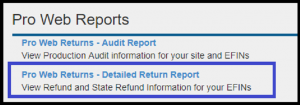
  • We recommend taking advantage of the Site Production Detail Report (Electronic and Paper) to drill into TP data at your site. There are also various other reports available within Management Reports to assist.

Q: Question about for carryforward data, why does a state with no income tax show as an optional carryforward item.

  • Recommended to the volunteer to request an enhancement via the Suggestion Box to adjust the way carryforward data works in relation to states without income tax.

Q: When suggestions are submitted via the Suggestion Box, would like to receive an automated e-mail referencing the enhancement entered.

  • All requests entered into the Suggestion Box are  responded to by Kim or Craig along with regular updates based on status changes with submitted enhancements. Since all suggestions are manually reviewed, it can take a little time before we are able to send out acknowledgement e-mails.

Q: Volunteer was asking the IRS if there was an income limitation for assisting taxpayers in their community.

  • IRS representative indicated there is not an income limitation but the most important item to note is the volunteer must have the appropriate certifications to complete the tax returns.

Q: Question about a 1040-NR/EZ return getting rejected by the IRS due to $0 AGI.

  • The IRS does not accept any 1040 return with $0 AGI via e-file and that these returns should be paper filed. Alternatively, sites have indicated they enter $1 in Other Income in order to e-file a return.

Q: Why does a 1040-NR return for a married nonresident require spouse information?

  • We have opened Issue 3239 to remove the current validations requiring spouse entry when no longer applicable for 2018 1040-NR returns. For the time being, enter all spouse information but if a SSN/ITIN is not known, volunteers can enter 111-00-1111.

Q:What SSN do you enter when needing to apply for an ITIN?

  • Enter all zeros (000-00-0000) to get access to the W-7 menu for the applicable individual on the return needing an ITIN.

Q: Can you electronically file Form 8843 for 1040-NR returns?

  • The IRS still requires Form 8843 be paper filed if being filed by itself. If also preparing/filing the 1040-NR/EZ, Form 8843 will be included in the transmission.

TaxSlayer Pro Online: 2015-2017 Program Oddities

18 Mar 19
Craig Smith
No Comments

We have received a few sporadic reports of inconsistent behavior related to the 2015 and 2016 programs. We wanted to identify what we know below in relation to this reports from the field.

2015-2017 HTML Plain Text Issues (Issue 3290) – We have heard reports of users opening returns in 2016 and 2017 and ultimately seeing a white screen load with all menu options showing on the left-hand side of the page. This is generally due to the screen loading as HTML Plain Text and not downloading graphics properly. You can press CTRL+F5 to re-load the page but certain functionality icons may not load such as the “EDIT” and “DELETE” icons. The 1040 View may also not load properly after selecting CTRL+F5.

  • (RESOLVED) The issue with the prior year programs loading in HTML Plain Text has been resolved. If you still see this, please refresh your page by selecting Ctrl+F5 to recycle the page.

2015/2016 State Menu Issues (Issue 3243) – Using Internet browsers, Google Chrome and Microsoft Edge, the state menus are missing the “Continue” button to advance or exit the state menu. Also, attempting to open sub-menu’s does not allow entry. At this time, we advise impacted sites to utilize a different Internet browser such as Mozilla Firefox or Internet Explorer.

2015/2016 Functionality Issues (Issue 3257) – We have received various reports of users, when inside the 2015 program, having sporadic issues of trying to save W-2 entries, various checkboxes not staying marked, and unable to adjust taxable amounts in 1099-R(s) among other odd behavior. This does not appear to be related to specific Internet browsers. If you are seeing this behavior, we recommend closing all browser windows (not just the window tab), clear your cache, and start a fresh session until we are able to determine what may be causing this behavior.

  • (RESOLVED) This issue appeared to be related to Issue 3290 from above. If described issues still exist in the prior year software, clear your cache and start a new session by closing all browser instances.


Suggestion Box: Wrapping up 2018 and moving to 2019

08 Mar 19
Kim Manuel
No Comments

Click here to view PDF

Click here to submit a suggestion

There are three attachments

  • Attachment #1:  Dedicated to application and federal suggestions
  • Attachment #2: Dedicated to State suggestions
    • Sorted by State
  • Attachment #3:  TaxSlayer Suggestion Status
    • Broken into categories
    • Duplicates have been removed and only list the TaxSlayer Responses
    • Column indicating when the item is expected to be delivered (TS 2017 or TS 2018)
    • Column indicating if the item was added or updated since the last document (as always…prone to human error!!)

An example of the status column can be found by Tracking ID 269372 (Ctrl+F allows you search in the document)

Check out Attachment 3 to see the rest of the new and/or update items.

We are still reading through a few of last years request and will be starting on the exciting new suggestions you have already submitted.

Click here to view PDF

The link will launch a Brainshark video with instructions on how to view the file.

Sites in the Northeast area: Cannot hit IP Address when logging in

08 Mar 19
Kim Manuel
No Comments

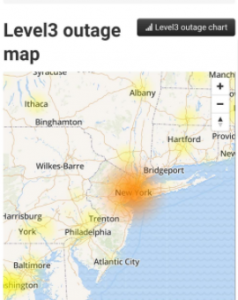
A major internet backbone is having an outage in the area.  If you are getting an error that you cannot hit the IP Address when trying to login to the site, you should contact your IT team or your ISP (Internet Service Provider) to see if they use Level3 as their internet backbone.

This potentially impacts those using cellular service of AT&T and Verizon for hotspots.

Spectrum (formerly Charter Spectrum) offers cable television, internet and home phone service is also impacted in this area.

TaxSlayer Pro Online: Printing in a Return – Issue 3062 (RESOLVED)

08 Mar 19
Craig Smith
No Comments

RESOLVED: 3/11/19 – Issue 3062 has been closed out. The fix is now live.


UPDATE: 3/8/19 – The fix is currently working its way through internal testing. Assuming it passes all levels of testing, the fix should be deployed on Monday, March 11th


We have opened a high priority issue with development to look into and resolve the issue related to sporadic reports of users indicating printing issues when inside of a tax return. Below are the details of what we’ve determined as the root cause and why it is so sporadic. We expect to have this corrected soon, hopefully before the weekend.

Any user assigned the below default security templates will NOT be able to generate a PDF from inside of a tax return (Summary/Print, State PDF, and View Forms). They CAN generate a PDF from outside of a return (Client List and Submission page of e-file).

The issue is specifically tied to templates that DO NOT allow transmission of returns to the IRS – specifically the “Send Return to IRS” security role. In the simplest terms, if a Security Template has e-file rights, they can generate a PDF from anywhere inside a return and outside of a return. If a Security Template does not have e-file rights, they CANNOT generate a PDF when inside of a tax return (Summary/Print, State PDF View, and View Forms) but CAN generate a PDF when outside of a return (Client List and Submission page of E-file).

  • Preparer Current Year
  • Preparer All Years
  • Setup Manager
  • Interviewer
  • Reviewer

Note: This will also impact any custom security template with and without e-file rights.

Site Maintenance Alert Reminder: Thursday, March 7th 11:00 PM EST

07 Mar 19
Kim Manuel
No Comments

Update 2:00 am EST:  The print services are online and rendering PDFs


Update 1:50 am EST:  Our engineering team is continuing to work to get printing back online.


Update 1:30 am EST:  We are continuing to work on bringing the print services back online


Update 1:00 am EST… We are still working on bringing the print services back online.  


Update Midnight:  You can prepare returns for all years, with the exception of printing.  We need about 30 more minutes to bring the print servers back online.  If your return is not calculating when you open it or create a new one, you will need to close all instances of your browser (not just the tab) and login with a new browser instance.


Update 11:38 PM EST:  The calc servers for all years are back online.  You can now open existing returns and create new returns.  We HAVE NOT brought the print servers back online yet. If your return is not calculating when you open it or create a new one, you will need to close all instances of your browser (not just the tab) and login with a new browser instance.


Update 11:31 PM EST:  Once all of the calc servers are brought on line, we will begin bringing the print servers online


11:26 pm EST:  We are in the process of bringing the calculation servers back online.  If your return is not calculating when you open it or create a new one, you will need to close all instances of your browser (not just the tab) and login with a new browser instance.


11:15 pm EST:  We will update the blog when we are ready for you to start preparing returns.  We cannot put the returns in maintenance mode and test the changes at the same time.


We will be performing required maintenance on the site between 11:00 PM and 12:00 midnight on Thursday, March 7th.

What to expect:

We expect a minimum amount of outage (less than 30 minutes) during this process.  We will be updating the blog with information as the maintenance is being conducted.

TaxSlayer Pro Online: “Client Status” Error (RESOLVED)

06 Mar 19
Craig Smith
No Comments

3/8/2019 – This issue has been resolved.


3/6/2019 – 11:15am ET – Client Status is now available again. Note: The underlying issue is related to the “Client Return Audit History” section of Client Status and is currently turned off until the next scheduled deployment.


We have opened Issue 3088 for development to resolve an issue accessing “Client Status” from the Tools drop-down menu in Client List. Currently, clicking on “Client Status” renders an “Unexpected Error” message. If you get this page, click the “Main Menu” option on the left-hand navigation bar to return to your main site menu.

Site Maintenance Alert – Thursday, March 7th at 11:00 PM EST

05 Mar 19
Kim Manuel
No Comments

We will be performing required maintenance on the site between 11:00 PM and 12:00 midnight on Thursday, March 7th.

What to expect:

We expect a minimum amount of outage (less than 30 minutes) during this process.  We will be updating the blog with information as the maintenance is being conducted.