Tag: Reports

Pro Online: Custom Consents Report

14 Jun 18
Kim Manuel
,
No Comments

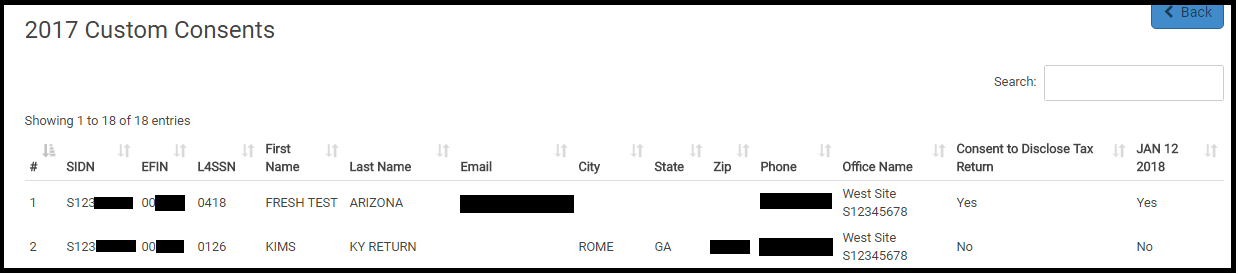
The Custom Consents Report is now available.  This report is designed to indicate the Acceptance (Yes) or denial (No) granted by the taxpayer.  This report was designed to run at the site level.

Navigate to Reports and select Custom Consents:

Note:  If you have customized your reports via Configuration, you will need to navigate to Configuration >> Report Customization and add Custom reports to your report list

Click Select

Below is an example of a generated report.

Note:  If you have multiple consents, you will need to export the report to see all of the consent titles and corresponding results

You can export the information and merge it with other reports that require consents to ensure you are reporting up the approved taxpayer information.

Suggestion of the Day: Report Management

26 Apr 18
Kim Manuel
, ,
No Comments

Suggestion from Volunteer

Would like ability to arrange Reports Categories in the order that I use them. I use “Transmissions”, then make a PDF in “Returns Transmitted”. Later I check “IRS Acknowledgements” and make a PDF copy. Scrolling through the list to get to Returns Transmitted is annoying. Putting it after IRS acknowledgements would be helpful. Or, giving us the ability to customize the list would be nice.

TaxSlayer Recommendation

Proposal:  Allow the site administrator to manage the reports that are available for use under the Reports tab and in what order they are displayed.

Tracking ID 269580

Status:  Committed

Implementation Plans

This feature will be available at the site level only.

We will be adding an option to Security Templates that allow the site administrator to enable the ability to edit the report listing.

The user that has the option enabled will be able to limit the reports that are displayed under Reports on the Welcome page.  They can also order the reports to better fit the workflow of their sites.

This is scheduled to be delivered the week of April 30th.

Pro Online 2017: New: Customer Retention Report

09 Mar 18
Kim Manuel
,
No Comments

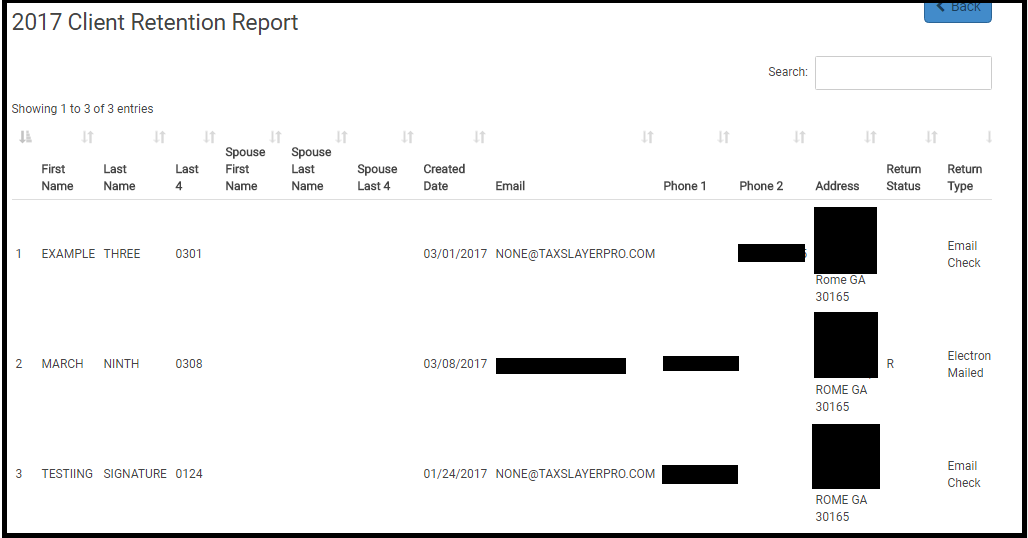
Purpose:  Allows you to quickly view the returns that were prepared at the site in the prior year during a specific time period that have not been prepared during the current year.

Benefit: Helps in planning and helps understand taxpayer retention patterns.

How do I use the report?

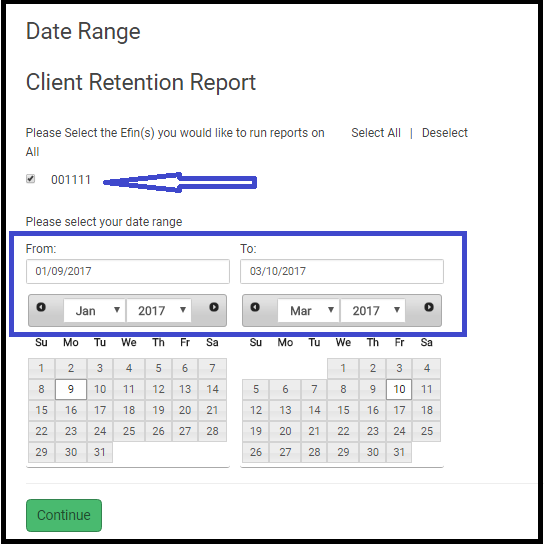
(1) Navigate to the Reports menu and click Select on Client Retention Report

(2) Select the EFIN and PRIOR year date range

(3) Click Continue.  The report will generate a list of clients that had returns prepared during that time period that have not had their returns prepared for the current year.

Pro Online: Site Production Reports missing data (RESOLVED)

15 Feb 18
Kim Manuel
, ,
No Comments

Update 2/20:  Resolved

Update 2/16:  We are still working through these returns.  This primarily impacts the two Site Production Detail reports, where returns are missing from the report and another symptom is the SIDN and preparer name is blank.


~~~~~  Original Blog Post ~~~~~

The Site Production Reports are missing data from 2/8 through 2/11.  We are replaying the returns to populate the reporting database for the Management Reports

Blog Posted 02/15/2018

Pro Online: Site Production Detail Reports (Electronic and Paper) (RESOLVED)

31 Jan 18
Kim Manuel
, ,
No Comments

Scenario:  You run either one of these reports

Results:  Nothing (blank screen)

Solution:  This will be corrected in a future update


Blog posted 01/31/2018


Pro Online 2017: Open Return reminder and additional Report information

26 Jan 18
Kim Manuel
, ,
No Comments

Below is a reminder of the message sent out by SPEC last week.  Today is the opening day for many sites to service your taxpayers on EITC Awareness Day.

We have an additional report that will list all returns (regardless of status) that you may want to run prior to electronically filing the return.  It also includes the state abbreviation of any state listed on the return.

This is listed under Reports>>Management Reports

Make sure you select 2017 and select the EFIN even if you are running it at your site level.

~~  Original blog Post ~~~

VITA/TCE sites that prepared tax returns prior to January 29th will now be able to transmit those created returns.  To ensure these returns are re-calculated based on the updated forms and instructions released by IRS to software vendors, each tax return must be opened prior to transmitting to TaxSlayer. This will ensure previously prepared tax returns have the updated IRS forms calculations applied prior to transmission and reduce the need of VITA/TCE sites having to prepare amended returns.

Sites are strongly encouraged to run a Site Production Detail management report (titled: Pro Web Returns – Detailed Return Report) listing all returns prepared prior to January 29th to assess possible return calculations changes.  This report will reflect the original return calculations for refund, credit, or balance due dollar amounts.  Sites may also review the “Client Return History” to determine if the refund or balance due changed on a tax return.

Taxpayers must sign a new declaration (Form 8879, IRS e-file Signature Authorization) if the electronic return data on individual income tax returns is changed after taxpayers signed the original, and the amounts differ by more than either $50 to “Total income” or “AGI,” or $14 to “Total tax,” “Federal income tax withheld,” “Refund,” or “Amount you owe.”  See Publication 1345, Handbook for Authorized IRS e-file Providers of Individual Income Tax Returns, for additional guidance.

Site Production State Summary Report: Preparer Name Column Added

23 Aug 17
Craig Smith

No Comments

Within “Management Reports”, the “Site Production State Summary Report” now has a column specific to the Preparer Name shown below. This allows sites to filter state returns prepared by volunteer. This was a request received as some sites are required to produce this information for further funding.

Management Reports — Site Production Detail Report

14 Mar 17
Kim Manuel
,
No Comments

We made a change that now allows the report to reflect the appropriate amounts for EITC, Additional CTC, and CTC for returns that were displaying overstated values.

Blog Posted 03/14/2017    9:25 AM EST