We have added a Last Checkpoint button on the Summary/Print page.
This feature will take the user back to the last form that was accessed before coming to the Summary/Print page.
Blog posted 10/05/2017
We have added a Last Checkpoint button on the Summary/Print page.
This feature will take the user back to the last form that was accessed before coming to the Summary/Print page.
Blog posted 10/05/2017
The following two items will no longer be applicable and will be removed from the application prior to the roll out of TaxSlayer Pro Online 2017:
Blog Posted 09/12/2017
We will be changing the look of the Login page, as well as some wording prior to the tax season. We will be using the verbiage “Access Code” instead of “Security Code”


Three (3) unsuccessful login attempts will trigger the Multi-Factor Authentication process. Please refer to Question 2 from the blog post titled MFA: Timing Questions (Series 1, Part 3) posted on Monday, August 21st.
Blog Posted 08/23/2017
The following views will be delivered prior to tax season. The expanded links take you directly to the section for easier navigation within the return.
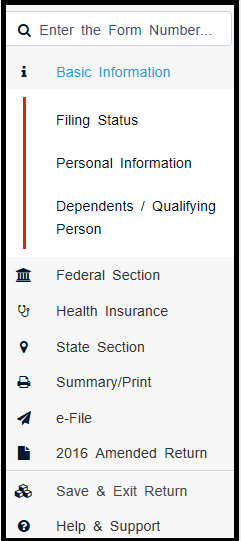
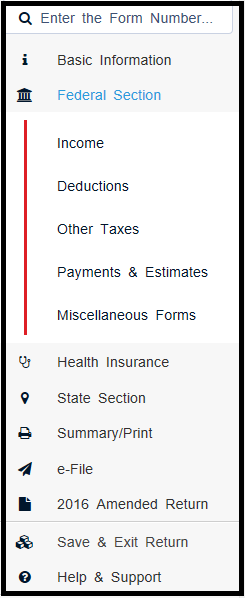

blog posted 08/19/2017
Site Administrators will have the ability to change a return with the status of Complete back to In Progress prior to tax season. This feature can be assigned to other uses via Security Templates to more easily manage returns.
A new item has been added to Security Templates. It will be defaulted to true, which will prevent any user from doing this until the Site Administrator allows access
Below is the item as default which = the user cannot change the return status

Below is the item enabled by the site administrator which = the user can change the return status from “Complete” to “In Progress”

Note: This is also an easier method if you need to delete a return marked as “Complete”. You will now have the ability to go from “Complete” to “In Progress” and then ” Deactivate” (all based on the Security Template applied to the user).
Below is an example of a return from the client list that has the status of “Complete”:

The user with the appropriate Security Template, will open the return and navigate to the Submission page in the e-file section of the return. Below is an example of what the screen will look like:

Click Yes to change the status back to “In Progress”. Below is an example of what the screen will look like after clicking Yes:

Save and Exit the return. Below is an example from the client list after the status has been changed:

Note: The return can be marked “Complete” again after this process has been used.
Blog Posted 08/14/2017
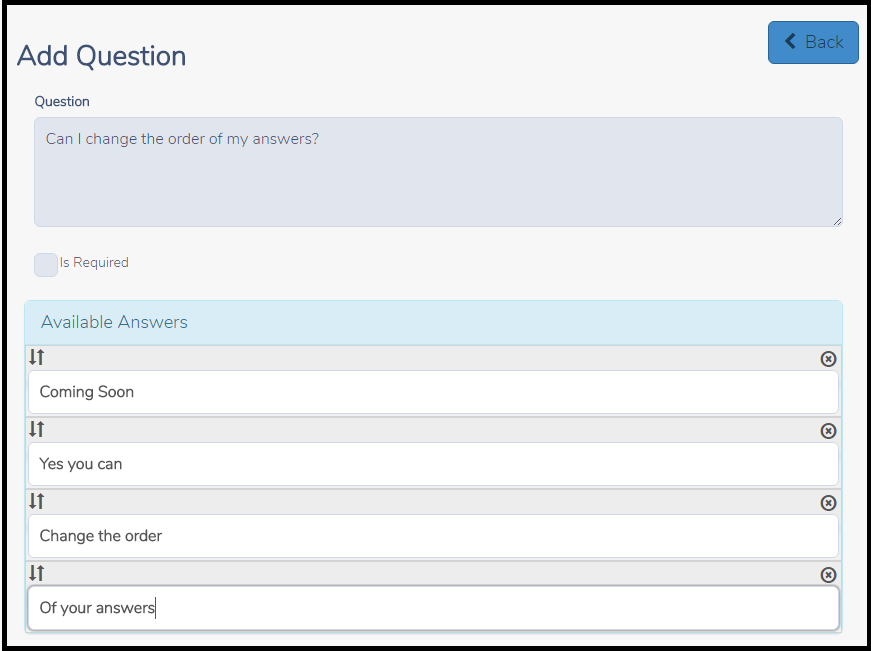
The ability to change the order of how the answers display for the custom questions created at your site or created by a multi-site/Relational login and assigned to a site will be deployed prior to the upcoming tax season. This will allow you to manage the order you want the answers to be displayed during return creation. Another advantage of this change will allow you to “insert” an answer where you need it mid season rather than having to delete the list and start over.
Old Custom Question and Answer page:

Coming Soon: Custom Question and Answer page.
Simply drag the answers to the positions you want them to appear during return preparation
Blog Posted 07/26/2017