Tag: Updates

Product Update Alert: Monday, February 26th at 5:00 am EST

24 Feb 18
Kim Manuel
,
No Comments

We will be putting the returns in maintenance mode at 5:00 am EST on Monday, February 26th for a series of updates.

  • Fixed an issue where the Schedule OI Tax Treaty Article selection was not holding if the menu was re-entered (Issue #1234)
  • Added zip code 85388 for Surprise, Arizona to the zip code database (Issue #1318)
  • Kansas – Fixed an issue within the K-40H/PT menu where “Other Household Members” was not holding the SSN entry (Issue #1159)
  • Michigan – Fixed an issue where Worksheet 4 for MI-1040CR was not calculating (Issue #1126)
  • Michigan – Fixed an issue where 1099-R entries within “Deductions for Taxpayers born before 1953” were not fully being cleared after information was removed. The Private or Public checkbox was still showing on the PDF (Issue #1288)
  • Pennsylvania – Fixed an issue in the Schedule UE menu where deleting entries for standard mileage rate to override automatically carried amounts from the Federal 2106 was carrying $0 to the PDF instead of the amounts from the Federal 2106 (Issue #1177)
  • California – Added a drop-down within the Tax menu to indicate if a taxpayer paid their Use Tax directly to CDTFA (Issue #1316)
  • Delaware – Fixed a display issue on the DE amended return where Line 6B was not showing the leading percentage number (Issue #1257)
  • Delaware – Fixed an issue where Line 7a was not calculating personal credits on the DE amended return (Issue #1258)
  • Louisiana – Removed “Motion Picture Resident” credit (Issue #1245)
  • Louisiana – Fixed a display issue where the description for subtraction code 21E was not carrying to the PDF (Issue #1300)
  • Louisiana – Fixed a display issue where the DOB for a dependent listed for the Military Serviceman menu was not showing in the correct format (Issue #1299)
  • Minnesota – Fixed an issue where the M1CD was calculating incorrectly when qualifying child was born during 2017 (Issue #1293)


Blog posted 02/24/2018
Pro Online: Product Update Alert for Thursday, February 22nd at 5:00am ET

21 Feb 18
Craig Smith
,
No Comments

We will be placing returns in maintenance on Thursday, February 22nd at 5:00am ET to release a series of updates.

  • Adding the extenders back into the software – Tuition and Fees Deduction and PMI
  • Text update on the Federal Estimated Payment screen (Issue #1253)
  • Fix for an issue with e-filing Application for Extensions (Issue #1000)
  • Adding the below zip codes to the zip code database
    • 19060 – Garnet Valley, PA
    • 80951 – Colorado Springs, CO

Product Update Alert: Wednesday, February 21st at 5:00am ET

20 Feb 18
Craig Smith
,
No Comments

We will be placing the site in maintenance on Wednesday, February 21st at 5:00am ET to release a series of updates.

  • Implementation of Section 933 for Puerto Rico exclusion of income on the Federal 1040.
    • Will be located within “Other Compensation” menu inside of “Other Income”
  • Addition of various zip codes to the zip code database
    • 89521 – Reno, NV
    • 89178 – Las Vegas, NV
    • 95757 – Elk Grove, CA
    • 28759 – Mills River, NC
    • 85140 – San Tan Valley, AZ
  • Fixed the issue where the 8888 wasn’t included in the PDF if a return was marked Paper Return with Direct Deposit and the refund was allocated between two or more banks.

Product Update Alert: Monday, February 12, 5:00 am EST

11 Feb 18
Kim Manuel
,
No Comments

We will be putting the return in maintenance mode to deliver a series of updates at 5:00 am EST on Monday, February 12th.

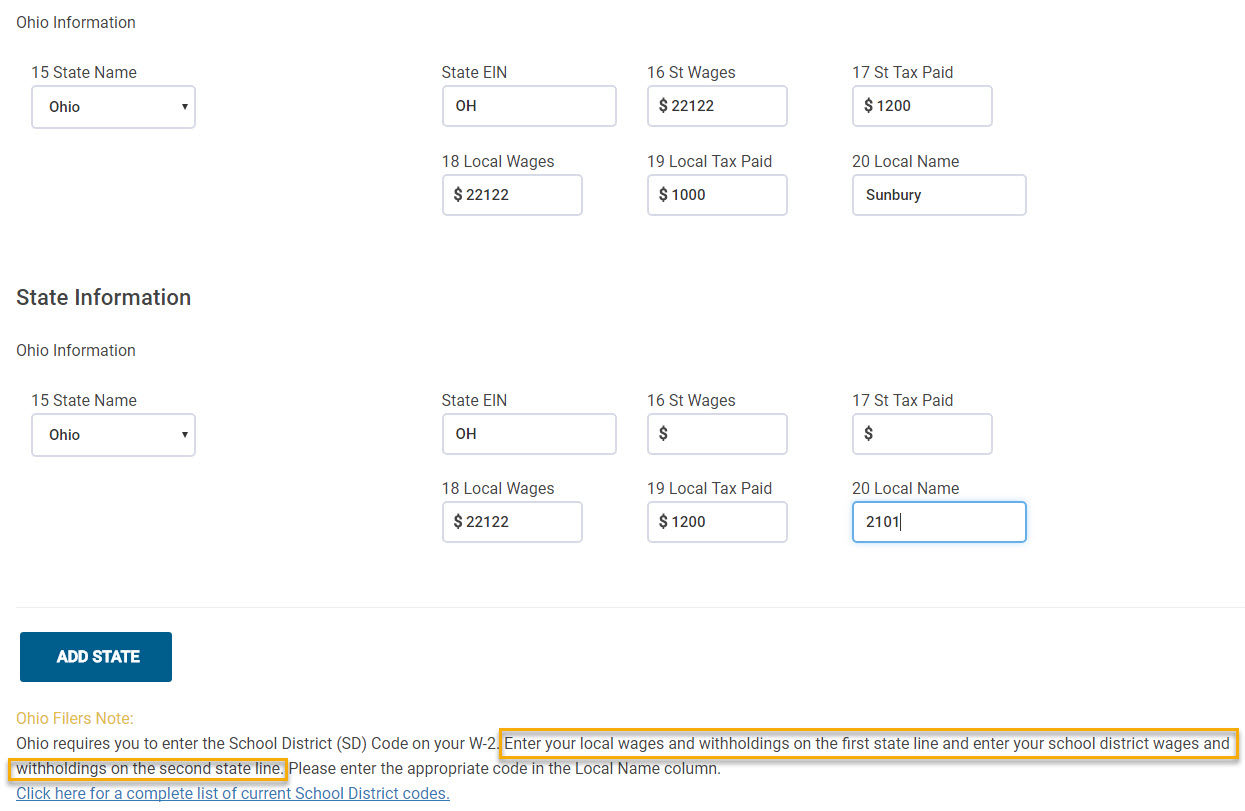
An update specific to OH W-2 entries was released to provide text as to how to prepare the OH W-2 specific to the School District entries. The highlighted text below was added to assist users when completing the state section of a W-2 for OH returns.

Blog Posted 02/11/2018

Product Update Alert: Thursday, February 8th at 5:00 am EST

07 Feb 18
Kim Manuel
,
No Comments

We will be putting the returns in maintenance mode to perform a series of updates.


blog posted 02/07/2018

Product Update Alert: Tuesday, February 6th at 5:00am ET

05 Feb 18
Craig Smith
,
No Comments

We will be putting the returns in maintenance on Tuesday, February 6th at 5:00am ET for a series of updates.

Product Update Alert: Monday, February 5, 2018 5:00 am EST

04 Feb 18
Kim Manuel
, , ,
No Comments

We will be putting the returns in maintenance mode on Monday, February 5th at 5:00 am for a series of updates.  The updates is scheduled to include:

  • PA – A fix for the PA Schedule UE
  • LA – Fixed an issue where Line 5a of LA Schedule E was not populating on the print
  • Site Production Detail Report (both Electronic and Paper) were yielding zero results. This is now fixed
  • WI – Fixed an issue where the zip code entry for Private School Tuition Credit was not saving
  • RI – Fix to check the Retirement Modification qualifications when subtracting certain retirement income
  • AZ – Form 340 is now an available form to include a print set option for AZ returns
  • CA – Fixed an issue that was keeping CA Schedule X from generating in the return.

Blog posted 02/04/2018  3:42 pm EST


Pro Online: Change to Returns in Transmitted Status

02 Feb 18
Kim Manuel
, , ,
No Comments

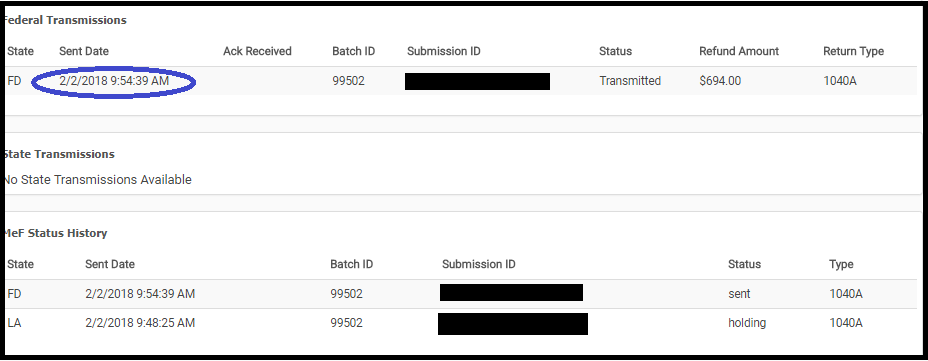
We made a change to what the preparer can do with a return while it is in the status of “Transmitted”.  We removed the ability to open a return and make changes to it while it is in the status of “Transmitted”


The average turn around time for federal acknowledgements is 7 to 15 minutes.

How do I correct federal returns with validation errors because they stay in the transmitted status

Navigate to Rejected Clients on the Welcome Screen and select Validation errors.  A list of returns with outstanding federal validation errors will be listed.  Click Select to open the return

What if the return does not show up under validation errors?

We have not received an acknowledgement from the IRS.  You can still view the Client Status to see where the return is in the transmission process

What if the return is a true State Only return and there was no federal filing requirement?

We will be making a modification to the status to indicate that it is a “State Only” return (where there was no federal return filed) to allow you to open it to make corrections to state rejects.

What about my 2015 returns that have a true validation error?

We will be adding an option to allow you entry into these returns from Rejected Clients.