All years are now generating PDFs outside and inside of the tax return.
Stress with Kim and Craig: Today is the day
Click here to complete today’s Stress Test Survey
12:00 PM EST: This year’s first stress test will begin in 15 minutes. We are so excited for this opportunity and we appreciate everyone who is participating.
12:15 PM EST: Group 1 please begin
12:20 PM EST: Group 2 please begin
12:25 PM EST: Group 3 please begin
12:30 PM EST Group 4 please begin
12:33 PM EST: Keep up the good work…you have created over 1,100 returns in the past 18 minutes…we are at approximately 1,789 concurrent users…this equates to about 9 AM during peak weeks.
12:41 PM EST: We are up to approximately 1836 concurrent users….Keep up the good work and thank you for participating
12:53 PM EST: We are about 1/2 through the stress test. We are still running at around 1800 users…give a shout out to all of your volunteer friends and ask them to join you…stress now so you don’t have to stress later. You all are doing awesome…1,865 returns…
1:00 PM EST: 30 minutes left. There is plenty of time to make a difference. If you run through all of our scenarios, just enter returns like you prepare at your sites.
1:11 PM EST: We are receiving reports of Print failures and we are looking at them now. We are tracking this information
1:15 PM EST: We will be concluding the stress test at 1:30. It looks like we started receiving print time outs at 1:04 PM EST. We are continuing to trace the errors you are producing.
1:30 PM EST: This concludes our first 2018 stress test. Please join us again at 11:00 am EST on Saturday, December 8th. It will be holiday season, so bring a friend or two along with you… You all did a great thing today…you created 2,966 2018 returns, 685 2017 returns and generated print errors for us to review. Thank you all for your participation.
3:30 PM EST: We were able to identify and resolve a concern that caused the prints to time out because of your participation…Thank you
Each group will have an assigned time to begin the testing process and scenarios
-
- Group A: Beginning character of Practice Lab Username: Any number or character – D Begin 12:15 pm
- This includes users that have not established a username yet.
- Group B: Beginning letter of Practice Lab Username: E – J Begin 12:20 pm
- Group C: Beginning letter of Practice Lab Username K – R Begin 12:25 pm
- Group D: Beginning letter of Practice Lab Username S – Z Begin 12:30 pm
- Group A: Beginning character of Practice Lab Username: Any number or character – D Begin 12:15 pm
Make notes of the Practice Lab 2018 behavior as you execute the following instructions – any slowdowns, difficulties opening returns; problems completing inputs, navigation issues, etc.:
Practice Lab URL: Practice Lab
Generic Password: TRAINPROWEB
Scenarios:
- Login to Practice Lab 2018
- Create a new return using Basic (No Profile) that has a minimum of 2 income documents from basic information through creating an e-file.
- Save and Exit the return
- Open an existing return
- Navigate to the Income Section and add an additional income document.
- Navigate to Summary/Print and select View/Print Return.
- Select Print your 2018 Tax Return to render the PDF.
- Close the PDF.
- Select Save & Exit Return
- Switch years to Practice Lab 2017
- Create a new return using Basic (No Profile) that has a minimum of 2 income documents.
- Add a State (even if you don’t typically do state returns).
- At a minimum, open Additions and Subtractions to Income menus, enter data and continue. This will kick off calculations within the state menu (new from last year’s stress test).
- Generate the PDF of the state when you return to the state summary page.
- Switch years back to Practice Lab 2018
- Create a new return using Master Taxpayer Profile that has at least Interest and/or Dividends.
- Generate the PDF for the Schedule B.
- Navigate to Deductions and complete Itemized Deductions.
- Generate the PDF for Itemized Deductions.
- Save and exit the Return
- Select the Quality Review Print Set for a return in the client list.
- Generate the PDF
- Close the PDF
- Continue moving around within returns as you would experience at your site during tax season. We want to keep as many volunteers active through entire stress test time period at 1:30 PM EST.
Practice Socials and EIN Guidance: The Practice Lab automatically enforces 00 as the 4th and 5th digit of the taxpayer SSN when starting a return. Even though this is a secured, practice environment, we recommend you use 00 as the 4th and 5th digit of any SSN in the return. We also recommend that you use 00 as the 3rd and 4th digit of any EIN you are using.
Communications: TaxSlayer will be communicating to testers through the VITA/TCE Blog and the message center.
Feedback: We will post a link to a survey that will allow you to share your experiences with us.
Stress with us tomorrow, November 15th When: 12:15 PM – 1:30 PM EST
- Each group will have an assigned time to begin the testing process and scenarios
- Group A: Beginning character of Practice Lab Username: Any number or character – D Begin 12:15 pm
- This includes users that have not established a username yet.
- Group B: Beginning letter of Practice Lab Username: E – J Begin 12:20 pm
- Group C: Beginning letter of Practice Lab Username K – R Begin 12:25 pm
- Group D: Beginning letter of Practice Lab Username S – Z Begin 12:30 pm
- Group A: Beginning character of Practice Lab Username: Any number or character – D Begin 12:15 pm
Make notes of the Practice Lab 2018 behavior as you execute the following instructions – any slowdowns, difficulties opening returns; problems completing inputs, navigation issues, etc.:
Scenarios:
- Login to Practice Lab 2018
- Create a new return using Basic (No Profile) that has a minimum of 2 income documents from basic information through creating an e-file.
- Save and Exit the return
- Open an existing return
- Navigate to the Income Section and add an additional income document.
- Navigate to Summary/Print and select View/Print Return.
- Select Print your 2018 Tax Return to render the PDF.
- Close the PDF.
- Select Save & Exit Return
- Switch years to Practice Lab 2017
- Create a new return using Basic (No Profile) that has a minimum of 2 income documents.
- Add a State (even if you don’t typically do state returns).
- At a minimum, open Additions and Subtractions to Income menus, enter data and continue. This will kick off calculations within the state menu (new from last year’s stress test).
- Generate the PDF of the state when you return to the state summary page.
- Switch years back to Practice Lab 2018
- Create a new return using Master Taxpayer Profile that has at least Interest and/or Dividends.
- Generate the PDF for the Schedule B.
- Navigate to Deductions and complete Itemized Deductions.
- Generate the PDF for Itemized Deductions.
- Save and exit the Return
- Select the Quality Review Print Set for a return in the client list.
- Generate the PDF
- Close the PDF
- Continue moving around within returns as you would experience at your site during tax season. We want to keep as many volunteers active through entire stress test time period at 1:30 PM EST.
Practice Socials and EIN Guidance: The Practice Lab automatically enforces 00 as the 4th and 5th digit of the taxpayer SSN when starting a return. Even though this is a secured, practice environment, we recommend you use 00 as the 4th and 5th digit of any SSN in the return. We also recommend that you use 00 as the 3rd and 4th digit of any EIN you are using.
Communications: TaxSlayer will be communicating to testers through the VITA/TCE Blog and the message center.
Feedback: We will post a link to a survey that will allow you to share your experiences with us.
Suggestion Box Responses: What’s New?
Click here to view PDF
Click here to submit a suggestion
There are three attachments
- Attachment #1: Dedicated to application and federal suggestions
- Attachment #2: Dedicated to State suggestions
- Sorted by State
- Attachment #3: TaxSlayer Suggestion Status
- Broken into categories
- Duplicates have been removed and only list the TaxSlayer Responses
- Column indicating when the item is expected to be delivered (TS 2017 or TS 2018)
- Column indicating if the item was added or updated since the last document (as always…prone to human error!!)
An example of the status column can be found by Tracking ID 269372 (Ctrl+F allows you search in the document)
Check out Attachment 3 to see the rest of the new and/or update items.
We are still reading through and analyzing the suggestions. We are also beginning to update the Status column as we commit to implement a suggestions.
Click here to view PDF
The link will launch a Brainshark video with instructions on how to view the file.
IRS News Essentials: Issue Number IR-2018-218 e-file closes
For Tax Year 2017, e-file closes on Nov. 17; After that, disaster victims, others need to file on paper
WASHINGTON —The Internal Revenue Service today reminded people, including those in disaster areas, who want to file a 2017 tax return electronically to do so by Saturday, Nov. 17, 2018. Filing of paper tax returns will remain available after that date.
IRS Modernized e-file, the system that processes electronically-filed individual returns, will shut down after Nov. 17, enabling the IRS to perform annual maintenance and to reprogram the system for the upcoming 2019 tax-filing season.
As a result, any taxpayer needing to file after Nov. 17 will need to do so on paper.
While the vast majority of individuals have already filed their tax year 2017 federal tax returns, victims of Hurricane Michael, Hurricane Florence and other recent disasters qualify for an additional extension. This includes taxpayers who live, work or have a business in a federally declared disaster area, have a U.S. tax filing obligation and had previously obtained a valid 6-month extension of time to file their federal tax return. Extended deadlines vary by locality and range from Dec. 17, 2018, to Feb. 28, 2019. Currently, parts of Florida, Georgia, North Carolina, South Carolina, Virginia, Wisconsin and the Northern Mariana Islands qualify.
Note: TY 2016 and TY2015 returns will also have to be paper filed during the cut-over period
Reports: Same reports with a new modern look
Along with allowing the site administrator to determine which reports show, we have now broken them into categories.

Transmission Reports
The Transmission reports are broken into Federal and State

The Federal section is where you will find your IRS Acknowledgement, Old IRS Acknowledgement Reports, Rejected Returns reports, etc. The State section where you will your State Acknowledgement, Old State Acknowledgement Reports, and other state reports.
Financial Reports
This is where the Fees charged reports will be located for the sites tracking Fees saved to the taxpayer.
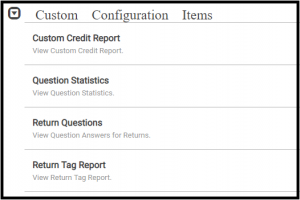
Custom Configuration Items
List the reports such as Custom Credit Report, Return Questions, etc.
Other Data Reports
This is where the Management Report that launches Web Reports is located.
TaxSlayer 2018: Getting ready for tax season
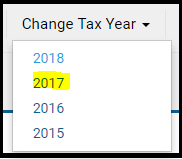
Scenario: I do not see any returns when I go to client Search
Navigate to Change Tax Year and select 2017
Scenario: I see Start A New Return when I have 2018 selected
Yes, but you will receive the following message if you try to create a new return from the Start New Return Line or the button in Client Search.
Reminder: We will not be turning on the Start New Return feature at the site level until a yet to be determined date in January 2019.

IRS Quick Alert: Veterans Day weekend systems maintenance
IRS will conduct maintenance on several electronic systems, including e-Services, over the Veterans Day weekend beginning Sunday, Nov. 11 at 8:00 a.m. ET through Monday, Nov. 12 at 6:00 p.m. ET.
Impact:
We will not be transmitting returns or receiving acknowledgements during this extended maintenance period.