Author Archives: %s

Pro Online: Addition of Explanation Forms

14 Jun 18
Kim Manuel

No Comments

We have added the IRS Explanation forms that are submitted to the IRS if further explanation about something is needed to be provided to the IRS.  These will print with the Assigned Print sets if they are used in the return and will be included in the electronic file.

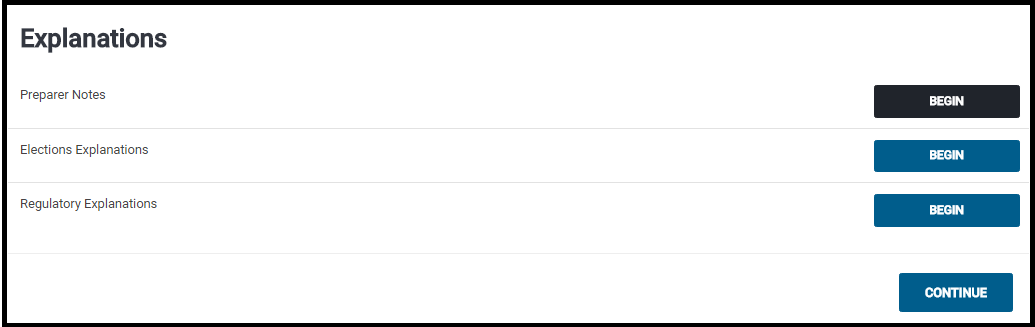
Navigate to Federal Section >> Miscellaneous Forms and Select Begin on the Explanations line

Select the appropriate Explanation.  The majority of the explanations will go on Preparer Notes (which we are using in the example)

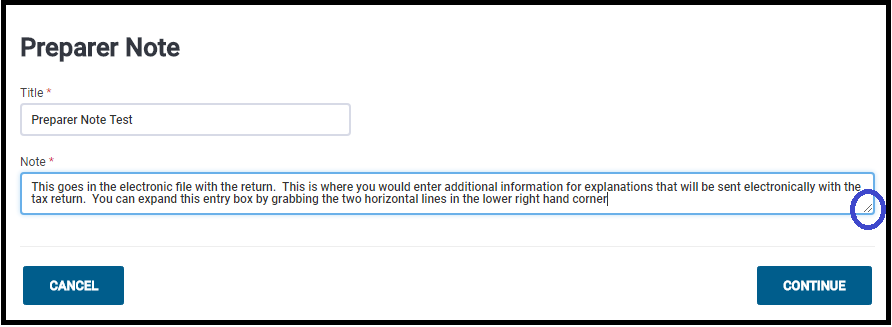
Enter a title and explanation…Click continue when finished.

Note:  You can expand the box by dragging the two horizontal lines in the lower right hand corner (circled in picture)

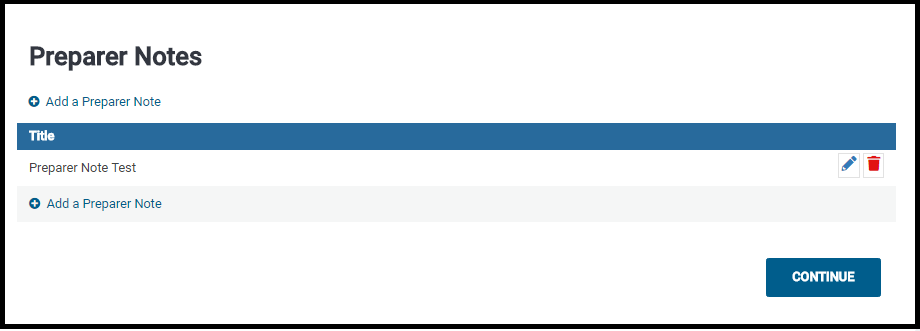
The Preparer Note Summary page will be displayed:

Click Continue to return to the Explanations Menu when finished.


Pro Online: Custom Consents Report

14 Jun 18
Kim Manuel
,
No Comments

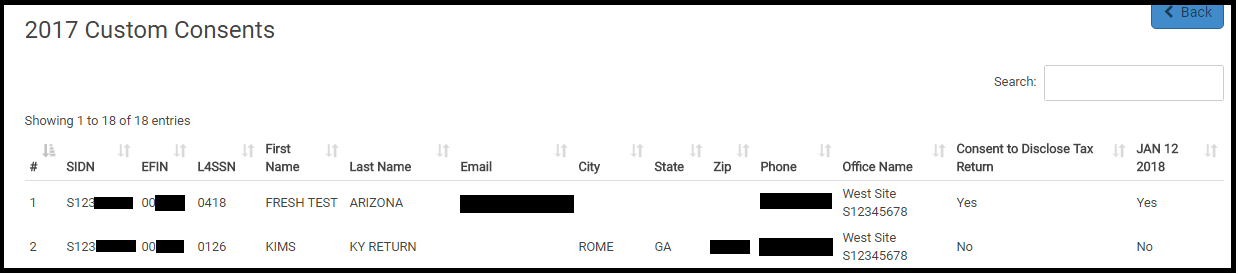
The Custom Consents Report is now available.  This report is designed to indicate the Acceptance (Yes) or denial (No) granted by the taxpayer.  This report was designed to run at the site level.

Navigate to Reports and select Custom Consents:

Note:  If you have customized your reports via Configuration, you will need to navigate to Configuration >> Report Customization and add Custom reports to your report list

Click Select

Below is an example of a generated report.

Note:  If you have multiple consents, you will need to export the report to see all of the consent titles and corresponding results

You can export the information and merge it with other reports that require consents to ensure you are reporting up the approved taxpayer information.

Suggestion Box Responses: Updated through June 8th.

12 Jun 18
Kim Manuel
, ,
No Comments

Click here to view PDF

Click here to submit a suggestion

There are two spreadsheets

  • Spreadsheet #1:  Dedicated to application and federal suggestions
  • Spreadsheet #2: Dedicated to State suggestions

An example of the status column can be found by Tracking ID 269372 (Ctrl+F allows you search in the document)

Below are some of the items that we have committed to completing (We are still reviewing all requests and there will be more commitments coming your way)

  • Change the wording from Cancel to Back in the state programs to be consistent with the Federal program
  • Several new “committed” items in the state spreadsheet

More exciting changes to come.

We are still reading through and analyzing the suggestions.  We are also beginning to update the Status column as we commit to implement a suggestions.

Click here to view PDF

The link will launch a Brainshark video with instructions on how to view the file.

Volunteer Time: SPEC 4.0 watch us grow: Rural Michigan

01 Jun 18
Kim Manuel
, ,
No Comments

A TC’s success story – One good lead turns into many

With the quest to continue serving and expanding its reach to more taxpayers, SPEC is looking to stretch as far and wide as possible. Yes, it’s all for underserved communities, but more specifically the rural communities. There are taxpayers in rural communities without our services within an hour commute. There is still opportunity SPEC 4.0 watch us grow.

Many of you already have partners doing great work in rural communities across the country. Our goal is to share how these partners are successful and how you are helping them reach those successes. The possibility of gaining new ideas to help you and your partners can be endless.

Whether you have a partner that can possibly expand their current services to more taxpayers or if there is potential for new partnerships, starting with the basics of relationship building can be the key.

We asked Tax Consultant Brian Soloman to tell us about his recent partner success story. 
Describe to us your geographic area and current partnership base.

My post of duty is in Traverse City Michigan, which is in Area 2’s Detroit Territory. Most of my partners are rural due to where I’m located. I have a very strong coalition base that I’ve been working with for several years. Our relationship is very solid and I feel confident in saying that our value and trust in each other lends to us knowing we can depend on each other.

How did your recent success story begin?

Late last summer I received a call from the director of my statewide coalition with a great lead. He shared with me that the United Way of Roscommon County was interested in the VITA program. I knew the lead was solid but once I spoke the contact point I also learned the deal was not as simple. The United Way contact needed help with selling the program among board members and the other organizations they wanted to bring on board to help with administering the program. This included local colleges, libraries, commission on aging etc.

What steps did you take next?

I knew I needed to show how there was an actual need for the services in this designated community. And, that they could successfully work the program. This is when I put my consultative skills into action. After assessing what steps I needed to take, I went to The Point and proceeded to pull SPEC market segment data, by county and gathered the low income portion. I shared with the potential partner how there was a huge need for free tax prep services in the area and what the benefits would be for their community if the services were made available. I simply presented them with the facts and showed them the numbers.

How long did it take you to work this opportunity?

It took a few months to convince them that they could do it. But after several months of discussions, answering lots of questions and walking them through the Site Coordinator Handbook from front to back, there was confirmation of not only a new partnership (United Way Roscommon County) with one new site, but an actual total of eight new sites. There are three libraries, a college, a state workforce development group and three commission on aging groups. Brian took this lead, working it 100% remotely by phone, and now has eight new sites in a rural community that really needs the help.  

In your opinion, what were the key actions that made this turn out successfully?

I think partly due to the relationship I have with my coalition director. He trusted me enough to share his solid lead with me. But after that point it was officially in my hands to work. I diligently worked to provide them with all the answers they needed to make their decision and thankfully it turned out to be positive for everyone.

What advice would you give to fellow TCs/RMs to gain additional successes?

Many are probably doing this already, but if not, I would recommend following the four actions I generally use:

  1. Work and manage your relationships;
  2. Use all available tools at your disposal– i.e. the SPEC market data;
  3. Always include a “what’s in it for them” approach; and
  4. Share any success stories from other sites

Volunteer Time: SPEC 4.0 watch us grow: Rural Southwest Georgia

31 May 18
Kim Manuel
, ,
No Comments

A TC’s success story

Universities and colleges can equal rural success

As SPEC continues its efforts to help more taxpayers in rural communities, the RM and partner success stories are building too. The goal is to share as many of these stories as possible, with the premise that they may possibly help others expand their reach in rural areas

Senior Tax Consultant Kenneth Brown shares his Southwest Georgia rural success story 

Describe to us your geographic area and current partnership base.

I am a Senior Tax Consultant, managing one of the larger coalitions in the Atlanta Territory. Working in the Savannah, GA POD, I always get to use my consultative skills to create new partnerships and promote free-tax preparation in our territory. Our small team work actively together in our rural areas to increase productivity and support.

How did your rural success story begin?

I received a call from a former partner at the local university, extending an invitation to come to a “Meet the Firms” event.  During this event, we had the opportunity to market VITA and other free-tax prep options to more than 40 local firms. Coincidentally, we had a scheduled meeting at the university for the next day and took the liberty to invite some of the employers who were at this meeting to come to our meeting. During our meeting, we targeted three rural locations:  Valdosta, Albany and Tifton, Georgia. All three rural areas have universities who ultimately agreed to train their students to become certified for the upcoming filing season.

What steps did you take next?

We began the process to successfully set up sites remotely and face-to-face. We obtained EFINS, ordered software and certified student volunteers at two locations.

How long did it take you to work this opportunity?

It took two months during the pre-filing season to prepare the partners and sites to be ready for the filing season.

In your opinion, what were the key actions that made this turn out successfully?

The collaboration with a current VITA partner was a key element. That relationship allowed us the opportunity to host a meeting where we shared best practices and economic impact data (EID) for all three communities. Using information directly from SPEC’s return database, E-file, and TaxSlayer Reports allowed us to show attendees key information such as refund data in their areas, including EITC dollars. We also shared the potential savings of tax return preparation costs when using our free tax prep services. Presenting this information sparked an interest with the attending professors, and they agreed to share this information at their community meetings. Also, two of the universities agreed to incorporate VITA into their class curriculum next filing season, to ensure they will always have a pool of certified volunteers.

What advice would you give to fellow TCs/RMs to gain additional successes?

Many of the universities and/or colleges have programs or career days where 30 to 40 employers are invited. TCs/RMs can check with their local colleges or coalition partner to determine if they can participate in these outreach sessions to market the free-tax programs.

Any other information you’d like to add:

Coalition building in rural communities is essential.  Beginning with the colleges and universities is a great start to build your program and volunteer base. If not already established, this will be a great time to work on a partnership with the colleges, universities and employers in the rural communities and other locations.

Suggestion Box: Responses through May 29th

30 May 18
Kim Manuel
,
No Comments

There are two spreadsheets

  • Spreadsheet #1:  Dedicated to application and federal suggestions
  • Spreadsheet #2: Dedicated to State suggestions

An example of the status column can be found by Tracking ID 269372 (Ctrl+F allows you search in the document)

Below are some of the items that we have committed to completing (We are still reviewing all requests and there will be more commitments coming your way)

  • Ability to sort the Transmission columns
  • SSN under Review Returns will be masked if the user cannot view full SSN

More exciting changes to come.

We are still reading through and analyzing the suggestions.  We are also beginning to update the Status column as we commit to implement a suggestions.

Click here to view PDF

The link will launch a Brainshark video with instructions on how to view the file.

Release Notes: Form 8919 (LIVE 5/24/18)

23 May 18
Kim Manuel
,
No Comments

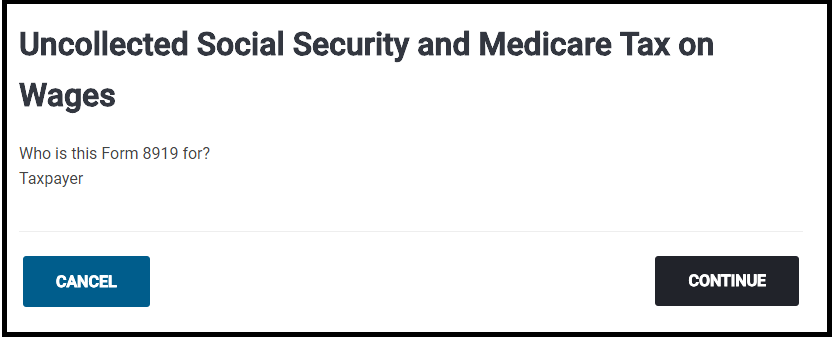
Navigate to Other Taxes and Select Begin on the following item:

Select if the form belongs to the Taxpayer or Spouse (in this screenshot, there was only a taxpayer)

Click Contiinue

Complete the Employer section

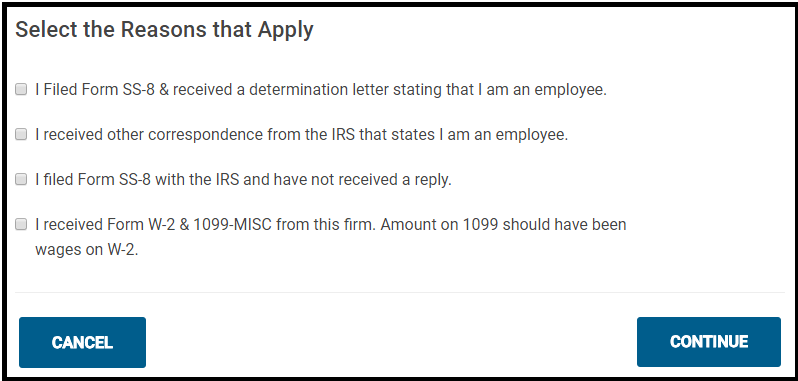
Select the appropriate reason:

Click Continue


Release Notes: Form 2120 (LIVE 5/24/18)

23 May 18
Kim Manuel
,
No Comments

Feature:

Adding the ability to complete Form 2120 from the application

Instructions:

Select the following question when completing the Dependent/Qualifying person information

Click Continue

Complete the information for each person that provided at least 10%, but no more than 50% of the support that have agreed not to claim the listed individual as a dependent.

The 2120 Summary page will display the taxpayers that will be listed on Form 2120

The form will print with the return

Blog posted 05/23/2018