Author Archives: %s

Pro Online 2017: Acceptance Agent for W-7 — Complete

07 Mar 18
Kim Manuel
,
No Comments

We released Phase I on Friday, March 2nd of having the ability to print the Certified Acceptance Agent information on the bottom of Form W-7 when applying for or renewing ITIN applications.

Navigate to the Preparer(s) menu in configuration

Edit an existing Preparer or Create a new one

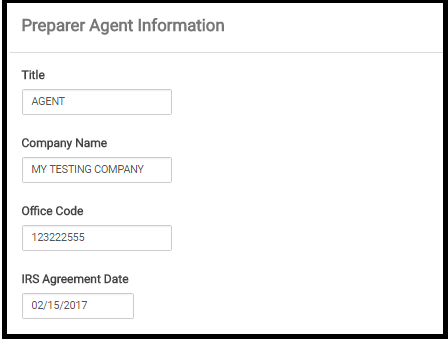
There is a new section located between the Personal Information Section and Login Account Section

This is where you enter the information that will carry along with your preparer name to the Acceptance Agent portion of the W-7

Blog posted 03/07/2018

Pro Online/Desktop: Information from Massachusetts

05 Mar 18
Kim Manuel
, ,
No Comments

We received the following from the MA DOR:

Refunds Changed from Direct Deposit to Paper Check

February 26, 2018: DOR has just released a number of income tax refunds via paper check where direct deposit had been requested on the tax returns. DOR sometimes changes the refund delivery method from direct deposit to paper check as an additional security measure and this action was taken in an effort to honor these early refund requests more quickly. We apologize for any inconvenience this may cause.

Here is the link:

Click Here

Pro Online 2017: Print PDF not Generating — RESOLVED

03 Mar 18
Kim Manuel
No Comments

Update 2:43 pm — verification code emails are now functioning properly.  You will most likely need to request a new code if yours was delayed and you have since closed your browser session

Update 2:05 pm — 2014 calculations and prints are rendering

Update 1:59 pm — 2015 calculations and prints are rendering

Update 1:56 pm — 2016 calculations and prints are rendering

Update 1:42 pm — We are in the process of making the prior year calculations and prints available.  This process will take approximately 1 hour to complete.

Update 1:29 pm — 2017 print is now rendering a PDF from all areas, Client List, Summary/Print and the Submission page in e-file.  I am going to keep this blog post updated with prior year information as well.

Update 1:21 pm — Print from Summary/Print is now rendering a PDF.  We are now working on bringing the print up from the Client List and E-file

Update 1:17 pm — We are testing print internally now and will post another update in approximately 10 minutes

Update 1:07 pm — We are in the process of making the print available.  This also appears to be impacting getting authentication emails.  Once we get print back online, we will look at this.

Update 12:49 pm — We are still actively working to get 2017 prints rendering as the top priority, and then investigate prior years

Update 12:36 pm — Items impacted:

  • TY2017 — All prints
  • TY2016 — Prints and calculations
  • TY2015 — Prints and calculations
  • TY2014 — Prints and calculations

Update:  Ticket 1478 is currently being worked by our IT and software engineers.  This is impacting 2017 and 2016 printing inside and outside of the return

We have opened a ticket to investigate the PDFs not generating for print

Weekly Maintenance Notification: Sunday, March 4th 1:00 am – 7:00 am EST

02 Mar 18
Kim Manuel
No Comments

We will be performing our March maintenance on Sunday, March 4th from 1:00 am – 7:00 am EST.  The sites will be unavailable during this time.

Blog posted 03/02/2018

Pro Online 2017: Acceptance Agent for W-7 Phase I

02 Mar 18
Kim Manuel

No Comments

We have released Phase I of having the ability to print the Certified Acceptance Agent information on the bottom of Form W-7 when applying for or renewing ITIN applications.

Navigate to the Preparer(s) menu in configuration

Edit an existing Preparer or Create a new one

There is a new section located between the Personal Information Section and Login Account Section

This is where you enter the information that will carry along with your preparer name to the Acceptance Agent portion of the W-7

Note: For EIN to carry to W-7, it needs to be entered in ERO Setup within Configuration

Phase II is scheduled to be delivered next week

Phase II is actually carrying the data to this section which is scheduled for the week of March 5th

Pro Online 2017: Unexpected Server Errors (RESOLVED)

02 Mar 18
Kim Manuel
No Comments

Update 10:36 am EST — This has been resolved

Update 10:25 am EST —  We have found the issue in the code stream and are currently working to update it.  An alternative solution that works the majority of the time is to click the Back arrow button of the browser to take you back to the page you were on before and then click continue as normal.  We are seeing this work for most of the returns.

————————————————

We have received several calls about an Unexpected Server Error in Healthcare and E-file.  We are currently investigating this.

Rather than clicking log back in button, close the browser, and open a new instance of the browser, log back in.  This will route you to a different server.


Volunteer Time: All Partners Call Notes from March 1

02 Mar 18
Kim Manuel

No Comments

The following items were covered by TaxSlayer at the opening of the call

  • There have been well over 500,000 returns electronically filed since the last partner call on February 15th.
  • TaxSlayer delivered Form 5695 – Residential Energy Credit in Thursday morning’s deploy.  This goes along with the other three items already in the software for the recently passed extenders:
    • Tuition and Fees
    • PMI in Itemized Deductions
    • Form 982 – Cancellation of Debt
  • The 1040 View is still showing Line 34 as reserved.  This is just a display issue and does not impact the calculations of the return
  • We are still gathering information from the states regarding how they are going to handle the recently passed extenders.  We will keep a blog post updated as that information comes in.
  • We resolved the issue from Tuesday afternoon where the states were not automatically being made available to the IRS state delivery system after the federal return was accepted.
    • If there are still states that are outstanding from your perspective, please send the information to support.  They will need to know SIDN, last 4 of the SSN and which state (in case you have multiple states on the return)
  • We have been getting several inquiries regarding Form 8867 – Paid Preparer Due Diligence.
    • The software bypasses the form this year when going to E-file.
    • The form is not in the default print sets that are delivered by TaxSlayer
    • If the form is in a custom print set and was manually completed, it WILL print the preparer’s name on it, as this form is designed for our Paid Preparer customers.
  • IRS Reject IND-046
    • We are seeing a lot of support traffic regarding this code because a lot of sites are seeing it more this year than they have in the past.
    • The IRS went back and added additional items to be flagged as disallowed (CTC, ACTC, and AOTC).  While these have different business rules, they could have also updated more taxpayers for being disallowed EIC
    • This business rule also applies if EIC was partially disallowed
    • If the taxpayer’s return is issued this business rule, the only way to electronically file the return is to add the 8862 to the return.
  • Disaster Areas for California Wildfires
    • We are in the process of adding California Wildfires to the drop down list in personal information
    • During the meantime, you can still designate the disaster area:
      • Navigate to personal information
      • Select the disaster area box
      • Select enter Disaster Designation from the list
      • Type in California Wildfires
    • This will follow the path of returns marked for the hurricane area
  • The 933 Exclusion has been added to the 1040 program.  There is a blog article with screenshots on how to use it, use keyword search 933 to bring up the article or click here
    • Navigate to Other Income
    • Select Other Compensation
    • Answer the Bona fide resident question
    • Enter the amount of income to exclude
    • If you are itemizing deductions the program will tell you the Pro rated percentage
    • If you are using the standard deduction, the program will automatically prorate the deduction
  • We added a new dialog to the Submission page in the e-file section last week.
    • If you click Save and Transmit, a new dialog box displays that requires an action
  • We corrected an issue last where where IRS Accepted returns were being resent (which generated a 902 reject) if the user exited the application through Save and Exit return on the submission page in e-file.  This is no longer happening
  • The IRS MeF system will have an extended maintenance period on Sunday from midnight to 2:00 pm EST
    • This means any returns sent to us during this time will be held until the IRS completes their mainenance
  • TaxSlayer maintenance will be Sunday morning (March 4th) from 1:00 am to 7:00 am EST
  • At the time of the call we were having an issue with the states generating a validation error if there was a date field on the entry page.
    • This was Resolved at approximately 4:00 on Thursday afternoon


Q:  Where is the direct debit information printed on the return?

A:  It is printed on the Client List form, which is currently in the Quality Review print set.  An alternative to pulling this up and just printing out the page, would be to create a Direct Debit print set that just has the Client List Form in it.  This would allow you to print the tax return as normal and then for those taxpayers using direct debit, you can choose that print set and it will just generate a PDF with the Client list form in it.  You can then print the entire Client List for or the page the information is listed on.

Q:  Are there more instructional videos or information on entering ACA exemptions A and C

A:  There is a blog post that outlines how to use the new Affordability worksheet.  This can be pulled up by using the keyword search of Affordability or clicking here.  The Taxpayer Opportunity Network will be sending out some training information on this later next week for sites that are members of this group.

Q:  When does Form 5405 print

A:  It only prints if you are disposing of the property.  If the taxpayer doesn’t know how much they have paid back, there is a lookup tool on the entry page that will give this information if the taxpayer is there to provide the required information for pulling the data from the IRS.

Q:  When will prior year reports pull return data for TY2016 returns that were prepared after January 1st, 2018

A: We do have an issue in development to display this information on the Site Production Detail and Summary reports for 2016.  The following reports until Management Reports will display information on these returns

  • ProWeb Reports — Detailed Return Report
  • Electronic Filing Summary Report
  • State Detail Summary Report

Q:  Do front line reps have access to returns this year?

A:  Yes because our system has been revised to mask the personal information.  They do not have the ability to change and transmit these returns, just view them.

Q:  If there is an occasion when TaxSlayer goes in and resubmits a return, how would the volunteer site know?

A:  This would be a very rare occurrence and limited to a few people with the appropriate credentials.  We would only do this to troubleshoot something going on in the field for the site, or test a fix that would bypass a validation error.  If we do this, it logs our username in the return client history so the site can tell.

Q:  How to resolve getting a message that the SSN already exists, if we prepared the return in TS 2016 and then switch to TS 2017?

A:  The best solution for this is to have the user log out of the application, close the browser, open a new instance of the browser and then create the 2017 return.  This will by pass the error message and allow for prior year data.  This does not happen all of the time, but sometimes the session does not end switching between years and the application still thinks the user session is in the prior year.

Q:  Does TaxSlayer prevent $0 AGI returns from being electronically filed?

A:  No, but the IRS will reject them.  If you need to file a state that does not have a federal filing requirement, make sure you select the “Send state only” box in the e-file section.  Note:  You must select a federal filing type for E:file, but as long as the “Send State Only” box is marked, the federal will not be transmitted.

blog posted 03/02/2018


Phishing Scam Email Awareness

01 Mar 18
Kim Manuel
, ,
No Comments

Phishing

Scammers often try to steal their victims’ identities by sending them phony e-mails which claim to come from trusted sources, such as well-known financial institutions or government agencies (including the IRS), and ask them for detailed personal and financial information. This practice is known as “phishing.” The information requested is used by the scammers to gain access to the victims’ bank accounts, open new credit cards in their victims’ names and get cash advances, and more.

While we have not heard this from our VITA/TCE community, we wanted to share this as an informational awareness alert:

TaxSlayer Pro has been made aware of an email phishing scam where the sender claims to be from TaxSlayer Pro.  The subject line may read “Urgent Warning” or “Action Required”.  The body of the email is asking you to “take action or lose access to your account within 24 hours” or “we’ve updated our servers and some of your information is missing”.  This email contains a link to a site intended for you to update your information.  Do not click the link or provide any requested information.  These emails were sent from an unknown party not affiliated with TaxSlayer Pro.  Please note, official email from TaxSlayer Pro will always be sent from a TaxSlayerPro.com email address, or in the case of VITA/TCE a [email protected] email address.

The IRS has noticed an increase in the number of phishing attempts targeting professional tax preparers over the past year.  Phishing emails may use differing language in an attempt to trick an individual in to disclosing sensitive data.  Should you ever have concerns about the legitimacy of an email claiming to be from TaxSlayer Pro, please do not hesitate to contact our Support team by phone at 800-421-6346 or by email at [email protected] prior to taking any action.

How to Spot a Scam

Many e-mail scams are fairly sophisticated and hard to detect. However, there are signs to watch for, such as an e-mail that:

  • Requests detailed or an unusual amount of personal and/or financial information, such as name, SSN, bank or credit card account numbers or security-related information, such as mother’s maiden name, either in the e-mail itself or on another site to which a link in the e-mail sends the recipient.
  • Dangles bait to get the recipient to respond to the e-mail.
  • Threatens a consequence for not responding to the e-mail.
  • Gets the company or other federal agency names wrong.
  • Uses incorrect grammar or odd phrasing.
  • Uses a really long address in any link contained in the e-mail message or one that does not start with the actual company email address. To see the actual link address, or url, move the mouse over the link included in the text of the e-mail.