Category: RESOLVED

Accessing Returns Presenting an Error [RESOLVED]

20 Mar 23
Craig Smith
No Comments

12:49 – This has been resolved.

12:47 – We are aware and actively investigating the error presented when opening a 2022 tax return.

TaxSlayer Pro Online: Printing Issue Related to NC Estimated Payment Vouchers [RESOLVED]

02 Mar 23
Craig Smith
No Comments

3/24/2023: This has been resolved.


3/6/2023: We are still receiving reports of sporadic printing issues for NC with estimated payment vouchers added. We have opened a new high priority work item (Issue 9563)


3/6/2023: The fix is live.


The fix is scheduled to be deployed the morning of Monday, March 6th.


Our development team is aware returns with a NC return added (more specifically with Form NC-40, Estimated Payment Vouchers) are continuing to experience printing issues. We will update this post as additional information is available. If you have returns impacted at your site, we have a couple recommendations that may help depending on what you are trying to do.

Note: E-filing NC returns with estimated payment vouchers is not impacted.

If you are trying to quality review an impacted return, remove the estimated payment vouchers. The same is true to provide a copy of the return to the taxpayer. Obviously the taxpayer needs the payment vouchers, otherwise they wouldn’t be added to the NC return. Once our issue is resolved, we recommend utilizing the Customer Portal to provide a copy of the return to the TP with the vouchers. Another option is to try to print the return from other areas of the application such as:

  • Summary/Print page
  • State PDF View from the State Section grid
  • Submission page of e-file
  • Client List
  • Client Status

E-file Validation Appearing on Submission Page: “Must Have Efile Fee Record Saved to Efile” [RESOLVED]

20 Feb 23
Craig Smith
No Comments

2/22/23 – this has been resolved.


If your site is seeing the below e-file validation showing on the Submission page, you are likely tracking fees at your site. If the e-file validation does appear for you from the Submission Page, you will be unable to e-file the return from Submission temporarily. Instead, mark the return complete > save and exit. You can transmit from the Transmission menu. We have an open work item in with development to remove this validation so it is not visible to VITA/TCE sites. We expect this to be resolved by end of this week.

IL Subtractions from Income Not Working [RESOLVED]

20 Feb 23
Craig Smith
No Comments

2/22/23 – This is now resolved.


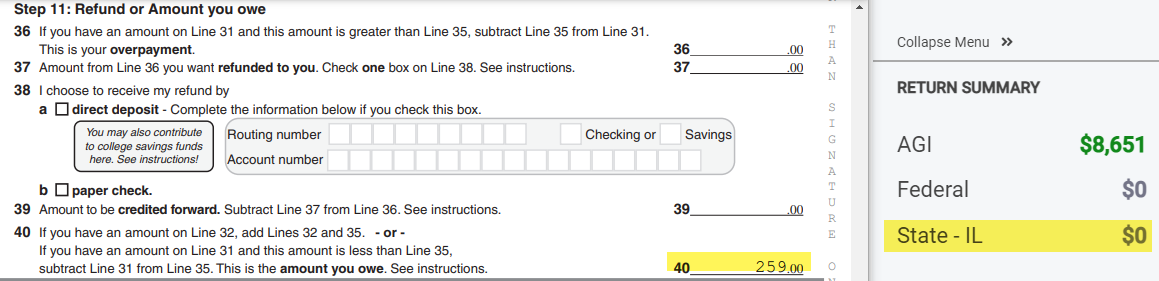
Update 2/20/23: The deployment on Friday, February 17th corrected the calculation issue related to Line 5 of the IL-1040. However, the display in the PDF is still incorrect and does not reflect the accurate refund/amount owed on Line 37 or 40. The Return Summary (example below) is correct and that is the value the TP can expect to owe or receive as a refund. NOTE: The electronic submission is correct and the amount reflected in the Return Summary is what is sent with the electronic submission. It is ok to resume electronically filing impacted IL returns.

So, looking at the screenshot below, the PDF (IL return) incorrectly shows the TP owes $259 (Line 40 of IL-1040). Their Return Summary correctly reflects the TP does not have a tax liability and will not receive a refund from IL.


Update 2/17/23: The fix was rolled back due to an unforeseen issue.  We are currently working to resolve this issue.


The fix for this should be deployed Friday morning, February 17th.


We are aware of an issue that began this morning (2/15/23) where entries in the subtractions from income menu within the Illinois application are not carrying to the return. We have a high priority ticket in with our development team.

Intermittent spinning of the application (Update 12:48 pm) [RESOLVED]

05 Feb 23
Kim Manuel
No Comments

Update 12:48pm EST:  This has been resolved.  If you continue to see the application spinning do the following:

  • Log out
  • Open a new instance of your browser, not just a new tab
  • Log back in

This gives you a total refresh


Update 12:34pm EST:  We have narrowed the issue down to the server pool that renders access to the state returns.  We are actively working to resolve this.


We have opened a critical ticket to determine why some people are getting a constant spinning in the application.

Suggestion:  Open another instance of the browser and login from the new instance.  This seems to be isolated to a server, so we are checking the health of all servers.

State Availability [RESOLVED]

24 Jan 23
Kim Manuel
No Comments

1/24/2023 – 12:33pm ET: This has been resolved.


We are aware that Louisiana is the only state available.  We are working to make the other states “available”

TaxSlayer Pro Online: 2022 Calc Spinning [RESOLVED]

24 Jan 23
Craig Smith
No Comments

1/24/2023 – 9:57am ET: This has been resolved.


1/24/2023 – 9:50am ET: We are aware and actively investigating an issue in 2022 where the calc is not working. This post will be updated once resolved.

Unable to Enter State Details in W-2 [RESOLVED]

23 Jan 23
Craig Smith
No Comments

9:58am ET – This has been resolved.

9:40am ET – We are aware of an issue when attempting to make entries in the state area of the W-2. Our developers are actively investigating. This post will be updated as additional information is available.