Category: Software News

TaxSlayer 2018: Getting ready for tax season

08 Nov 18
Kim Manuel

No Comments

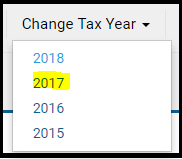
Scenario:  I do not see any returns when I go to client Search

Navigate to Change Tax Year and select 2017

Scenario:  I see Start A New Return when I have 2018 selected

Yes, but you will receive the following message if you try to create a new return from the Start New Return Line or the button in Client Search.

Reminder:  We will not be turning on the Start New Return feature at the site level until a yet to be determined date in January 2019.


You are invited: Stress Test 2018

06 Nov 18
Kim Manuel
,
No Comments

We recently sent out over 82,000 emails to Practice Lab users who have prepared 1 or more returns in Practice lab 2017.  Some of the emails bounced back and some may have been marked as SPAM by your email provider.   This is an open invitation for all volunteers…

We would like to extend an invitation for you to participate in our stress test events.   Our goal is to have 12,000 -15,000 concurrent users during this period, so we can closely simulate our peak hours during the season.

Stress Test 1

When:  Thursday, November 15, 2018

Time:  12:15 PM – 1:30 PM Eastern

Where:  TaxSlayer Practice Lab 2018 from anywhere with an internet connection

Stress Test 2

When:  Saturday, December 8, 2018

Time:  11:00 am – 12: 15 PM Eastern

Where:  TaxSlayer Practice Lab 2018 from anywhere with an internet connection

Please take a moment to RSVP via our Survey Monkey Stress Test Survey

https://www.research.net/r/TaxSlayer2018StressTest

Thank you in advance for your participation.

Coming Soon: New Idle Time Out Requirements

05 Nov 18
Kim Manuel
No Comments

The Security Technical Implementation Guide (STIGs) requires the following change to our idle timeout period policies:

The application must automatically terminate the non-privileged user session and log off non-privileged users after a 15 minute idle time period has elapsed.”  In order to comply with this requirement we must decrease the idle timeout period from 20 minutes to 15 minutes

When will this be implemented?

This change is scheduled to be implemented by the end of November, 2018.


Blog posted 11/05/2018 9:21 AM EST


Save the Dates: TaxSlayer 2018 Stress Test is just around the corner

23 Oct 18
Kim Manuel
,
No Comments

We would like to extend an invitation for you to participate in our stress test events.   Our goal is to have 12,000 -15,000 concurrent users during this period, so we can closely simulate our peak hours during the season.

Stress Test 1

When:  Thursday, November 15, 2018

Time:  12:15 PM – 1:30 PM Eastern

Where:  TaxSlayer Practice Lab 2018 from anywhere with an internet connection


Stress Test 2

When:  Saturday, December 8, 2018

Time:  11:00 am – 12: 15 PM Eastern

Where:  TaxSlayer Practice Lab 2018 from anywhere with an internet connection


Suggestion Box Responses: Updated through June 8th.

12 Jun 18
Kim Manuel
, ,
No Comments

Click here to view PDF

Click here to submit a suggestion

There are two spreadsheets

  • Spreadsheet #1:  Dedicated to application and federal suggestions
  • Spreadsheet #2: Dedicated to State suggestions

An example of the status column can be found by Tracking ID 269372 (Ctrl+F allows you search in the document)

Below are some of the items that we have committed to completing (We are still reviewing all requests and there will be more commitments coming your way)

  • Change the wording from Cancel to Back in the state programs to be consistent with the Federal program
  • Several new “committed” items in the state spreadsheet

More exciting changes to come.

We are still reading through and analyzing the suggestions.  We are also beginning to update the Status column as we commit to implement a suggestions.

Click here to view PDF

The link will launch a Brainshark video with instructions on how to view the file.

Suggestion Box: Response Document through May 22nd

23 May 18
Kim Manuel

No Comments

There are two spreadsheets

  • Spreadsheet #1:  Dedicated to application and federal suggestions
  • Spreadsheet #2: Dedicated to State suggestions

An example of the status column can be found by Tracking ID 269372 (Ctrl+F allows you search in the document)

Below are some of the items that we have committed to completing (We are still reviewing all requests and there will be more commitments coming your way)

  • Display AGI
  • Make Consents Year Specific
  • Create a Consent report that indicates the consent Title and corresponding acceptance or denial

More exciting changes to come.

We are still reading through and analyzing the suggestions.  We are also beginning to update the Status column as we commit to implement a suggestions.

Click here to view PDF

The link will launch a Brainshark video with instructions on how to view the file.

Suggestion Box: Responses through May 11th

14 May 18
Kim Manuel
, ,
No Comments

There are two spreadsheets

  • Spreadsheet #1:  Dedicated to application and federal suggestions
  • Spreadsheet #2: Dedicated to State suggestions

An example of the status column can be found by Tracking ID 269372 (Ctrl+F allows you search in the document)

Below are some of the items that we have committed to completing (We are still reviewing all requests and there will be more commitments coming your way)

  • 1040NR: Load Schedule OI while in Taxpayer Information
  • 1040NR:  Carry data from schedule OI to Form 8843
  • Add a Save and Enter another button to make repeat entries easier for the following
    • W-2 entry page
    • Interest Income entry page
    • Dividend Income entry page
    • 1099-Entry entry page

More exciting changes to come.

We are still reading through and analyzing the suggestions.  We are also beginning to update the Status column as we commit to implement a suggestions.

Click here to view PDF

The link will launch a Brainshark video with instructions on how to view the file.

Suggestion Box: Highlight Rejects in Red

27 Apr 18
Kim Manuel
,
No Comments

Suggestion from Volunteer

If you have a reject for EIN or SS Number highlighted the incorrect number in red. We have many clients that have multiple children, W-2s. and/or 1099-R.

TaxSlayer Recommendation

There are several ways in the software to make this determination.

(1) click the word Reject under the status column to display the rejected value

(2) Selecting Client Status from the tools drop down on the Client List will display the reject value and

(3) the IRS acknowledgement will display the reject value.  This is typically the last 4 digits of the rejected SSN or the EIN if it is a 1099R or W2 getting rejected.