The Kentucky Department of Revenue does not support receipt of 2015 e-files. All 2015 Kentucky state returns prepared at sites must be printed and mailed for processing. 2016 and 2017 Kentucky state returns can be transmitted electronically.
Production Update Alert: Wednesday, February 14th at 5:00am ET
The site will be placed in maintenance on Wednesday, February 14th at 5:00am ET to apply a series of updates. Items scheduled to be included in this deployment are as follows:
- Fix an issue where Delaware returns are including Column A figures in error (Issue #821)
- Fix an issue where the Minnesota Direct Debit Authorization was displaying “20” of 2018 instead of “18” of 2018 indicating year of debit (Issue #1073)
- Various State Reject Codes received due to the “Other State Return” not being included in the transmission to support the “Credit for Taxes Paid to Another State or Jurisdiction”.
- Impacted returns can be resubmitted by the sites on 2/14/18 (Issue #950)
- 1040 View fix to display the total number of exemptions claimed in box 6d
- Fixed an issue where adding Form 8862 to a return for previously disallowed CTC/ACTC was not working (Issue #888).
- Any impacted return (Federal Reject Code IND-165) that could not add F8862 for CTC/ACTC can now add this form and resubmit the return
Pro Online/Desktop: New Mexico State Acknowledgements (Update 2/10)
Updated 02/10 8:48am EST
We received the following information from New Mexico early Friday evening:
As of the afternoon of 2/9/2018, New Mexico has fully opened for the processing of individual e-file returns. We have an extensive backlog of pending submissions, which we expect that may take upwards of a week to clear out. Given that, it still may be some time before acknowledgements are received on all outstanding submissions.
Updated 02/09/11:28 am EST
We received the following information from New Mexico
A brief status update on New Mexico e-filing of individual returns. We have been troubleshooting an ongoing internal issue, which has required the throttling of incoming returns. As a result, processing and acknowledgment of submissions has been significantly slowed. We are reaching the end of our troubleshooting and, contingent on the outcome of final review, are expecting to be opening fully later today. Once we are open, we do expect that we may take several days to process through the backlog. We apologize for any inconvenience.
Updated 02/08 4:33 pm EST
We received the following information from New Mexico.
New Mexico will begin loading MeF submissions into the tax system today, February 8, 2018. Returns filed by taxpayers which indicate they do not want to provide a driver’s license or state id will be rejected with error code 847, Taxpayer declined to provide Driver’s license or State ID number, which is required by the State of NM.
~~~~~ Original Blog Post ~~~~~
New Mexico has reached out to vendors to acknowledge they will be a little delayed in processing acknowledgements of individual NM returns. New Mexico indicated they are throttling the processing of incoming individual returns to ensure they are able to respond more easily to any technical issues that may arise. This means that it may take longer than usual to issue acknowledgements.
Q: What should sites do that have not received acks for transmitted NM returns?
A: Nothing. If your site has transmitted NM returns and they have not been accepted or rejected, continue to wait as NM is currently working through their backlog to issue acknowledgements. They should start coming in over the next several days.
Pro Online: 2015 and 2016 Arizona Reject Code 500 (RESOLVED 2/16/18)
RESOLVED 2/16/18 – Prior Year AZ returns rejected for this reason can be resubmitted at this time
If your site has transmitted a 2015 or 2016 Arizona return and it has received the below reject code, please hold on to these returns and do not resubmit until notified. We are working to resolve the issue causing this AZ state reject code. Note: This DOES NOT impact 2017 Arizona submissions.
“AZ Reject Code: 500 – The ‘stateSchemaVersion’ attribute is invalid – The value ‘AZIndividual2016v1.3’ is invalid according to its datatype ‘String’ – The Enumeration constraint failed.; Return failed Schema Level Validation.”
Pro Online/Desktop – Delay in Issuing New Mexico Acknowledgements
New Mexico has reached out to vendors to acknowledge they will be a little delayed in processing acknowledgements of individual NM returns. New Mexico indicated they are throttling the processing of incoming individual returns to ensure they are able to respond more easily to any technical issues that may arise. This means that it may take longer than usual to issue acknowledgements.
Q: What should sites do that have not received acks for transmitted NM returns?
A: Nothing. If your site has transmitted NM returns and they have not been accepted or rejected, continue to wait as NM is currently working through their backlog to issue acknowledgements. They should start coming in over the next several days.
Pro Online: New “State Only” Status
The client list has a new status that you can filter returns on: “State Only”

Can I filter my client list on the State Only status?
Yes
When will the State Only status display?
When you have electronically filed a state WITHOUT filing the federal return
Will the State Only status change when the state is accepted or rejected?
Updated 2/21: Yes, the status will change to the final status of the state only return. Accepted or Rejected
Blog posted 02/05/2018
Pro Online 2017: MN Validation Error (RESOLVED: ACTION REQUIRED)
Resolved
The validation error has been resolved. However, you will need to wait until we have enabled “Send State Only” to resend the returns that received this validation error if the Federal return has already been accepted.
How do I know which returns had the validation error?
They are listed on Reports>Validation Errors
~~~~~Original Blog Post~~~~~
Scenario: You receive the following state validation error for MN:

This has been reported to our state development team Issue ID 872
Blog posted 01/29/2018
Alabama Reject Code: AL 40-915 series
Scenario: You selected No Drivers License or State ID from the drop down list and receive the following reject(s)
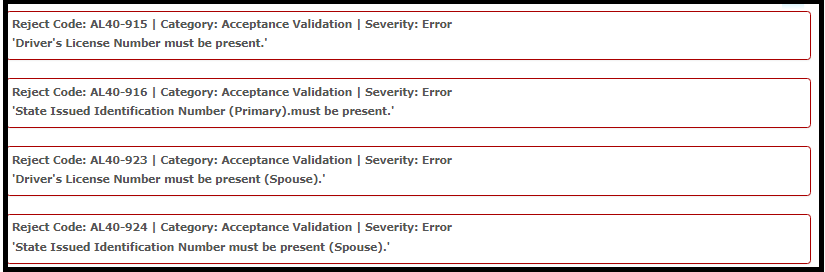
Reason: Alabama requires a state ID for both the taxpayer and spouse. They do not allow for no license or state ID
Solution: If no information is available, the state will have to be filed paper