Category: What’s New

e-News for Tax Professionals: 2018-26 New Form 1040 for 2019 Tax Season

02 Jul 18
Kim Manuel
, ,
No Comments

The IRS posted the following news release:

R-2018-146, June 29, 2018

WASHINGTON – As part of a larger effort to help taxpayers, the Internal Revenue Service plans to streamline the Form 1040 into a shorter, simpler form for the 2019 tax season.

The new 1040 – about half the size of the current version — would replace the current Form 1040 as well as the Form 1040A and the Form 1040EZ.  The IRS circulated a copy of the new form and will work with the tax community to finalize the streamlined Form 1040 over the summer.

This new approach will simplify the 1040 so that all 150 million taxpayers can use the same form. The new form consolidates the three versions of the 1040 into one simple form. At the same time, the IRS will still obtain the information from each taxpayer needed to determine their tax liability or refund.

The new Form 1040 uses a “building block” approach, in which the tax return is reduced to a simple form. That form can be supplemented with additional schedules if needed. Taxpayers with straightforward tax situations would only need to file this new 1040 with no additional schedules.

Since more than nine out of 10 taxpayers use software or a tax preparer, the IRS will be working with the tax community to prepare for the streamlined Form 1040. This will also help ensure a smooth transition for people familiar with software products and the interview process used to prepare tax returns.

Taxpayers who file on paper would use this new streamlined Form 1040 and supplement it with any needed schedules.

Submitting Comments on the new 1040

Tax professionals can review a draft copy of the new Form 1040 and submit comments regarding the draft to [email protected]

What are the next steps?

  • The new 1040 building block approach (along with new schedules) have to be finalized by the IRS
  • The IRS MeF (modernized efile) team has to accommodate and issue any business rules associated with the new 1040 approach
  • Estimated pre-release of the new 1040 instructions is mid-October
  • TaxSlayer representatives are members of several IRS working groups and state working groups.  As we receive additional data on these changes, as well as the instructions and guidance on the Tax Reform, we will continue to update the blog.


Suggestion Box Responses – Updated through June 22nd

26 Jun 18
Craig Smith
, ,
No Comments

Click here to view PDF

Click here to submit a suggestion

There are three attachments

  • Attachment #1:  Dedicated to application and federal suggestions
  • Attachment #2: Dedicated to State suggestions
  • Attachment #3:  TaxSlayer Suggestion Status

Attachment 3 has the duplicates removed and only has the TaxSlayer Responses.

An example of the status column can be found by Tracking ID 269372 (Ctrl+F allows you search in the document)

Below are some of the items that we have committed to completing (We are still reviewing all requests and there will be more commitments coming your way)

  • Change the wording from Cancel to Back in the state programs to be consistent with the Federal program
  • Several new “committed” items in the state spreadsheet

More exciting changes to come.

We are still reading through and analyzing the suggestions.  We are also beginning to update the Status column as we commit to implement a suggestions.

Click here to view PDF

The link will launch a Brainshark video with instructions on how to view the file.

Release Notes: Tuesday, June 26th at 5:00am ET

26 Jun 18
Craig Smith
No Comments

The below items were released into production this morning.

1040-NR

  • Below information provided within the Schedule OI now carries to Form 8843 to prevent re-entry of data
    • Country of Citizenship
    • Number of days in the U.S.
    • Type of Visa and Visa Code

Form 8919

  • Resolved Issue #2038 where clicking “Cancel” within the 8919 entry screen was throwing an error to the end-user

ARIZONA

  • A “Household Income Adjustments” menu has been added within the AZ PTC (Property Tax Credit) menu to adjust capital gain/loss items for household income purposes (Issue #2030)

ARKANSAS

  • Update some text within the AR Retirement Exclusion Worksheet Menu
    • Corrected “IRS” to reflect “IRA” and “Worksheet” was missing the “t”
  • For MFJ returns, when selecting the AR Filing Status within Basic Information, the corresponding filing status numbers have been added


Issue #2059 is now resolved

MASSACHUSETTS

  • Within the Schedule HC, Affordability Worksheet menu, the order of the questions has been rearranged to match the order on the Schedule HC PDF

OHIO

  • Within the OH Localities menu, specifically the CCA City Tax Form, the allowed entry of employers has been increased from one (1) to four (4). The additional employers added will carry to Lines A-D of Section A on the PDF


Release Notes: Scheduled Deploy on Thursday, June 21st at 5:00am ET

20 Jun 18
Craig Smith
,
No Comments

The site will be placed in maintenance on Thursday, June 21st at 5:00am ET to release a series of updates and back-end work.

  • Form 8889 – Adding clarifying text next to coverage selection drop-down for what type of coverage should be selected if a TP/SP received a distribution from a HSA when no longer covered under a HPDP plan (Issue #1432)
  • Federal Direct Debit – Enhancement released that will prompt a warning to a user when a payment is entered to the IRS that is higher than the balance due
    • For example, if $1,000 is owed to the IRS, when selecting “E-file: Direct Debit” and entering $1,500 as the payment, a warning will show indicating the payment exceeds the amount owed.
  • Transmissions Menu – Enhancement released that will allow the columns within the Transmissions menu to be sortable
  • Practice Lab – Adding two additional Practice Returns under Section 6
    • Practice Return International
    • Practice Return Military

Release Notes: Scheduled Deploy Tuesday, June 19th at 5:00am ET

18 Jun 18
Craig Smith
,
No Comments

Returns will be placed in maintenance beginning Tuesday, June 19th at 5:00am ET to release updates.

  • IA: Update some text within the blue header inside the Itemized Deduction page (Issue #2033)
  • CA: Adding additional transparency inside the CA return (Other Income Taxable to California and Adjustments to Income Subject to California Tax menus) for users to easily see Federally reported amounts
  • MN: Adding additional transparency inside the MN return for Federally reported INT/DIV income, Business Income/Loss, Gains/Losses, Pension and Annuities, Rents and Royalties, Farm Income/Loss, and Other Income/Loss

Suggestion Box Responses: Added a 3rd PDF to reflect committed items

18 Jun 18
Kim Manuel
, ,
No Comments

Click here to view PDF

Click here to submit a suggestion

There are three attachments

  • Attachment #1:  Dedicated to application and federal suggestions
  • Attachment #2: Dedicated to State suggestions
  • Attachment #3:  TaxSlayer Suggestion Status

Attachment 3 has the duplicates removed and only has the TaxSlayer Responses.

An example of the status column can be found by Tracking ID 269372 (Ctrl+F allows you search in the document)

Below are some of the items that we have committed to completing (We are still reviewing all requests and there will be more commitments coming your way)

  • Change the wording from Cancel to Back in the state programs to be consistent with the Federal program
  • Several new “committed” items in the state spreadsheet

More exciting changes to come.

We are still reading through and analyzing the suggestions.  We are also beginning to update the Status column as we commit to implement a suggestions.

Click here to view PDF

The link will launch a Brainshark video with instructions on how to view the file.

Pro Online: Addition of Explanation Forms

14 Jun 18
Kim Manuel

No Comments

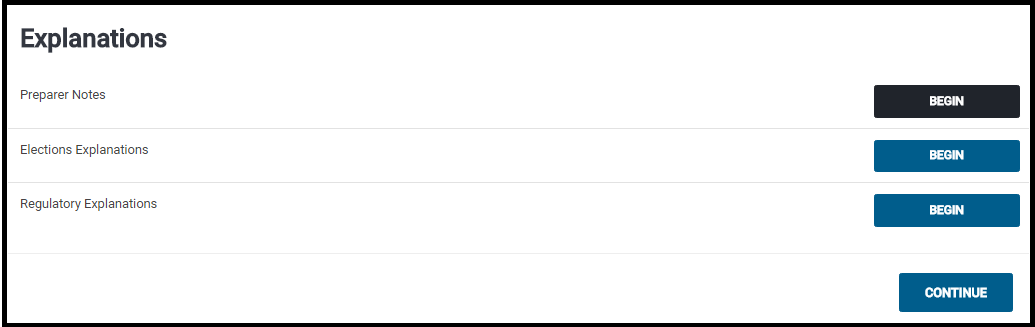
We have added the IRS Explanation forms that are submitted to the IRS if further explanation about something is needed to be provided to the IRS.  These will print with the Assigned Print sets if they are used in the return and will be included in the electronic file.

Navigate to Federal Section >> Miscellaneous Forms and Select Begin on the Explanations line

Select the appropriate Explanation.  The majority of the explanations will go on Preparer Notes (which we are using in the example)

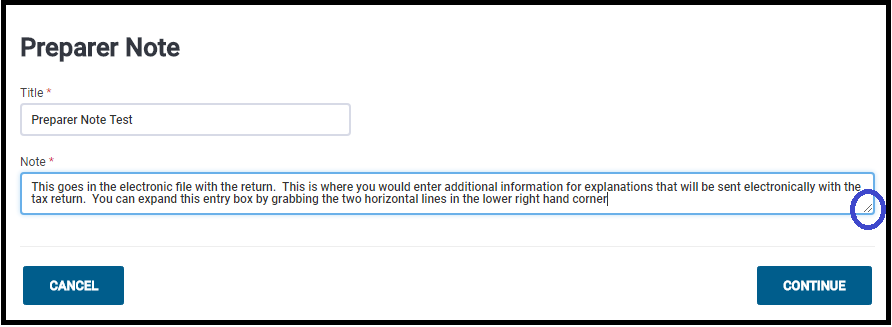
Enter a title and explanation…Click continue when finished.

Note:  You can expand the box by dragging the two horizontal lines in the lower right hand corner (circled in picture)

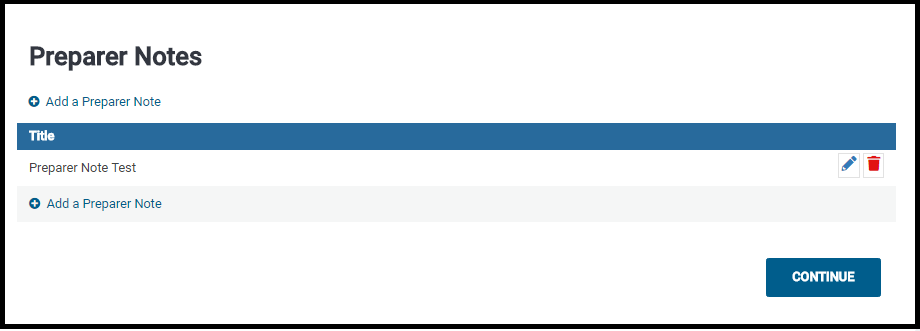
The Preparer Note Summary page will be displayed:

Click Continue to return to the Explanations Menu when finished.


Pro Online: Custom Consents Report

14 Jun 18
Kim Manuel
,
No Comments

The Custom Consents Report is now available.  This report is designed to indicate the Acceptance (Yes) or denial (No) granted by the taxpayer.  This report was designed to run at the site level.

Navigate to Reports and select Custom Consents:

Note:  If you have customized your reports via Configuration, you will need to navigate to Configuration >> Report Customization and add Custom reports to your report list

Click Select

Below is an example of a generated report.

Note:  If you have multiple consents, you will need to export the report to see all of the consent titles and corresponding results

You can export the information and merge it with other reports that require consents to ensure you are reporting up the approved taxpayer information.