Tag: Pro Desktop

Information from SPEC HQ: Possible Scam Reporting of Elder Care Wages

20 Mar 18
Kim Manuel
, ,
No Comments

Background:  We received a report of a possible scam involving taxpayers claiming Elder Care Wages to receive a larger refund that includes refundable credits such as Earned Income Tax Credit.  The taxpayers visiting the site provided a handwritten document claiming to be from an individual stating they paid the taxpayer for elder care.

Message for Relationship Managers:

  • Share the possible scam with partners.
  • Advise partners that the Site Coordinator has the discretion to decline tax preparation services if sufficient documentation is not provided by the taxpayer.

Message for Partners:

  • Be vigilant in identifying possible scams.
  • Report possible scams to your local SPEC representative.
  • Use the below reference documents to assist with reporting possible scams.

Reference Tools:

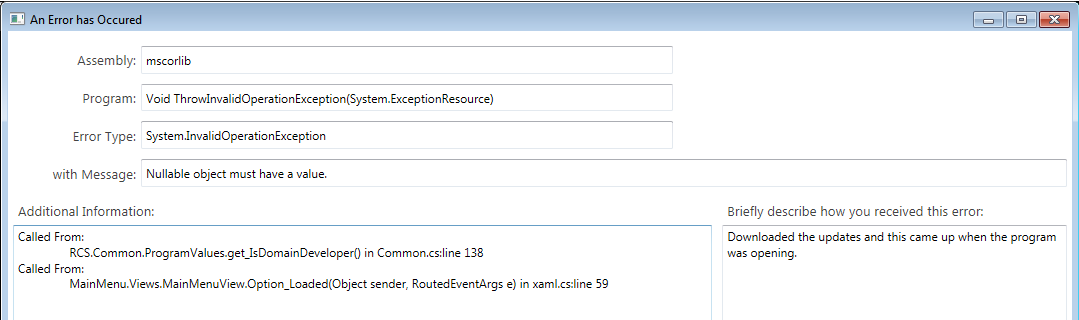
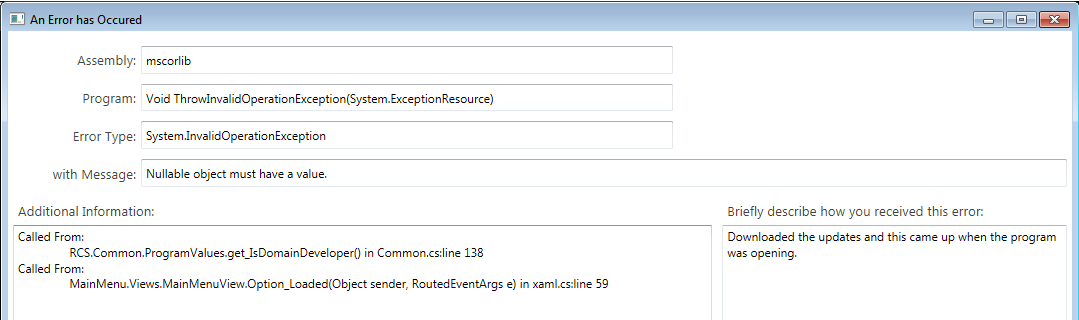
Desktop 2017: Errors after updating (RESOLVED)

19 Mar 18
Kim Manuel
,
No Comments

Updated 8:52 am:  

When the error appears, click OK and then go in to Updates.  Download the latest update and the error will be resolved.

Updated 8:47 am:  The updating causing the error has been rolled back.  Anyone opening the program from this point forward should not receive the below errors.  We are in the process of building a fix for the user receiving the below error.

Scenario:  Desktop users are receiving the following errors after this morning’s update:

Solution:  This will be resolved within the next hour.

Note:  This does not impact Pro Online

IRS Reject: IND-158

16 Mar 18
Kim Manuel
, ,
No Comments

Scenario:  The return was prepared for taxpayer/spouse whose between the age of 25 and 64 with Earned Income, however the IRS rejected the return for the following:

IRS reject:  Reject Code IND-158
Message If ‘EarnedIncomeCreditAmt’ in the return has a non-zero value and Schedule EIC (Form 1040A or 1040) is not present, then the Primary or Spouse must be at least 25 but less than 65 years old.
Data Value XX

Why did it get rejected?  The IRS master file has a date of birth on file for rejected person that puts the age out of the above range.

Solution:  The taxpayer/spouse will need to contact the Social Security Administration to determine what they have on file for the SSN and then request the information be corrected and/or updated in the IRS system.

Message from SPEC: SPEC 4.0, Watch us Grow!

09 Mar 18
Kim Manuel
, , , ,
No Comments

First, we want to thank each of you for your dedication and commitment to make this a banner year for return production.  SPEC’s goal is not only to reach 4 million returns for Filing Season 2018, but also serve more taxpayers and touch more lives by offering as many free tax preparation options as possible.  We are confident and poised to accomplish great things this filing season with your assistance.

To help track our progress, we have developed weekly projections to determine where we should be in relation to our 4.0 goal.  Each week this message will be updated with our progress and promote SPEC’s theme: SPEC 4.0, Watch us Grow!

For the week ending 3/4/2018, 356,317 returns were projected to be completed.  We reached an actual count of 313,542 and are almost at the 1.5 million mark. Our cumulative return count is 1,468,961.

While the actual count is below the SPEC projection, there is still time to narrow the gap!

If you have any ideas on ways to help this initiative, we would love to hear from you! Some of you may consider extended hours or days.  Every little bit helps!

Thanks for your engagement and all you are doing to provide free tax assistance to the taxpayers in your community!

SPEC Headquarters

Pro Online/Desktop – D.C. Reject Code for Schema Validation

08 Mar 18
Craig Smith
,
No Comments

The District of Columbia recently released a new schema version for DC returns. D.C. has sent a message to software vendors that any D.C. return rejected for Reject Code X0000-005. “The value of the ‘stateSchemaVersion’ attribute does not equal its fixed value” can be resubmitted AFTER 7:00pm ET tonight, March 8th.

Note: For TaxSlayer Pro Desktop sites, make sure you download the latest D.C. updates before resubmitting any D.C. returns rejected for Reject Code X0000-005.

Pro Online/Desktop: Schedule E not Displaying in PDF (RESOLVED)

07 Mar 18
Craig Smith
, ,
No Comments

RESOLVED 3/9/18

Issue #1523 has been opened to review why the Schedule E is not being generated in the PDF view of returns where the Schedule E menu has been completed for 2017. This does not impact any calculation as the applicable value carries to Line 17 of the 1040 and all supporting statements necessary for the Schedule E are included in the PDF.

Pro Online/Desktop: Information from Massachusetts

05 Mar 18
Kim Manuel
, ,
No Comments

We received the following from the MA DOR:

Refunds Changed from Direct Deposit to Paper Check

February 26, 2018: DOR has just released a number of income tax refunds via paper check where direct deposit had been requested on the tax returns. DOR sometimes changes the refund delivery method from direct deposit to paper check as an additional security measure and this action was taken in an effort to honor these early refund requests more quickly. We apologize for any inconvenience this may cause.

Here is the link:

Click Here

Phishing Scam Email Awareness

01 Mar 18
Kim Manuel
, ,
No Comments

Phishing

Scammers often try to steal their victims’ identities by sending them phony e-mails which claim to come from trusted sources, such as well-known financial institutions or government agencies (including the IRS), and ask them for detailed personal and financial information. This practice is known as “phishing.” The information requested is used by the scammers to gain access to the victims’ bank accounts, open new credit cards in their victims’ names and get cash advances, and more.

While we have not heard this from our VITA/TCE community, we wanted to share this as an informational awareness alert:

TaxSlayer Pro has been made aware of an email phishing scam where the sender claims to be from TaxSlayer Pro.  The subject line may read “Urgent Warning” or “Action Required”.  The body of the email is asking you to “take action or lose access to your account within 24 hours” or “we’ve updated our servers and some of your information is missing”.  This email contains a link to a site intended for you to update your information.  Do not click the link or provide any requested information.  These emails were sent from an unknown party not affiliated with TaxSlayer Pro.  Please note, official email from TaxSlayer Pro will always be sent from a TaxSlayerPro.com email address, or in the case of VITA/TCE a [email protected] email address.

The IRS has noticed an increase in the number of phishing attempts targeting professional tax preparers over the past year.  Phishing emails may use differing language in an attempt to trick an individual in to disclosing sensitive data.  Should you ever have concerns about the legitimacy of an email claiming to be from TaxSlayer Pro, please do not hesitate to contact our Support team by phone at 800-421-6346 or by email at [email protected] prior to taking any action.

How to Spot a Scam

Many e-mail scams are fairly sophisticated and hard to detect. However, there are signs to watch for, such as an e-mail that:

  • Requests detailed or an unusual amount of personal and/or financial information, such as name, SSN, bank or credit card account numbers or security-related information, such as mother’s maiden name, either in the e-mail itself or on another site to which a link in the e-mail sends the recipient.
  • Dangles bait to get the recipient to respond to the e-mail.
  • Threatens a consequence for not responding to the e-mail.
  • Gets the company or other federal agency names wrong.
  • Uses incorrect grammar or odd phrasing.
  • Uses a really long address in any link contained in the e-mail message or one that does not start with the actual company email address. To see the actual link address, or url, move the mouse over the link included in the text of the e-mail.